Upgrade & Secure Your Future with DevOps, SRE, DevSecOps, MLOps!

We spend hours on Instagram and YouTube and waste money on coffee and fast food, but won’t spend 30 minutes a day learning skills to boost our careers.
Master in DevOps, SRE, DevSecOps & MLOps!

Learn from Guru Rajesh Kumar and double your salary in just one year.

Get Started Now!

How to Change Your Default Browser on Windows, macOS, and Linux

Changing the default browser on your laptop varies depending on the operating system you’re using. Here are the steps for Windows and macOS:

Windows

  1. Open Settings: Press Windows + I to open the Settings app.
  2. Go to Apps: Click on “Apps”.
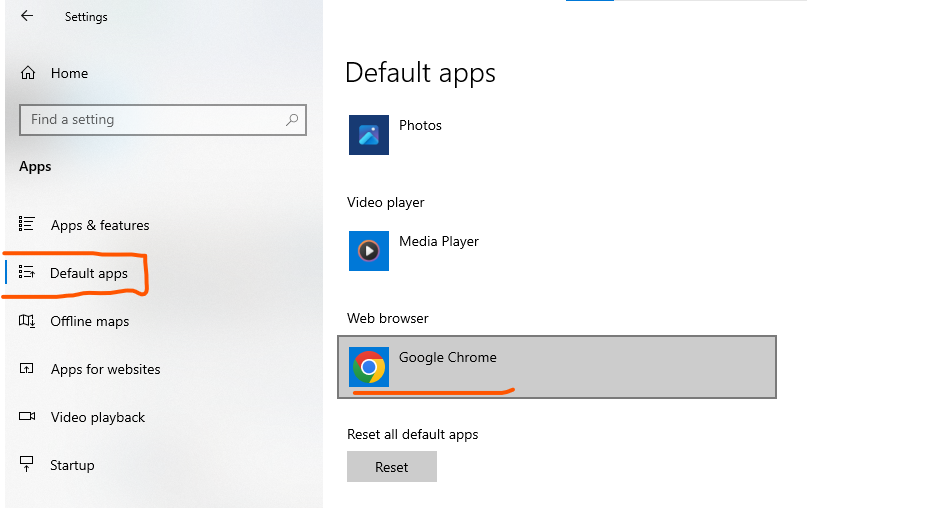
  3. Default Apps: In the left sidebar, click on “Default apps”.
  4. Web Browser: Scroll down to the “Web browser” section and click on the current default browser.
  5. Choose a New Browser: A list of installed browsers will appear. Select the browser you want to set as the default.

macOS

  1. Open System Preferences: Click on the Apple menu in the top-left corner and select “System Preferences”.
  2. Go to General: Click on “General”.
  3. Default Web Browser: In the “General” tab, find the “Default web browser” dropdown menu.
  4. Choose a New Browser: Click on the dropdown menu and select the browser you want to set as the default.

Linux (Ubuntu)

  1. Open Settings: Open the “Settings” application.
  2. Go to Default Applications: Navigate to the “Default Applications” section.
  3. Web Browser: Click on the current default browser and choose the browser you want to set as the default from the list of installed browsers.

Tips

  • Ensure the browser you want to set as default is already installed on your laptop.
  • After changing the default browser, you may want to check browser-specific settings for additional configuration.
  • Restarting your laptop can sometimes help ensure the changes take effect properly.

Following these steps will help you change the default browser on your laptop to the one you prefer.

Related Posts

How to Choose the Best Free Blogging Platform Easily

INTRODUCTION In an era dominated by short-form videos and fast-paced social feeds, long-form content remains the bedrock of deep connections, authority, and organic search traffic. Blogging continues Read More

Read More

The Rise of Quiet Publishing: How Calm Writing Tools Change Content Creation

INTRODUCTION In an era dominated by fast-moving social media feeds and fleeting algorithmic attention, long-form writing remains the bedrock of deep ideas, authentic storytelling, and professional credibility. Read More

Read More

Top 10 Federated Learning Platforms

Introduction Federated Learning Platforms enable organizations to collaboratively train AI and machine learning models across multiple decentralized data sources without moving or exposing raw data. In plain Read More

Read More

Comparing Heart Surgery Options, Costs, and Leading Hospitals

INTRODUCTION When dealing with complex cardiovascular conditions, choosing the right medical institution is one of the most critical health decisions you will ever make. The quality of Read More

Read More

Top 10 AI ESG Data Extraction Tools: Features, Pros, Cons & Comparison

Introduction AI ESG Data Extraction Tools use artificial intelligence, machine learning, natural language processing (NLP), document intelligence, and automation technologies to collect, extract, classify, and organize environmental, Read More

Read More

Top 10 AI Carbon Accounting Automation Tools: Features, Pros, Cons & Comparison

Introduction AI Carbon Accounting Automation Tools use artificial intelligence, machine learning, natural language processing, data automation, and sustainability analytics to help organizations measure, track, calculate, and report Read More

Read More
Subscribe
Notify of
guest
0 Comments
Oldest
Newest Most Voted
0
Would love your thoughts, please comment.x
()
x