Introduction
AI Appointment Scheduling Assistants are intelligent software solutions that help businesses automate appointment booking, calendar management, reminders, rescheduling, and customer communication. These tools use artificial intelligence, natural language processing, automation, and calendar intelligence to help users schedule meetings faster while reducing manual coordination efforts.
Traditional appointment scheduling often involves back-and-forth emails, phone calls, missed appointments, and administrative workload. AI-powered scheduling assistants simplify this process by understanding user requests, checking availability, suggesting suitable time slots, managing calendars, and sending automated follow-ups.
Modern AI scheduling assistants are becoming important for businesses that manage high volumes of appointments, meetings, consultations, and customer interactions. They help improve customer experiences, increase operational efficiency, and allow teams to focus on higher-value activities.
Real-world use cases:
- Healthcare providers use AI scheduling assistants for patient appointments, reminders, cancellations, and follow-up scheduling.
- Sales teams use AI assistants to arrange customer meetings, qualify requests, and reduce scheduling delays.
- Recruitment teams use scheduling automation for candidate interviews and hiring coordination.
- Educational institutions use AI scheduling tools for student meetings, counseling sessions, and appointments.
- Professional service businesses use AI assistants for consultations, bookings, and client communication.
- Enterprises use AI scheduling assistants to manage internal meetings across multiple teams and time zones.
Evaluation Criteria for Buyers:
Organizations evaluating AI Appointment Scheduling Assistants should consider:
- Calendar integration capabilities.
- Natural language scheduling accuracy.
- Automated booking and rescheduling features.
- Meeting reminder automation.
- Multi-time-zone support.
- Integration with communication platforms.
- AI agent capabilities.
- Workflow automation features.
- User experience and ease of adoption.
- Data privacy and security controls.
- Analytics and reporting capabilities.
- API availability and customization options.
- Support for team scheduling and shared calendars.
Best for:
AI Appointment Scheduling Assistants are best for healthcare organizations, sales teams, recruitment departments, consulting businesses, customer support teams, education providers, and enterprises managing frequent appointments and meetings.
Not ideal for:
Small teams with very limited scheduling needs may find traditional calendar tools sufficient. Organizations managing highly sensitive appointments should carefully evaluate privacy controls, security features, and compliance requirements before adoption.
What’s Changed in AI Appointment Scheduling Assistants
AI Appointment Scheduling Assistants are evolving from simple calendar booking tools into intelligent workflow automation systems. Businesses are increasingly using AI to manage scheduling conversations, improve customer experiences, and reduce administrative tasks.
Key developments include:
- Conversational scheduling experiences: AI assistants can understand natural language requests instead of requiring users to manually select calendar options.
- AI calendar agents: Modern scheduling tools are moving toward autonomous assistants that can coordinate meetings, handle conflicts, and manage follow-ups.
- Smart availability management: AI systems analyze calendars, preferences, and scheduling rules to recommend suitable meeting times.
- Automated rescheduling: AI assistants can handle cancellations, changes, and new availability without manual intervention.
- Multi-channel scheduling: Businesses are using AI scheduling through websites, chat, email, messaging platforms, and voice interactions.
- Personalized scheduling workflows: AI assistants can consider user preferences, meeting types, priorities, and business rules.
- Integration with business systems: Scheduling assistants are becoming connected with CRM platforms, customer support systems, sales tools, and communication applications.
- AI-powered reminders: Intelligent reminders help reduce missed appointments and improve attendance rates.
- Enterprise privacy controls: Organizations are focusing on secure calendar access, permission management, and controlled data handling.
- Analytics-driven optimization: Businesses are using scheduling data to understand customer behavior and improve operations.
- Human and AI collaboration: Teams are combining AI automation with human approval for important scheduling decisions.
- Developer-focused scheduling APIs: Companies are embedding AI scheduling capabilities directly into their applications.
Quick Buyer Checklist (Scan-Friendly)
Before selecting an AI Appointment Scheduling Assistant, check:
✅ Does the tool integrate with your existing calendar systems?
✅ Can it understand natural language scheduling requests?
✅ Does it support automatic booking and rescheduling?
✅ Can it manage multiple calendars and time zones?
✅ Does it provide automated reminders?
✅ Can it connect with CRM and business applications?
✅ Does it support AI-powered conversations?
✅ Can administrators control permissions and access?
✅ Does it protect calendar and customer data?
✅ Can teams monitor scheduling performance?
✅ Does it support APIs and custom workflows?
✅ Can it scale as appointment volume increases?
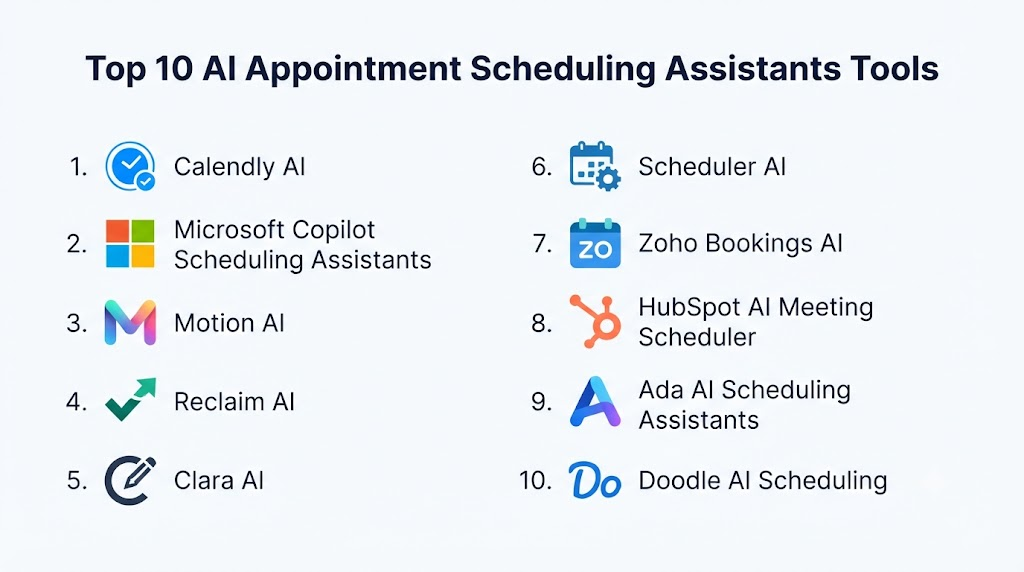
Top 10 AI Appointment Scheduling Assistants Tools
1 — Calendly AI
One-line verdict: Best for businesses needing simple AI-assisted scheduling with strong calendar automation.
Short description:
Calendly AI provides intelligent scheduling capabilities that help individuals and teams automate meeting coordination. It is widely used for sales meetings, customer calls, interviews, and internal collaboration.
Standout Capabilities
- Automated meeting scheduling.
- Calendar availability management.
- Meeting preference settings.
- Scheduling links and workflows.
- Automated reminders.
- Team scheduling features.
- Integration with business tools.
AI-Specific Depth
- Model support: Platform-provided AI capabilities.
- RAG / knowledge integration: N/A as a primary capability.
- Evaluation: Scheduling performance measurement depends on analytics and workflow tracking.
- Guardrails: Access permissions and scheduling rules vary by configuration.
- Observability: Usage analytics and scheduling insights depend on available features.
Pros
- Easy adoption for individuals and teams.
- Strong calendar workflow support.
- Reduces scheduling communication overhead.
Cons
- Advanced AI customization may be limited.
- Complex enterprise workflows may require additional setup.
- AI features depend on available plans.
Security & Compliance
Security features depend on account configuration and organizational requirements. Users should verify access controls, data protection, and compliance needs.
Specific certifications should be verified based on business requirements.
Deployment & Platforms
- Cloud-based platform.
- Web access.
- Mobile applications may be available.
- Calendar integrations supported.
Integrations & Ecosystem
Calendly AI integrates with common productivity and business platforms.
Common integrations include:
- Calendar systems.
- Video conferencing tools.
- CRM platforms.
- Sales workflows.
- Communication applications.
Pricing Model
Subscription-based pricing model. Costs vary based on users, features, and organizational requirements.
Best-Fit Scenarios
- Sales teams.
- Consultants.
- Businesses managing frequent meetings.
2 — Microsoft Copilot Scheduling Assistants
One-line verdict: Best for organizations using Microsoft ecosystems for intelligent meeting coordination.
Short description:
Microsoft Copilot scheduling capabilities help users manage meetings, calendars, and workplace communication using AI-powered productivity features. They are designed for organizations already operating within Microsoft environments.
Standout Capabilities
- AI-assisted calendar management.
- Meeting preparation support.
- Scheduling assistance.
- Workplace productivity automation.
- Calendar coordination.
- Enterprise collaboration support.
- Integration with Microsoft workflows.
AI-Specific Depth
- Model support: AI capabilities depend on Microsoft Copilot services.
- RAG / knowledge integration: Can use connected workplace information depending on configuration.
- Evaluation: Productivity measurement depends on organizational analytics.
- Guardrails: Enterprise security controls vary by deployment.
- Observability: Monitoring depends on Microsoft environment configuration.
Pros
- Strong enterprise productivity integration.
- Useful for workplace collaboration.
- Supports large organizations.
Cons
- Best suited for Microsoft-based environments.
- Advanced capabilities may require specific configurations.
- Smaller teams may not need enterprise features.
Security & Compliance
Security capabilities depend on organizational Microsoft configuration. Access controls, data governance, and administrative settings vary.
Deployment & Platforms
- Cloud-based.
- Web and desktop environments.
- Enterprise productivity ecosystem.
Integrations & Ecosystem
Common integrations include:
- Microsoft calendars.
- Collaboration platforms.
- Enterprise applications.
- Productivity workflows.
Pricing Model
Pricing depends on selected Microsoft services and organizational licensing.
Best-Fit Scenarios
- Enterprise teams.
- Organizations using Microsoft productivity tools.
- Internal meeting coordination.
3 — Motion AI
One-line verdict: Best for professionals combining AI scheduling with personal productivity management.
Short description:
Motion AI combines calendar management, task planning, and scheduling automation to help individuals and teams organize work more effectively. It focuses on automatically arranging tasks, meetings, and priorities.
Standout Capabilities
- AI calendar planning.
- Automated scheduling.
- Task prioritization.
- Meeting management.
- Personal productivity optimization.
- Time-blocking automation.
- Workflow organization.
AI-Specific Depth
- Model support: Platform-provided AI capabilities.
- RAG / knowledge integration: N/A as a primary capability.
- Evaluation: Productivity measurement depends on user workflows.
- Guardrails: Scheduling rules and preferences vary by configuration.
- Observability: Productivity analytics depend on available features.
Pros
- Combines scheduling and productivity management.
- Useful for busy professionals.
- Automates calendar planning.
Cons
- More focused on productivity than enterprise scheduling.
- Team workflows may require additional evaluation.
- Advanced business integrations vary.
Security & Compliance
Security capabilities depend on platform configuration and user requirements.
Deployment & Platforms
- Cloud-based platform.
- Web and application access.
- Calendar integration support.
Integrations & Ecosystem
Motion AI integrates with productivity workflows.
Common integrations include:
- Calendar systems.
- Task management workflows.
- Business productivity tools.
- Communication platforms.
Pricing Model
Subscription-based pricing model. Costs vary depending on features and users.
Best-Fit Scenarios
- Entrepreneurs.
- Knowledge workers.
- Professionals managing complex schedules.
4 — Reclaim AI
One-line verdict: Best for teams and professionals using AI to optimize calendars, habits, and recurring schedules.
Short description:
Reclaim AI is an intelligent scheduling assistant that helps users automatically manage calendars, protect focus time, schedule tasks, and organize recurring activities. It is commonly used by individuals and teams looking to improve productivity and reduce calendar conflicts.
Standout Capabilities
- AI-powered calendar optimization.
- Automatic task scheduling.
- Smart meeting planning.
- Habit and routine scheduling.
- Focus time protection.
- Team availability management.
- Calendar conflict resolution.
AI-Specific Depth
- Model support: Platform-provided AI capabilities.
- RAG / knowledge integration: N/A as a primary capability.
- Evaluation: Productivity analysis depends on workflow tracking.
- Guardrails: User-defined scheduling preferences and controls vary.
- Observability: Calendar analytics and usage insights depend on available features.
Pros
- Strong calendar optimization capabilities.
- Helps reduce scheduling conflicts.
- Useful for productivity-focused workflows.
Cons
- More focused on productivity than customer appointment booking.
- Advanced enterprise requirements may need evaluation.
- AI features depend on configuration.
Security & Compliance
Security features depend on platform configuration and organizational requirements. Users should verify calendar permissions, data handling, and access controls.
Deployment & Platforms
- Cloud-based platform.
- Web application.
- Calendar integrations supported.
Integrations & Ecosystem
Reclaim AI connects with productivity and calendar environments.
Common integrations include:
- Calendar platforms.
- Task management tools.
- Communication applications.
- Team collaboration workflows.
Pricing Model
Subscription-based pricing model. Costs vary depending on users and available features.
Best-Fit Scenarios
- Professionals managing complex schedules.
- Teams optimizing meeting time.
- Organizations improving productivity workflows.
5 — Clara AI
One-line verdict: Best for professionals needing AI assistance for meeting coordination and scheduling communication.
Short description:
Clara AI is an AI scheduling assistant designed to help users manage meeting coordination through automated communication workflows. It focuses on reducing manual scheduling conversations and handling calendar coordination tasks.
Standout Capabilities
- Automated scheduling conversations.
- Email-based scheduling assistance.
- Calendar coordination.
- Meeting arrangement workflows.
- Availability management.
- Scheduling communication automation.
- Administrative support.
AI-Specific Depth
- Model support: AI scheduling models; exact architecture varies.
- RAG / knowledge integration: N/A as a primary capability.
- Evaluation: Scheduling success depends on workflow measurement.
- Guardrails: User preferences and calendar rules provide scheduling controls.
- Observability: Monitoring capabilities vary.
Pros
- Reduces manual scheduling emails.
- Useful for executive assistance workflows.
- Simplifies meeting coordination.
Cons
- Focused mainly on scheduling communication.
- Enterprise workflow features may vary.
- Availability of advanced features depends on product configuration.
Security & Compliance
Security capabilities depend on service configuration. Organizations should verify calendar access, communication data handling, and privacy controls.
Deployment & Platforms
- Cloud-based service.
- Email and calendar-based workflows.
- Platform availability varies.
Integrations & Ecosystem
Clara AI works with scheduling and communication workflows.
Common integrations include:
- Email systems.
- Calendar platforms.
- Meeting tools.
- Business communication workflows.
Pricing Model
Pricing details vary based on product availability and service configuration.
Best-Fit Scenarios
- Executives requiring scheduling assistance.
- Administrative teams.
- Professionals managing external meetings.
6 — Scheduler AI
One-line verdict: Best for organizations building automated appointment booking experiences with AI conversations.
Short description:
Scheduler AI solutions help businesses automate appointment booking through conversational interfaces. They allow customers to request appointments, check availability, and complete scheduling workflows through AI-powered interactions.
Standout Capabilities
- Conversational appointment booking.
- Automated availability checking.
- Customer scheduling workflows.
- Appointment reminders.
- Rescheduling automation.
- AI chat-based interactions.
- Business workflow integration.
AI-Specific Depth
- Model support: Depends on the specific Scheduler AI platform.
- RAG / knowledge integration: May support business information connections depending on implementation.
- Evaluation: Requires workflow-specific testing.
- Guardrails: Depends on scheduling rules and business configuration.
- Observability: Monitoring depends on platform capabilities.
Pros
- Improves customer booking experiences.
- Reduces manual appointment handling.
- Supports conversational scheduling.
Cons
- Features vary across providers using this category name.
- Enterprise capabilities may require customization.
- Integration quality depends on implementation.
Security & Compliance
Security capabilities vary depending on provider and deployment configuration.
Organizations should evaluate:
- Data access controls.
- Customer information protection.
- Appointment data handling.
Deployment & Platforms
- Cloud-based solutions.
- Web-based interfaces.
- API integration options vary.
Integrations & Ecosystem
Common integrations include:
- Calendar systems.
- Customer relationship platforms.
- Booking systems.
- Customer support tools.
- Communication channels.
Pricing Model
Pricing varies depending on provider, usage, and deployment requirements.
Best-Fit Scenarios
- Customer appointment booking.
- Service businesses.
- Organizations automating scheduling workflows.
7 — Zoho Bookings AI
One-line verdict: Best for small and medium businesses needing affordable AI-assisted appointment management.
Short description:
Zoho Bookings provides online appointment scheduling and business calendar management capabilities. Combined with AI-powered workflows, it helps organizations automate bookings, reminders, and customer interactions.
Standout Capabilities
- Online appointment scheduling.
- Calendar synchronization.
- Automated reminders.
- Customer booking pages.
- Team scheduling.
- Business workflow automation.
- Appointment management.
AI-Specific Depth
- Model support: AI capabilities depend on connected Zoho services.
- RAG / knowledge integration: N/A as a primary capability.
- Evaluation: Scheduling analytics depend on available reporting.
- Guardrails: Access controls depend on configuration.
- Observability: Usage monitoring varies.
Pros
- Good fit for SMB workflows.
- Affordable scheduling automation.
- Integrates with business applications.
Cons
- Advanced AI capabilities may vary.
- Large enterprise workflows may require additional tools.
- Complex scheduling needs may require customization.
Security & Compliance
Security features depend on account configuration and organizational requirements.
Deployment & Platforms
- Cloud-based platform.
- Web and mobile access.
- Business application integrations.
Integrations & Ecosystem
Zoho Bookings integrates with business tools.
Common integrations include:
- CRM systems.
- Calendar platforms.
- Payment systems.
- Communication tools.
- Productivity applications.
Pricing Model
Subscription-based pricing model. Costs depend on users and features.
Best-Fit Scenarios
- Small businesses.
- Consultants.
- Service providers.
8 — HubSpot AI Meeting Scheduler
One-line verdict: Best for sales and marketing teams connecting scheduling with customer relationship workflows.
Short description:
HubSpot AI scheduling capabilities help businesses manage meetings, customer interactions, and sales processes. It connects appointment scheduling with CRM workflows to improve lead management and customer engagement.
Standout Capabilities
- Meeting scheduling links.
- CRM-connected workflows.
- Lead management support.
- Customer interaction tracking.
- Sales scheduling automation.
- Appointment reminders.
- Team availability management.
AI-Specific Depth
- Model support: AI capabilities depend on HubSpot AI services.
- RAG / knowledge integration: Can use connected CRM information depending on configuration.
- Evaluation: Sales and scheduling analytics depend on CRM reporting.
- Guardrails: Permissions and access controls vary.
- Observability: CRM analytics capabilities vary.
Pros
- Strong CRM integration.
- Useful for sales teams.
- Connects scheduling with customer data.
Cons
- Best value comes within HubSpot ecosystem.
- Less focused on complex appointment industries.
- Advanced features may require higher plans.
Security & Compliance
Security capabilities depend on HubSpot configuration and organizational requirements.
Deployment & Platforms
- Cloud-based platform.
- Web and mobile access.
- CRM ecosystem integration.
Integrations & Ecosystem
Common integrations include:
- CRM workflows.
- Marketing tools.
- Sales applications.
- Communication platforms.
Pricing Model
Subscription-based pricing model. Costs depend on selected products and features.
Best-Fit Scenarios
- Sales teams.
- Marketing teams.
- Customer relationship workflows.
9 — Ada AI Scheduling Assistants
One-line verdict: Best for customer service teams combining AI conversations with appointment automation.
Short description:
Ada AI provides conversational AI capabilities that help businesses automate customer interactions. Appointment scheduling can be integrated into AI customer service workflows depending on business requirements.
Standout Capabilities
- AI customer conversations.
- Automated customer assistance.
- Workflow automation.
- Appointment-related support.
- Customer inquiry handling.
- Multichannel communication.
- AI-driven responses.
AI-Specific Depth
- Model support: AI models depend on platform configuration.
- RAG / knowledge integration: Supports knowledge-based conversational workflows depending on setup.
- Evaluation: Requires conversation quality testing.
- Guardrails: AI safety and workflow controls depend on configuration.
- Observability: Conversation analytics and monitoring vary.
Pros
- Strong conversational AI capabilities.
- Useful for customer-facing workflows.
- Supports automated support experiences.
Cons
- Scheduling is not the only primary use case.
- Requires workflow design.
- May need integration development.
Security & Compliance
Security controls depend on platform configuration and business requirements.
Deployment & Platforms
- Cloud-based platform.
- Web and application integrations.
- API capabilities vary.
Integrations & Ecosystem
Common integrations include:
- Customer support platforms.
- Knowledge bases.
- CRM systems.
- Communication channels.
Pricing Model
Enterprise pricing model. Exact pricing varies based on requirements.
Best-Fit Scenarios
- Customer support automation.
- Service appointment workflows.
- AI-powered customer experiences.
10 — Doodle AI Scheduling
One-line verdict: Best for teams coordinating meetings across multiple participants and availability preferences.
Short description:
Doodle provides scheduling tools that help individuals and teams find suitable meeting times. AI-assisted scheduling capabilities help simplify coordination among multiple participants.
Standout Capabilities
- Group scheduling.
- Availability collection.
- Meeting coordination.
- Calendar integration.
- Scheduling preferences.
- Team collaboration.
- Appointment planning.
AI-Specific Depth
- Model support: Platform-provided AI capabilities vary.
- RAG / knowledge integration: N/A.
- Evaluation: Scheduling success depends on usage analytics.
- Guardrails: Calendar permissions and preferences provide controls.
- Observability: Usage insights depend on available features.
Pros
- Simple group scheduling experience.
- Easy participant coordination.
- Reduces scheduling conflicts.
Cons
- Less focused on complex AI automation.
- Enterprise workflows may need additional solutions.
- Advanced AI features may vary.
Security & Compliance
Security capabilities depend on account configuration and organizational needs.
Deployment & Platforms
- Cloud-based platform.
- Web and mobile access.
- Calendar integrations.
Integrations & Ecosystem
Common integrations include:
- Calendar systems.
- Meeting platforms.
- Collaboration tools.
- Productivity workflows.
Pricing Model
Subscription-based pricing model. Costs depend on selected features.
Best-Fit Scenarios
- Teams coordinating meetings.
- External meeting scheduling.
- Simple appointment planning.
Comparison Table (Top 10)
| Tool Name | Best For | Deployment | Model Flexibility | Strength | Watch-Out | Public Rating |
|---|---|---|---|---|---|---|
| Calendly AI | Business scheduling | Cloud | Hosted | Easy automation | Advanced AI limits | N/A |
| Microsoft Copilot Scheduling | Enterprise meetings | Cloud | Hosted | Productivity integration | Ecosystem dependency | N/A |
| Motion AI | Personal productivity | Cloud | Hosted | AI calendar planning | Less enterprise-focused | N/A |
| Reclaim AI | Calendar optimization | Cloud | Hosted | Smart scheduling | Productivity focus | N/A |
| Clara AI | Executive scheduling | Cloud | Hosted | Email coordination | Limited workflows | N/A |
| Scheduler AI | Conversational booking | Cloud | Varies | AI booking | Provider differences | N/A |
| Zoho Bookings AI | SMB scheduling | Cloud | Hosted | Affordability | Advanced needs vary | N/A |
| HubSpot AI Scheduler | Sales scheduling | Cloud | Hosted | CRM integration | Ecosystem dependency | N/A |
| Ada AI | Customer scheduling workflows | Cloud | Hosted | Conversational AI | Requires setup | N/A |
| Doodle AI | Group meetings | Cloud | Hosted | Simple coordination | Limited automation | N/A |
Scoring & Evaluation (Transparent Rubric)
The scoring below provides a comparative evaluation of AI Appointment Scheduling Assistants based on common business requirements. These scores are comparative, not absolute, because the best solution depends on business size, scheduling complexity, industry requirements, integrations, security expectations, and automation needs.
The evaluation focuses on scheduling intelligence, AI reliability, workflow automation, integrations, ease of use, performance, security controls, and ecosystem support.
| Tool | Core Features | Reliability/Eval | Guardrails | Integrations | Ease | Perf/Cost | Security/Admin | Support | Weighted Total |
|---|---|---|---|---|---|---|---|---|---|
| Calendly AI | 9 | 8 | 8 | 9 | 10 | 9 | 8 | 9 | 8.90 |
| Microsoft Copilot Scheduling | 9 | 9 | 9 | 10 | 8 | 8 | 10 | 9 | 9.00 |
| Motion AI | 8 | 8 | 7 | 8 | 9 | 8 | 8 | 8 | 8.05 |
| Reclaim AI | 8 | 8 | 8 | 8 | 9 | 8 | 8 | 8 | 8.10 |
| Clara AI | 7 | 8 | 7 | 7 | 9 | 8 | 8 | 8 | 7.75 |
| Scheduler AI | 8 | 8 | 8 | 8 | 8 | 8 | 7 | 7 | 7.90 |
| Zoho Bookings AI | 8 | 7 | 8 | 8 | 9 | 9 | 8 | 8 | 8.15 |
| HubSpot AI Scheduler | 8 | 8 | 8 | 10 | 8 | 8 | 9 | 9 | 8.55 |
| Ada AI | 9 | 8 | 8 | 9 | 7 | 8 | 8 | 8 | 8.15 |
| Doodle AI | 7 | 7 | 7 | 8 | 10 | 9 | 7 | 8 | 7.80 |
Top 3 for Enterprise
1. Microsoft Copilot Scheduling Assistants
Best suited for organizations that already use enterprise productivity tools and need AI-powered meeting coordination with strong administrative controls.
2. HubSpot AI Meeting Scheduler
A strong option for sales and customer-facing teams that want scheduling connected with CRM workflows.
3. Calendly AI
Suitable for organizations that need reliable scheduling automation across departments and teams.
Top 3 for SMB
1. Calendly AI
A practical choice for small and medium businesses looking for simple scheduling automation.
2. Zoho Bookings AI
Useful for businesses needing appointment management with broader business workflow integration.
3. Motion AI
A good option for professionals and small teams managing personal productivity and scheduling.
Top 3 for Developers
1. Microsoft Copilot Scheduling Workflows
Useful for developers building solutions within enterprise productivity environments.
2. HubSpot AI Scheduling Workflows
Suitable for teams creating customer-focused scheduling experiences connected with CRM systems.
3. Retool-style Custom Scheduling Integrations
Organizations requiring custom scheduling experiences can build solutions using APIs and application development platforms.
Which AI Appointment Scheduling Assistant Tool Is Right for You?
The right AI scheduling assistant depends on your business goals, appointment volume, customer interaction channels, and technology environment. Different organizations need different levels of automation.
Solo / Freelancer
Individuals usually need fast scheduling, simple calendar management, and fewer administrative tasks.
Recommended options:
- Calendly AI for professional meeting scheduling.
- Motion AI for personal productivity management.
- Reclaim AI for calendar optimization.
Important considerations:
- Easy setup.
- Calendar synchronization.
- Automated reminders.
- Minimal maintenance.
Best use cases:
- Client meetings.
- Consultation bookings.
- Personal productivity.
SMB
Small and medium businesses need scheduling automation without complex enterprise infrastructure.
Recommended options:
- Calendly AI.
- Zoho Bookings AI.
- HubSpot AI Meeting Scheduler.
SMBs should focus on:
- Customer booking experience.
- CRM integration.
- Automated reminders.
- Team calendar management.
Best use cases:
- Customer appointments.
- Sales meetings.
- Service bookings.
- Business consultations.
Mid-Market
Growing organizations require more structured workflows and better automation capabilities.
Recommended options:
- HubSpot AI Meeting Scheduler.
- Reclaim AI.
- Motion AI.
Important requirements:
- Multiple calendar management.
- Workflow automation.
- Team availability handling.
- Analytics.
- Business application integration.
Best use cases:
- Sales operations.
- Recruitment scheduling.
- Customer success meetings.
Enterprise
Large organizations require scalability, governance, security controls, and integration with existing workplace systems.
Recommended options:
- Microsoft Copilot Scheduling Assistants.
- Calendly AI.
- HubSpot AI Scheduler.
Enterprise buyers should evaluate:
- Calendar permissions.
- Data access management.
- Administrative controls.
- Integration architecture.
- User management.
- Security policies.
Best use cases:
- Global meeting coordination.
- Employee scheduling.
- Customer appointment workflows.
- Large sales teams.
Regulated Industries (Finance, Healthcare, Public Sector)
Organizations managing sensitive appointments should prioritize security, privacy, and controlled automation.
Important evaluation areas:
- Calendar data protection.
- Access restrictions.
- Audit capabilities.
- User permission management.
- Secure communication workflows.
- Human approval options.
Recommended approach:
- Use AI for scheduling automation.
- Maintain human oversight for sensitive appointments.
- Regularly review access permissions.
Specific certifications and compliance details should always be verified based on organizational requirements.
Budget vs Premium
Budget-focused approach
Organizations looking for affordable solutions should prioritize:
- Simple scheduling.
- Basic automation.
- Easy adoption.
- Low maintenance.
Suitable options:
- Calendly AI.
- Zoho Bookings AI.
- Doodle AI.
Premium enterprise approach
Organizations requiring advanced capabilities should focus on:
- AI-powered workflows.
- Enterprise integrations.
- Security management.
- Advanced administration.
Suitable options:
- Microsoft Copilot Scheduling.
- HubSpot AI Scheduler.
- Calendly AI.
Build vs Buy (When to DIY)
Building a custom AI appointment scheduling assistant may make sense when:
- Scheduling logic is highly specialized.
- The organization requires unique workflows.
- Internal engineering resources are available.
- Scheduling is part of a larger AI application.
Buying an existing platform is better when:
- Fast deployment is important.
- Standard scheduling workflows are enough.
- Maintenance resources are limited.
- The organization needs proven integrations.
Common Mistakes & How to Avoid Them
- Choosing a tool without checking calendar compatibility: Scheduling assistants must work with existing calendar systems.
- Ignoring user experience: Complex booking experiences reduce customer adoption.
- Over-automating sensitive appointments: Some meetings require human approval.
- Skipping workflow testing: AI scheduling should be tested before production use.
- Ignoring time-zone management: Global teams need accurate scheduling support.
- Not defining scheduling rules: AI requires clear preferences and business logic.
- Poor permission management: Calendar access should follow security policies.
- Ignoring integration needs: Scheduling tools should connect with existing systems.
- Not monitoring booking performance: Organizations should measure successful scheduling rates.
- Creating unnecessary automation: Not every scheduling process needs AI.
- Ignoring customer communication quality: Automated messages should remain clear and professional.
- Not planning for growth: Scheduling requirements can increase as businesses scale.
- Failing to review AI decisions: Important appointments may need oversight.
- Ignoring data privacy: Calendar information should be protected.
FAQs
1. What are AI Appointment Scheduling Assistants?
AI Appointment Scheduling Assistants are software tools that use artificial intelligence to automate booking, calendar management, reminders, and scheduling communication.
2. How do AI scheduling assistants work?
They analyze calendar availability, user preferences, scheduling rules, and requests to recommend or create appointments automatically.
3. Can AI scheduling assistants manage multiple calendars?
Yes, many solutions support multiple calendars and team availability management depending on configuration.
4. Are AI scheduling assistants secure?
Security depends on platform features, permissions, data handling practices, and organizational configuration.
5. Can AI assistants reschedule appointments automatically?
Many AI scheduling tools can help manage cancellations, changes, and new appointment times.
6. Do AI scheduling tools replace administrative staff?
No. They reduce repetitive scheduling work and allow teams to focus on higher-value activities.
7. Can businesses integrate AI scheduling assistants with CRM systems?
Yes, many platforms support CRM and business application integrations.
8. Are AI scheduling assistants expensive?
Costs vary depending on users, features, automation requirements, and business size.
9. Can healthcare organizations use AI scheduling assistants?
Yes, healthcare providers can use them for appointment management, reminders, and patient scheduling workflows while reviewing privacy requirements.
10. Can small businesses use AI appointment tools?
Yes, many solutions are designed for small teams and individual professionals.
11. Can companies build custom AI scheduling assistants?
Yes, organizations can build custom solutions using APIs, AI services, and application development platforms.
12. How should companies evaluate AI scheduling accuracy?
Organizations should test real scheduling scenarios, measure successful bookings, review user feedback, and monitor errors.
Conclusion
AI Appointment Scheduling Assistants are changing how organizations manage meetings, appointments, and customer interactions. These tools reduce administrative workload, improve booking experiences, and help teams coordinate schedules more efficiently.
