Introduction
AI Database Schema Generators use artificial intelligence to automatically design, generate, and optimize database structures from natural language requirements, application descriptions, business rules, and existing data models. These tools help developers and database architects create tables, relationships, indexes, constraints, and data models faster while reducing manual database design effort. Designing efficient database schemas requires careful planning around scalability, performance, normalization, and application requirements. AI-powered schema generation tools assist teams by translating business logic into database structures, suggesting improvements, and accelerating application development.
Real-world use cases include generating database models for new applications, converting requirements into SQL schemas, designing relational structures, creating prototypes, supporting application modernization, improving database documentation, and assisting developers during backend development. Buyers should evaluate schema accuracy, database support, SQL generation quality, customization options, migration capabilities, integrations, security controls, and enterprise scalability.
Best for
Developers, database architects, backend teams, startups, and enterprises building data-driven applications.
Not ideal for
Complex enterprise databases requiring deep domain modeling without expert database review or teams expecting completely automated database architecture decisions.
Key Trends
- Growth of AI-assisted database design
- Natural language to SQL schema generation
- Automated data modeling workflows
- AI-powered database optimization suggestions
- Integration with application development platforms
- Faster prototyping and MVP development
- Automated documentation generation
- Support for multiple database technologies
- AI-assisted migration planning
- Improved developer productivity
Methodology
- Selected tools based on AI database design capabilities
- Evaluated schema generation quality, database support, automation, integrations, and scalability
- Considered solutions for developers, startups, and enterprises
- Prioritized tools supporting modern application development workflows
- Reviewed customization, security, and deployment options
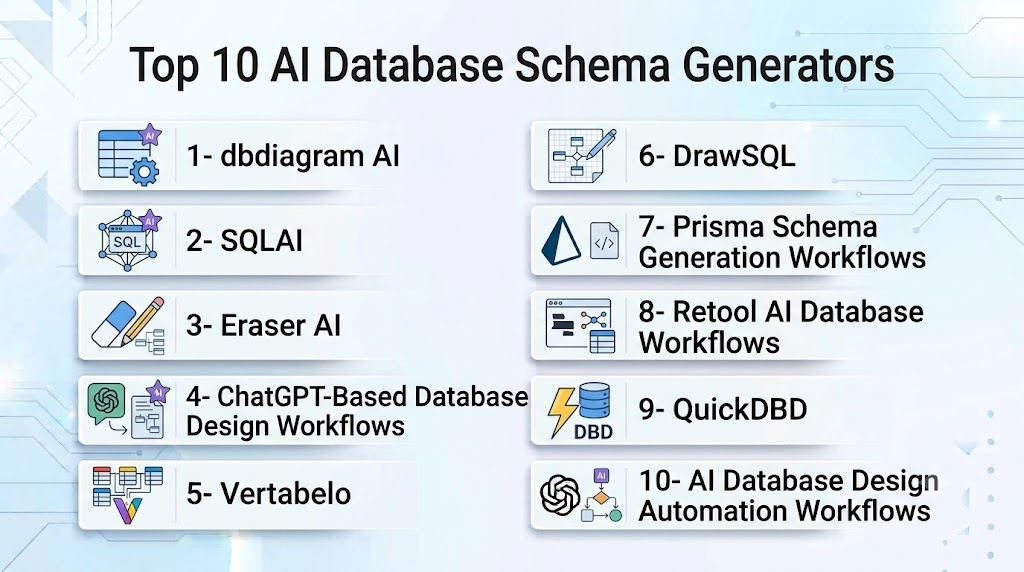
Top 10 AI Database Schema Generators
1- dbdiagram AI
Verdict: AI-assisted database modeling tool for quickly creating database structures.
Short Description: dbdiagram AI helps developers generate database schemas, visualize relationships, and create database diagrams from descriptions and modeling requirements.
Key Features:
- AI schema generation
- Database diagrams
- Relationship visualization
- SQL export
- Collaboration features
Pros:
- Simple database modeling workflow
- Developer-friendly interface
Cons:
- Requires schema validation
- Advanced enterprise features vary
Deployment: Cloud-based
Security & Compliance: Platform security controls
Integrations & Ecosystem: Database tools and developer workflows
Support & Community: Developer community
Pricing Model: Subscription-based
Best-Fit Scenarios: Developers and startups
2- SQLAI
Verdict: AI-powered SQL and database design assistant.
Short Description: SQLAI helps users generate SQL queries, database structures, and data-related solutions using natural language instructions.
Key Features:
- SQL generation
- Schema suggestions
- Query optimization
- Database assistance
- Natural language interaction
Pros:
- Easy database assistance
- Fast SQL generation
Cons:
- Requires technical validation
- Complex schemas need manual refinement
Deployment: Cloud-based
Security & Compliance: Depends on configuration
Integrations & Ecosystem: Database systems and SQL workflows
Support & Community: Developer community
Pricing Model: Subscription-based
Best-Fit Scenarios: Developers needing SQL assistance
3- Eraser AI
Verdict: Developer-focused AI tool for database and technical diagrams.
Short Description: Eraser helps engineering teams create database diagrams, architecture documentation, and technical visuals using AI-assisted workflows.
Key Features:
- Database diagrams
- AI-generated technical documentation
- Schema visualization
- Developer collaboration
- Diagram editing
Pros:
- Built for engineering teams
- Fast documentation workflows
Cons:
- Not a dedicated database platform
- Requires schema review
Deployment: Cloud-based
Security & Compliance: Security options available
Integrations & Ecosystem: Developer tools and documentation workflows
Support & Community: Developer community
Pricing Model: Subscription-based
Best-Fit Scenarios: Software teams
4- ChatGPT-Based Database Design Workflows
Verdict: Flexible AI approach for generating database schemas from requirements.
Short Description: Large language model-based workflows help developers convert business requirements into tables, relationships, SQL scripts, and database design recommendations.
Key Features:
- Requirement analysis
- Schema generation
- SQL creation
- Database explanation
- Design suggestions
Pros:
- Highly flexible
- Supports multiple database types
Cons:
- Requires expert review
- Output accuracy depends on prompts
Deployment: API and conversational environments
Security & Compliance: Depends on implementation
Integrations & Ecosystem: APIs and development tools
Support & Community: Developer ecosystem
Pricing Model: Usage-based
Best-Fit Scenarios: Custom database design workflows
5- Vertabelo
Verdict: Professional database modeling platform with automation capabilities.
Short Description: Vertabelo helps teams design, document, and manage database models for relational database systems.
Key Features:
- Database modeling
- ER diagrams
- SQL generation
- Documentation
- Model collaboration
Pros:
- Strong database modeling features
- Professional documentation support
Cons:
- More modeling-focused than AI-focused
- Requires database knowledge
Deployment: Cloud-based
Security & Compliance: Enterprise security options
Integrations & Ecosystem: Database platforms
Support & Community: Professional support
Pricing Model: Subscription-based
Best-Fit Scenarios: Database architects
6- DrawSQL
Verdict: Collaborative database diagramming platform.
Short Description: DrawSQL helps teams create visual database schemas and collaborate on relational database designs.
Key Features:
- Database diagrams
- Schema visualization
- Team collaboration
- Import and export options
- Documentation support
Pros:
- Easy collaboration
- Clean visual diagrams
Cons:
- Limited AI automation
- Requires manual modeling
Deployment: Cloud-based
Security & Compliance: Platform security controls
Integrations & Ecosystem: Database workflows
Support & Community: User community
Pricing Model: Subscription-based
Best-Fit Scenarios: Development teams
7- Prisma Schema Generation Workflows
Verdict: Developer-focused approach for generating database schemas.
Short Description: Prisma-based workflows help developers define application data models and generate database structures for modern applications.
Key Features:
- Schema definition
- Database migrations
- ORM integration
- Type-safe development
- Application modeling
Pros:
- Strong developer workflow
- Good application integration
Cons:
- Requires Prisma ecosystem
- Not a general database design platform
Deployment: Development environments
Security & Compliance: Depends on implementation
Integrations & Ecosystem: Application development tools
Support & Community: Developer community
Pricing Model: Tool dependent
Best-Fit Scenarios: Application developers
8- Retool AI Database Workflows
Verdict: AI-assisted application and database development platform.
Short Description: Retool AI helps developers build internal applications and database workflows with AI-powered assistance.
Key Features:
- Database connections
- AI-assisted development
- Application generation
- Data workflows
- Internal tools creation
Pros:
- Strong application development workflow
- Database integration support
Cons:
- More focused on apps than schemas
- Enterprise pricing
Deployment: Cloud and enterprise
Security & Compliance: Enterprise security controls
Integrations & Ecosystem: Databases and business systems
Support & Community: Enterprise support
Pricing Model: Subscription-based
Best-Fit Scenarios: Internal application teams
9- QuickDBD
Verdict: Fast database diagram generation tool.
Short Description: QuickDBD allows developers to create database schemas quickly using text-based modeling approaches.
Key Features:
- Text-based schema design
- SQL generation
- Database diagrams
- Quick modeling
- Export options
Pros:
- Fast workflow
- Simple syntax
Cons:
- Limited AI capabilities
- Smaller enterprise ecosystem
Deployment: Cloud-based
Security & Compliance: Platform dependent
Integrations & Ecosystem: Database tools
Support & Community: User community
Pricing Model: Subscription-based
Best-Fit Scenarios: Rapid database modeling
10- AI Database Design Automation Workflows
Verdict: Custom AI approach for automated database architecture generation.
Short Description: AI-powered workflows can analyze application requirements and generate database structures, relationships, migrations, and documentation.
Key Features:
- Requirement analysis
- Schema generation
- SQL creation
- Migration planning
- Documentation generation
Pros:
- Highly customizable
- Supports different databases
Cons:
- Requires implementation effort
- Needs database expertise
Deployment: API and custom environments
Security & Compliance: Depends on implementation
Integrations & Ecosystem: Development platforms and databases
Support & Community: Developer ecosystem
Pricing Model: Usage-based
Best-Fit Scenarios: Enterprise automation
Comparison Table
| Platform | AI Schema Generation | Database Support | SQL Generation | Collaboration | Best Use |
|---|---|---|---|---|---|
| dbdiagram AI | High | High | High | High | Database modeling |
| SQLAI | High | High | Very High | Medium | SQL assistance |
| Eraser AI | High | Medium | Medium | High | Technical diagrams |
| AI Design Workflows | Very High | Very High | Very High | Custom | Enterprise solutions |
| Vertabelo | Medium | Very High | High | High | Database architects |
| DrawSQL | Medium | High | Medium | High | Team modeling |
| Prisma Workflows | Medium | High | High | Medium | Application developers |
| Retool AI | Medium | High | Medium | High | Internal applications |
| QuickDBD | Low | High | High | Medium | Fast modeling |
| Custom AI Workflows | Very High | Very High | Very High | Custom | Advanced automation |
Evaluation & Scoring Table
| Platform | Schema Quality 25% | Database Support 15% | SQL Generation 15% | Integrations 15% | AI Capability 10% | Ease 10% | Value 10% | Total |
|---|---|---|---|---|---|---|---|---|
| dbdiagram AI | 24 | 14 | 14 | 14 | 9 | 10 | 9 | 94 |
| SQLAI | 23 | 14 | 15 | 12 | 10 | 10 | 9 | 93 |
| Eraser AI | 22 | 12 | 11 | 14 | 10 | 10 | 9 | 88 |
| AI Design Workflows | 25 | 15 | 15 | 13 | 10 | 8 | 9 | 95 |
| Vertabelo | 24 | 15 | 14 | 14 | 8 | 9 | 8 | 92 |
| DrawSQL | 21 | 14 | 12 | 14 | 8 | 10 | 9 | 88 |
| Prisma Workflows | 22 | 13 | 14 | 13 | 8 | 10 | 9 | 89 |
| Retool AI | 21 | 14 | 12 | 14 | 9 | 9 | 9 | 88 |
| QuickDBD | 20 | 14 | 13 | 11 | 7 | 10 | 9 | 84 |
| Custom AI Workflows | 25 | 15 | 15 | 12 | 10 | 8 | 9 | 94 |
Which AI Database Schema Generator Is Right for You?
- Developers Building Applications: dbdiagram AI, Prisma workflows
- SQL Generation Needs: SQLAI, AI design workflows
- Database Architects: Vertabelo, DrawSQL
- Technical Documentation: Eraser AI
- Enterprise Automation: Custom AI database workflows
- Rapid Prototyping: QuickDBD
Common Mistakes
- Using generated schemas without review
- Ignoring normalization principles
- Missing scalability considerations
- Not validating database relationships
- Skipping security planning
Frequently Asked Questions
What are AI database schema generators?
They are AI tools that create database structures, tables, relationships, and SQL definitions from requirements or descriptions.
Can AI create complete database designs?
Yes, but database experts should review generated schemas for performance and scalability.
Which databases do AI schema generators support?
Support varies, but many work with relational databases and SQL-based systems.
Can AI generate SQL scripts?
Yes. Many tools can create SQL statements, migrations, and database definitions.
Are AI-generated database schemas production-ready?
They require testing, optimization, and expert validation before production use.
Can AI understand business requirements?
AI can interpret requirements and suggest structures, but domain validation is important.
Do these tools support database migrations?
Some provide migration generation and upgrade assistance.
Can AI improve existing database designs?
Yes. Some tools analyze schemas and suggest improvements.
Are AI database tools secure for enterprises?
Enterprise usage requires proper security controls and data handling policies.
Can startups use AI schema generators?
Yes. They help accelerate MVP and application development.
Do AI schema tools replace database architects?
No. They assist architects by reducing manual design effort.
How should teams adopt AI database tools?
Start with prototypes, validate schemas, and gradually integrate them into development workflows.
Conclusion
AI Database Schema Generators are transforming database design by helping developers and architects create schemas faster, automate SQL generation, and improve application development workflows. Tools such as dbdiagram AI, SQLAI, Vertabelo, and AI-powered database workflows provide different approaches based on project complexity and database requirements.
