Introduction
AI Smart Forms & Intake Assistants are intelligent software solutions that help organizations collect, understand, validate, and process information through automated digital forms and conversational workflows. These tools use artificial intelligence, natural language processing, machine learning, and automation to transform traditional forms into interactive experiences that guide users, identify missing information, and improve data collection quality.
Traditional forms often create challenges such as incomplete submissions, confusing questions, manual data entry, and slow processing times. AI-powered intake assistants help organizations create smarter workflows by understanding user responses, asking relevant follow-up questions, extracting information from documents, and routing requests to the right teams.
Modern AI Smart Forms & Intake Assistants are being adopted across industries because they reduce administrative work, improve user experiences, and help organizations collect structured information from customers, employees, patients, applicants, and business partners.
Real-world use cases:
- Healthcare organizations use AI intake assistants to collect patient information, symptoms, appointment details, and medical history before consultations.
- Financial institutions use intelligent forms for customer onboarding, loan applications, and compliance-related information collection.
- HR teams use AI-powered forms for employee onboarding, recruitment applications, and internal requests.
- Insurance companies use smart intake workflows for claims submission and customer information gathering.
- Legal teams use AI forms to collect case details, client information, and document requirements.
- SaaS companies use intelligent forms for customer onboarding, support requests, and product feedback collection.
Evaluation Criteria for Buyers:
Organizations evaluating AI Smart Forms & Intake Assistants should consider:
- AI-powered form creation capabilities.
- Natural language understanding and conversational workflows.
- Data extraction accuracy.
- Conditional logic and dynamic questions.
- Document processing capabilities.
- Integration with business applications.
- API availability and developer flexibility.
- Data privacy and security controls.
- Workflow automation features.
- Human review and approval processes.
- Analytics and reporting capabilities.
- User experience and accessibility.
- Scalability for growing data collection needs.
Best for:
AI Smart Forms & Intake Assistants are best for enterprises, healthcare providers, financial organizations, HR teams, legal departments, SaaS companies, government services, and businesses that manage high volumes of customer or employee information collection.
Not ideal for:
Small teams with very simple data collection requirements may not need advanced AI intake solutions. Organizations collecting highly sensitive information should carefully evaluate privacy controls, security requirements, and human review processes.
What’s Changed in AI Smart Forms & Intake Assistants
AI Smart Forms & Intake Assistants are evolving from simple digital forms into intelligent workflow automation platforms. Businesses are increasingly using AI to improve data collection, reduce manual processing, and create personalized user experiences.
Key developments include:
- Conversational form experiences: AI assistants are replacing static forms with interactive conversations that guide users through information collection.
- AI-generated forms: Organizations can create forms automatically from business requirements, documents, or workflow descriptions.
- Dynamic question generation: Smart forms can adjust questions based on user responses to collect more relevant information.
- Intelligent data extraction: AI systems can extract information from uploaded documents, images, and files to reduce manual entry.
- Automated validation: AI helps identify missing information, inconsistent answers, and possible errors before submission.
- Workflow automation: Intake assistants increasingly connect form responses with business processes, approvals, and task routing.
- AI agents for intake management: Organizations are using AI agents to collect information, answer questions, and guide users through complex processes.
- Enterprise privacy controls: Businesses are focusing on secure data processing, access management, retention policies, and governance.
- Integration with business systems: Smart forms are becoming connected with CRM, ERP, HR, healthcare, and support platforms.
- Improved analytics: Organizations are using AI insights to understand submission patterns and improve workflows.
- Human-in-the-loop workflows: Critical processes increasingly combine AI automation with human review and approval.
- Low-code and no-code adoption: More teams can build intelligent intake workflows without extensive development resources.
Quick Buyer Checklist (Scan-Friendly)
Before selecting an AI Smart Forms & Intake Assistant, review these points:
✅ Does the platform support AI-powered form creation?
✅ Can it understand natural language responses?
✅ Does it support dynamic questions and conditional workflows?
✅ Can it extract information from documents?
✅ Does it validate submitted information automatically?
✅ Can it integrate with existing business systems?
✅ Does it provide APIs and developer tools?
✅ Does it protect sensitive user information?
✅ Can administrators manage access permissions?
✅ Does it provide workflow automation features?
✅ Can teams monitor submissions and performance?
✅ Does it support human review processes?
✅ Can it scale with increasing data collection needs?
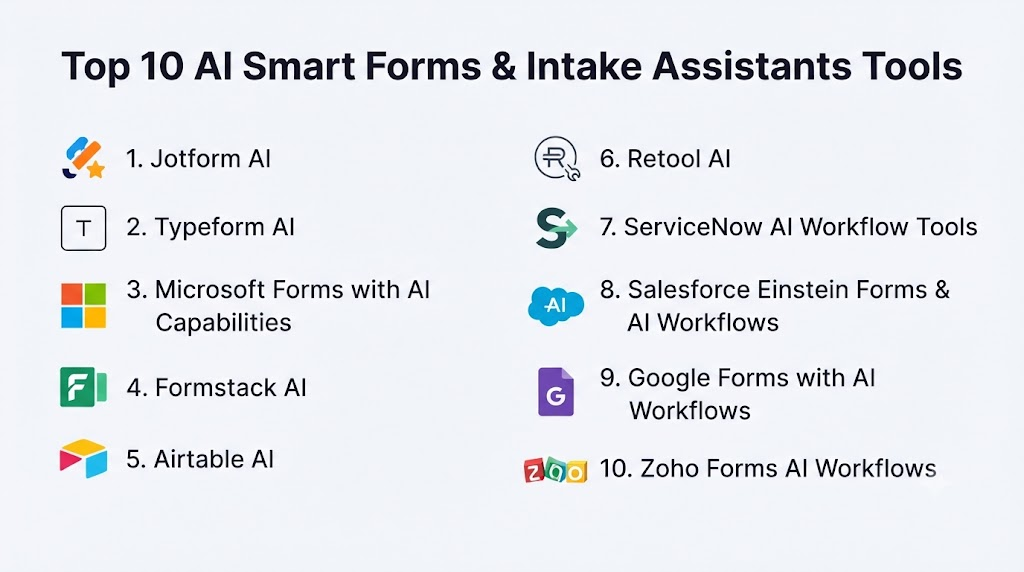
Top 10 AI Smart Forms & Intake Assistants Tools
1 — Jotform AI
One-line verdict: Best for businesses needing easy AI-powered forms with automation and workflow capabilities.
Short description:
Jotform AI provides intelligent form creation and automation features that help businesses collect information, manage submissions, and streamline digital workflows. It is widely used by organizations that need flexible form-building capabilities without complex development.
Standout Capabilities
- AI-assisted form creation.
- Drag-and-drop form building.
- Automated workflows.
- Conditional logic support.
- Data collection automation.
- Document and file collection.
- Integration with business applications.
AI-Specific Depth
- Model support: AI capabilities based on platform-provided models.
- RAG / knowledge integration: N/A as a primary capability.
- Evaluation: Form performance evaluation depends on workflow analytics.
- Guardrails: Security and validation controls vary by configuration.
- Observability: Submission analytics and workflow monitoring capabilities vary.
Pros
- Easy adoption for business users.
- Strong form customization options.
- Supports many workflow scenarios.
Cons
- Advanced AI customization may be limited.
- Large enterprise workflows may require additional configuration.
- AI capabilities depend on available features.
Security & Compliance
Security features depend on account configuration and selected services. Organizations should verify encryption, access controls, and compliance requirements based on their use case.
Specific certifications should be verified according to organizational needs.
Deployment & Platforms
- Cloud-based platform.
- Web-based access.
- Integration through APIs and connectors.
Integrations & Ecosystem
Jotform AI can connect with common business applications and workflow tools.
Common integrations include:
- CRM systems.
- Payment platforms.
- Productivity tools.
- Communication platforms.
- Automation workflows.
Pricing Model
Subscription-based pricing model. Exact pricing varies depending on features, usage, and plan selection.
Best-Fit Scenarios
- Small and medium businesses.
- Teams creating customer forms quickly.
- Organizations automating information collection.
2 — Typeform AI
One-line verdict: Best for companies creating engaging conversational forms and customer experiences.
Short description:
Typeform AI focuses on interactive form experiences designed to improve user engagement and data collection quality. It helps businesses create conversational-style forms for surveys, lead capture, customer feedback, and onboarding.
Standout Capabilities
- Conversational form experiences.
- AI-assisted question creation.
- User-friendly interface design.
- Dynamic form workflows.
- Customer feedback collection.
- Lead generation forms.
- Business integrations.
AI-Specific Depth
- Model support: Platform-provided AI capabilities.
- RAG / knowledge integration: N/A.
- Evaluation: Form analytics and response insights vary.
- Guardrails: Validation features depend on configuration.
- Observability: Analytics capabilities depend on selected features.
Pros
- Strong user experience design.
- Easy for non-technical teams.
- Good for customer engagement workflows.
Cons
- May not fit highly complex enterprise intake processes.
- Advanced automation may require integrations.
- AI customization options may vary.
Security & Compliance
Security features depend on configuration and organizational requirements. Users should verify available privacy and governance controls.
Deployment & Platforms
- Cloud-based platform.
- Web-based access.
- Integration-based workflows.
Integrations & Ecosystem
Typeform AI integrates with business tools for collecting and managing responses.
Common integrations include:
- CRM platforms.
- Marketing tools.
- Collaboration applications.
- Automation platforms.
Pricing Model
Subscription-based pricing model. Costs depend on usage and selected features.
Best-Fit Scenarios
- Marketing teams.
- Customer feedback collection.
- Businesses needing attractive interactive forms.
3 — Microsoft Forms with AI Capabilities
One-line verdict: Best for organizations needing simple intelligent forms within enterprise productivity environments.
Short description:
Microsoft Forms provides digital form creation and data collection capabilities within the Microsoft ecosystem. Combined with AI-powered productivity workflows, it can support smarter surveys, internal requests, and business information collection.
Standout Capabilities
- Simple form creation.
- Enterprise productivity integration.
- Survey and feedback collection.
- Collaboration features.
- Automated workflow connections.
- Data collection management.
- Integration with business environments.
AI-Specific Depth
- Model support: AI capabilities depend on connected Microsoft services.
- RAG / knowledge integration: Depends on connected enterprise systems.
- Evaluation: Analytics and reporting depend on configuration.
- Guardrails: Enterprise security controls vary.
- Observability: Monitoring depends on connected workflows.
Pros
- Strong enterprise ecosystem compatibility.
- Easy adoption for existing users.
- Suitable for internal workflows.
Cons
- Advanced AI intake features may require additional services.
- Complex workflows may need customization.
- Less specialized than dedicated intake platforms.
Security & Compliance
Security capabilities depend on Microsoft environment configuration. Organizations should verify access controls, data handling, and governance requirements.
Deployment & Platforms
- Cloud-based platform.
- Web access.
- Enterprise productivity integration.
Integrations & Ecosystem
Microsoft Forms connects with productivity and automation environments.
Common integrations include:
- Collaboration platforms.
- Workflow automation tools.
- Business applications.
- Enterprise data systems.
Pricing Model
Pricing depends on Microsoft service plans and organizational licensing.
Best-Fit Scenarios
- Enterprises using Microsoft environments.
- Internal employee workflows.
- Business surveys and requests.
4 — Formstack AI
One-line verdict: Best for organizations needing secure digital forms with workflow automation and enterprise data collection.
Short description:
Formstack AI provides digital form creation, automation, and workflow management capabilities for businesses. It helps organizations replace manual paperwork with intelligent intake processes across departments such as healthcare, HR, finance, and operations.
Standout Capabilities
- AI-assisted form creation.
- Digital workflow automation.
- Data collection and processing.
- Conditional form logic.
- Document generation workflows.
- Approval processes.
- Enterprise form management.
AI-Specific Depth
- Model support: Platform-provided AI capabilities; details vary by feature.
- RAG / knowledge integration: N/A as a primary capability.
- Evaluation: Workflow performance measurement depends on implementation.
- Guardrails: Validation and security controls vary by configuration.
- Observability: Form analytics and workflow monitoring capabilities vary.
Pros
- Strong workflow automation capabilities.
- Suitable for business process improvement.
- Supports enterprise data collection needs.
Cons
- Advanced configurations may require training.
- AI features depend on selected capabilities.
- Large deployments may require planning.
Security & Compliance
Security capabilities depend on product configuration and organizational requirements. Access controls, encryption, and compliance features vary based on deployment.
Specific certifications should be verified according to business needs.
Deployment & Platforms
- Cloud-based deployment.
- Web-based access.
- Integration-based workflows.
Integrations & Ecosystem
Formstack AI can connect with business systems to automate data movement and approvals.
Common integrations include:
- CRM systems.
- Healthcare applications.
- Document management platforms.
- Productivity tools.
- Workflow automation systems.
Pricing Model
Subscription-based enterprise pricing model. Exact pricing varies based on features, users, and usage.
Best-Fit Scenarios
- Enterprises managing digital paperwork.
- Healthcare intake workflows.
- Businesses automating approval processes.
5 — Airtable AI
One-line verdict: Best for teams combining intelligent forms with flexible databases and workflow automation.
Short description:
Airtable AI combines database capabilities, forms, and automation features to help teams collect, organize, and process information. It is commonly used for project intake, customer requests, internal workflows, and operational processes.
Standout Capabilities
- AI-assisted data organization.
- Custom intake workflows.
- Flexible database structure.
- Automated data processing.
- Form-based information collection.
- Team collaboration features.
- Workflow automation.
AI-Specific Depth
- Model support: Platform-provided AI features.
- RAG / knowledge integration: Can connect with organizational data depending on configuration.
- Evaluation: Workflow effectiveness depends on business metrics.
- Guardrails: Access controls and permissions vary by plan.
- Observability: Activity tracking and workflow monitoring depend on configuration.
Pros
- Flexible data management.
- Strong no-code workflow capabilities.
- Useful for cross-functional teams.
Cons
- Not a dedicated intake-only platform.
- Complex enterprise workflows may need additional setup.
- AI features may require configuration.
Security & Compliance
Security capabilities depend on account settings and organizational requirements. Access management and governance features vary.
Specific compliance details should be verified according to business needs.
Deployment & Platforms
- Cloud-based platform.
- Web and mobile access.
- API-based integrations.
Integrations & Ecosystem
Airtable AI integrates with business applications and automation tools.
Common integrations include:
- CRM systems.
- Project management platforms.
- Communication tools.
- Automation platforms.
- Custom applications.
Pricing Model
Subscription-based pricing model. Costs depend on users, features, and usage.
Best-Fit Scenarios
- Operations teams.
- Internal business workflows.
- Organizations needing flexible data intake.
6 — Retool AI
One-line verdict: Best for developers building custom AI-powered internal intake applications.
Short description:
Retool AI helps technical teams build internal applications, workflows, and AI-powered tools. It is commonly used for operational dashboards, employee requests, customer support tools, and custom intake systems.
Standout Capabilities
- Custom AI application development.
- Internal workflow creation.
- Database connectivity.
- API integrations.
- AI-powered automation.
- Developer-focused components.
- Custom business applications.
AI-Specific Depth
- Model support: Supports AI integrations depending on connected models and services.
- RAG / knowledge integration: Can support knowledge workflows through connected data sources.
- Evaluation: Requires implementation-specific testing.
- Guardrails: Depends on application design and configuration.
- Observability: Monitoring depends on connected systems.
Pros
- High customization flexibility.
- Strong developer workflow support.
- Useful for complex internal tools.
Cons
- Requires technical expertise.
- Not ideal for non-technical users.
- Custom applications require maintenance.
Security & Compliance
Security capabilities depend on deployment configuration. Organizations should evaluate authentication, permissions, data access, and governance controls.
Deployment & Platforms
- Cloud deployment.
- Self-hosted options may vary.
- Web application environment.
Integrations & Ecosystem
Retool AI supports connections with technical and business systems.
Common integrations include:
- Databases.
- APIs.
- Internal applications.
- Cloud services.
- Business tools.
Pricing Model
Subscription-based pricing model. Enterprise pricing varies based on usage and requirements.
Best-Fit Scenarios
- Engineering teams.
- Internal AI application development.
- Businesses requiring custom intake workflows.
7 — ServiceNow AI Workflow Tools
One-line verdict: Best for enterprises automating employee and customer intake processes across departments.
Short description:
ServiceNow AI workflow capabilities help organizations automate service requests, employee processes, customer interactions, and operational workflows. AI features enhance information collection, routing, and workflow execution.
Standout Capabilities
- Intelligent workflow automation.
- AI-assisted request handling.
- Service management workflows.
- Automated ticket routing.
- Enterprise process automation.
- Employee service workflows.
- Customer support automation.
AI-Specific Depth
- Model support: AI capabilities depend on ServiceNow AI services.
- RAG / knowledge integration: Can use connected enterprise knowledge sources depending on configuration.
- Evaluation: Workflow evaluation depends on organizational metrics.
- Guardrails: Enterprise controls vary by deployment.
- Observability: Workflow monitoring capabilities are available depending on configuration.
Pros
- Strong enterprise workflow capabilities.
- Suitable for complex business processes.
- Supports large organizations.
Cons
- Can be complex to implement.
- Requires enterprise-level planning.
- May be expensive for smaller teams.
Security & Compliance
Security capabilities depend on deployment and enterprise configuration. Organizations should verify access controls, governance, and compliance requirements.
Deployment & Platforms
- Cloud-based enterprise platform.
- Web access.
- Enterprise workflow environment.
Integrations & Ecosystem
ServiceNow AI workflows integrate with enterprise applications.
Common integrations include:
- IT systems.
- HR platforms.
- Customer service tools.
- Business applications.
- Enterprise databases.
Pricing Model
Enterprise subscription model. Exact pricing varies based on modules and requirements.
Best-Fit Scenarios
- Large enterprises.
- Employee service centers.
- Complex workflow automation.
8 — Salesforce Einstein Forms & AI Workflows
One-line verdict: Best for businesses collecting customer information inside CRM-driven workflows.
Short description:
Salesforce AI capabilities help organizations automate customer information collection, relationship management, and business workflows. Smart forms and AI-powered processes can support sales, service, and customer operations.
Standout Capabilities
- CRM-connected intake workflows.
- AI-assisted customer data processing.
- Automated customer journeys.
- Lead collection workflows.
- Service request automation.
- Business process intelligence.
- Customer information management.
AI-Specific Depth
- Model support: AI capabilities depend on Salesforce AI services.
- RAG / knowledge integration: Can connect with CRM knowledge sources depending on configuration.
- Evaluation: Workflow evaluation depends on business metrics.
- Guardrails: Enterprise AI controls vary.
- Observability: Monitoring depends on Salesforce configuration.
Pros
- Strong CRM ecosystem.
- Useful for customer-facing workflows.
- Enterprise scalability.
Cons
- Best suited for Salesforce environments.
- Can require specialized administration.
- Advanced features may increase complexity.
Security & Compliance
Security capabilities depend on Salesforce configuration and organizational settings.
Deployment & Platforms
- Cloud-based platform.
- Web and mobile access.
- Enterprise CRM environment.
Integrations & Ecosystem
Common integrations include:
- CRM systems.
- Customer service platforms.
- Marketing tools.
- Business applications.
Pricing Model
Enterprise subscription model. Pricing varies based on products and features.
Best-Fit Scenarios
- Sales organizations.
- Customer service teams.
- CRM-driven businesses.
9 — Google Forms with AI Workflows
One-line verdict: Best for teams needing simple AI-enhanced information collection within productivity workflows.
Short description:
Google Forms provides digital data collection capabilities that can be enhanced through connected AI and automation workflows. It is commonly used for surveys, internal requests, feedback collection, and basic intake processes.
Standout Capabilities
- Simple form creation.
- Easy collaboration.
- Data collection workflows.
- Integration with productivity tools.
- Automated response processing.
- Team-based usage.
- Spreadsheet-connected workflows.
AI-Specific Depth
- Model support: Depends on connected AI services.
- RAG / knowledge integration: Depends on workflow configuration.
- Evaluation: Analytics depend on connected systems.
- Guardrails: Security controls depend on account settings.
- Observability: Monitoring depends on connected workflows.
Pros
- Easy adoption.
- Low technical barrier.
- Suitable for basic intake needs.
Cons
- Limited advanced intake automation.
- Enterprise workflows may require additional tools.
- AI capabilities depend on integrations.
Security & Compliance
Security depends on account configuration and organizational policies.
Deployment & Platforms
- Cloud-based.
- Web access.
- Productivity ecosystem integration.
Integrations & Ecosystem
Common integrations include:
- Spreadsheets.
- Productivity applications.
- Automation platforms.
- Business workflows.
Pricing Model
Availability depends on selected productivity plans and services.
Best-Fit Scenarios
- Small teams.
- Internal surveys.
- Simple information collection.
10 — Zoho Forms AI Workflows
One-line verdict: Best for businesses seeking affordable smart forms connected with business automation tools.
Short description:
Zoho Forms provides online form creation and workflow automation capabilities for businesses. AI-enhanced workflows help organizations collect information, automate processes, and connect form submissions with business applications.
Standout Capabilities
- Online form creation.
- Workflow automation.
- Data collection management.
- Business application integration.
- Approval workflows.
- Automated notifications.
- Custom form logic.
AI-Specific Depth
- Model support: Platform-provided AI capabilities vary.
- RAG / knowledge integration: N/A as a primary feature.
- Evaluation: Depends on workflow analytics.
- Guardrails: Security controls vary.
- Observability: Monitoring depends on configuration.
Pros
- Good value for small and medium businesses.
- Strong business workflow integration.
- Easy form management.
Cons
- Advanced AI capabilities may vary.
- Enterprise customization may require planning.
- Complex workflows may need additional configuration.
Security & Compliance
Security features depend on account configuration and business requirements.
Deployment & Platforms
- Cloud-based platform.
- Web access.
- Business application integration.
Integrations & Ecosystem
Common integrations include:
- CRM platforms.
- Business applications.
- Automation tools.
- Productivity systems.
Pricing Model
Subscription-based pricing model. Costs depend on features and usage.
Best-Fit Scenarios
- SMB workflows.
- Business process automation.
- Customer and employee intake.
Comparison Table (Top 10)
| Tool Name | Best For | Deployment | Model Flexibility | Strength | Watch-Out | Public Rating |
|---|---|---|---|---|---|---|
| Jotform AI | Easy AI forms | Cloud | Hosted | Simplicity | Limited customization | N/A |
| Typeform AI | Conversational forms | Cloud | Hosted | User experience | Complex workflows | N/A |
| Microsoft Forms | Enterprise productivity forms | Cloud | Hosted | Ecosystem integration | Advanced AI limits | N/A |
| Formstack AI | Enterprise workflows | Cloud | Hosted | Automation | Setup complexity | N/A |
| Airtable AI | Flexible workflows | Cloud | Hosted | Data management | Not intake-specific | N/A |
| Retool AI | Custom applications | Cloud/Self-hosted varies | Multi-model options vary | Developer flexibility | Requires coding | N/A |
| ServiceNow AI | Enterprise automation | Cloud | Hosted | Workflow management | Complexity | N/A |
| Salesforce AI Workflows | CRM intake | Cloud | Hosted | Customer workflows | Ecosystem dependency | N/A |
| Google Forms AI Workflows | Simple collection | Cloud | Hosted | Accessibility | Limited automation | N/A |
| Zoho Forms AI | SMB automation | Cloud | Hosted | Affordability | Advanced features vary | N/A |
Scoring & Evaluation (Transparent Rubric)
The scoring below provides a comparative evaluation of AI Smart Forms & Intake Assistants based on common business requirements. These scores are not absolute rankings because the right solution depends on workflow complexity, industry requirements, security expectations, technical resources, and integration needs.
The evaluation focuses on AI capabilities, workflow automation, data handling, security controls, usability, scalability, and ecosystem support.
| Tool | Core Features | Reliability/Eval | Guardrails | Integrations | Ease | Perf/Cost | Security/Admin | Support | Weighted Total |
|---|---|---|---|---|---|---|---|---|---|
| Jotform AI | 8 | 7 | 7 | 8 | 9 | 8 | 7 | 8 | 7.85 |
| Typeform AI | 8 | 7 | 7 | 8 | 9 | 8 | 7 | 8 | 7.80 |
| Microsoft Forms | 7 | 7 | 8 | 9 | 9 | 8 | 9 | 9 | 8.20 |
| Formstack AI | 9 | 8 | 8 | 8 | 8 | 7 | 9 | 8 | 8.15 |
| Airtable AI | 8 | 8 | 7 | 9 | 8 | 8 | 8 | 8 | 8.00 |
| Retool AI | 9 | 8 | 8 | 9 | 7 | 8 | 8 | 8 | 8.20 |
| ServiceNow AI | 10 | 9 | 9 | 10 | 6 | 7 | 10 | 9 | 8.95 |
| Salesforce AI Workflows | 9 | 8 | 9 | 10 | 7 | 7 | 10 | 9 | 8.70 |
| Google Forms AI Workflows | 7 | 7 | 7 | 8 | 10 | 9 | 7 | 8 | 7.85 |
| Zoho Forms AI | 8 | 7 | 7 | 8 | 9 | 9 | 7 | 8 | 8.00 |
Top 3 for Enterprise
1. ServiceNow AI Workflow Tools
Best suited for large organizations managing complex employee, customer, and operational intake workflows.
2. Salesforce AI Workflows
A strong option for organizations that need AI-powered intake connected directly with customer relationship management processes.
3. Formstack AI
Useful for enterprises requiring structured forms, workflow automation, and business process management.
Top 3 for SMB
1. Jotform AI
A practical choice for businesses needing fast form creation and automation without heavy technical requirements.
2. Zoho Forms AI Workflows
Suitable for small and medium businesses looking for affordable workflow automation.
3. Typeform AI
Helpful for organizations focused on customer engagement and interactive form experiences.
Top 3 for Developers
1. Retool AI
Best suited for developers building custom internal intake applications and AI-powered workflows.
2. Airtable AI
Useful for teams combining databases, automation, and flexible data collection.
3. Salesforce AI Workflows
Suitable for developers building customer-facing workflows within CRM environments.
Which AI Smart Forms & Intake Assistant Tool Is Right for You?
Choosing the right AI Smart Forms & Intake Assistant depends on your workflow requirements, technical capability, security expectations, and the type of information you need to collect.
There is no single universal winner. Different organizations require different levels of automation, customization, and governance.
Solo / Freelancer
Individuals and small teams usually need simple, affordable, and easy-to-manage intake solutions.
Recommended options:
- Jotform AI for quick form creation.
- Typeform AI for engaging customer interactions.
- Google Forms AI workflows for basic information collection.
Important considerations:
- Low setup requirements.
- Easy customization.
- Affordable pricing.
- Simple integrations.
Best use cases:
- Client onboarding.
- Feedback collection.
- Lead generation.
- Service requests.
SMB
Small and medium businesses often need better automation while maintaining simple operations.
Recommended options:
- Zoho Forms AI Workflows.
- Jotform AI.
- Typeform AI.
SMBs should focus on:
- Workflow automation.
- CRM integration.
- Data management.
- User experience.
- Cost control.
Best use cases:
- Customer onboarding.
- Sales inquiries.
- Employee requests.
- Internal processes.
Mid-Market
Growing organizations usually require more structured workflows and better integration capabilities.
Recommended options:
- Airtable AI.
- Formstack AI.
- Retool AI.
Important requirements:
- Custom workflows.
- Data validation.
- Approval processes.
- Application integration.
- Analytics.
Best use cases:
- Department-level automation.
- Customer operations.
- Internal request management.
Enterprise
Large organizations require scalability, security controls, governance, and integration with existing systems.
Recommended options:
- ServiceNow AI Workflow Tools.
- Salesforce AI Workflows.
- Formstack AI.
Enterprise buyers should evaluate:
- Access control.
- Data governance.
- Workflow visibility.
- Audit capabilities.
- Integration architecture.
- AI management policies.
Best use cases:
- Enterprise service requests.
- Customer onboarding.
- Employee lifecycle workflows.
- Compliance-related processes.
Regulated Industries (Finance, Healthcare, Public Sector)
Organizations handling sensitive information should prioritize security, privacy, and controlled automation.
Important evaluation areas:
- Data protection.
- User permissions.
- Encryption practices.
- Audit visibility.
- Human approval workflows.
- Data retention policies.
Recommended approach:
- Use AI for information collection and workflow assistance.
- Maintain human review for sensitive decisions.
- Regularly evaluate AI-generated outputs.
Specific certifications and compliance details should always be verified based on organizational requirements.
Budget vs Premium
Budget-focused approach
Organizations looking for affordable solutions should prioritize:
- Easy deployment.
- Basic automation.
- Low maintenance.
- Simple integrations.
Suitable options:
- Jotform AI.
- Zoho Forms AI.
- Google Forms workflows.
Premium enterprise approach
Organizations requiring advanced capabilities should prioritize:
- Complex workflow automation.
- Enterprise security.
- Advanced integrations.
- Governance controls.
Suitable options:
- ServiceNow AI.
- Salesforce AI Workflows.
- Formstack AI.
- Retool AI.
Build vs Buy (When to DIY)
Building a custom AI intake assistant may make sense when:
- Intake workflows are unique to the organization.
- Custom AI logic is required.
- Internal engineering resources are available.
- Deep system integration is necessary.
Buying an existing solution is better when:
- Faster implementation is important.
- Standard workflows are sufficient.
- The organization wants lower maintenance.
- Business teams need no-code solutions.
First 60 Days: Improve Security, Evaluation, and Rollout
The second phase focuses on improving reliability and expanding usage.
Key activities:
- Connect business systems.
- Configure access permissions.
- Create approval workflows.
- Train internal teams.
- Monitor user feedback.
- Improve form experiences.
FAQs
1. What are AI Smart Forms & Intake Assistants?
AI Smart Forms & Intake Assistants use artificial intelligence to collect information, understand responses, automate workflows, and improve digital form experiences.
2. How are AI forms different from traditional forms?
Traditional forms collect fixed information, while AI-powered forms can adapt questions, understand responses, validate information, and guide users.
3. Can AI intake assistants create forms automatically?
Yes, some platforms can help generate forms or workflows based on business requirements and user instructions.
4. Are AI Smart Forms secure?
Security depends on the platform configuration, access controls, and data protection practices. Organizations should evaluate security requirements before deployment.
5. Can AI forms connect with business systems?
Yes, many platforms provide integrations with CRM systems, databases, workflow tools, and enterprise applications.
6. Do AI intake assistants replace employees?
No. They reduce repetitive tasks and support employees by automating information collection and processing.
7. Can AI forms process documents?
Some platforms support document extraction and data processing capabilities, depending on available features.
8. Are AI Smart Forms expensive?
Costs vary based on users, features, automation requirements, and usage levels.
9. Can small businesses use AI intake tools?
Yes. Many AI form solutions are designed for small teams with limited technical resources.
10. Can enterprises build custom AI intake assistants?
Yes. Enterprises can build custom solutions using development platforms, APIs, and AI services.
11. How should companies evaluate AI form accuracy?
Organizations should test workflows using real examples, measure data quality, and review AI-generated outputs.
12. What industries benefit most from AI intake assistants?
Healthcare, finance, HR, legal, customer support, education, and enterprise operations benefit significantly from AI-powered intake workflows.
Conclusion
AI Smart Forms & Intake Assistants are transforming how organizations collect information, automate workflows, and improve user experiences. Instead of relying on static forms, businesses can create intelligent intake processes that understand users, reduce manual work, and connect information directly with operational systems.
