Introduction
Virtual Lab Simulators are interactive software platforms that replicate real‑world laboratory environments in a digital space. These tools allow learners to perform experiments, manipulate instruments, and observe outcomes without access to physical laboratory infrastructure. Virtual labs use simulation, animation, and often physics‑based modeling to deliver hands‑on practice in subjects like chemistry, biology, physics, engineering, and medical sciences.
In , Virtual Lab Simulators have moved from supplemental educational tools to core components of academic curricula and corporate training programs. Advances in cloud computing, web‑based graphics engines, augmented reality (AR), and adaptive learning systems make simulations more realistic, accessible, and pedagogically powerful. As institutions embrace blended and remote learning, virtual labs overcome cost, safety, and logistical barriers inherent in physical lab environments.
Real‑world use cases include:
- Science education: K‑12 and university students perform chemistry titrations, physics mechanics tests, and biology dissections virtually.
- Medical training: Simulated anatomy labs, surgical procedures, and clinical scenarios improve learner confidence without risk.
- Engineering design: Students experiment with circuits, robotics systems, and materials testing in virtual environments.
- Corporate upskilling: Technical training in manufacturing processes, maintenance simulations, and safety protocols.
- Research prototyping: Early‑stage model testing, hypothesis exploration, and iterative refinement without laboratory overhead.
What buyers should evaluate:
- Realism and accuracy of simulations
- Subject breadth and depth (science, engineering, medical domains)
- Device compatibility (PC, web, tablet, VR/AR)
- Integration with Learning Management Systems (LMS)
- Assessment, analytics, and reporting tools
- Collaboration features for group labs
- Adaptive learning and personalization
- Safety and compliance support (audit trails, data privacy)
- Cost, licensing models, and scalability
- Support and training resources
Best for: Educational institutions (K‑12, higher ed), corporate training programs, online learning platforms, educators looking for scalable lab access, and learners in remote or underserved regions.
Not ideal for: Courses where tactile, hands‑on equipment handling is critical and cannot be sufficiently approximated virtually, or institutions with reliable access to physical lab infrastructure and low delivery costs.
Key Trends in Virtual Lab Simulators
- Cloud‑native delivery and web‑based simulations eliminating complex installations
- AI‑driven adaptive learning tailoring experiments to student performance
- AR/VR immersive labs enhancing engagement and spatial understanding
- Collaborative multi‑user environments for group experimentation
- Integration with LMS and classroom dashboards for seamless assessment
- Real‑time analytics and learning insights informing instruction and feedback
- API‑first platforms enabling extensibility and external data use
- Gamification and achievement systems boosting learner motivation
- Mobile‑friendly access expanding reach to hybrid and remote learners
- Cost‑effective virtual replacements for expensive or hazardous physical labs
How We Selected These Tools (Methodology)
- Market adoption and educational credibility
- Simulator accuracy, realism, and pedagogical value
- Range of supported subjects and depth of content
- Platform performance, stability, and cross‑device support
- Security, data privacy, and compliance readiness
- Integration capabilities with LMS and classroom tools
- Support resources, training, and documentation quality
- Innovation, AI features, and collaborative capabilities
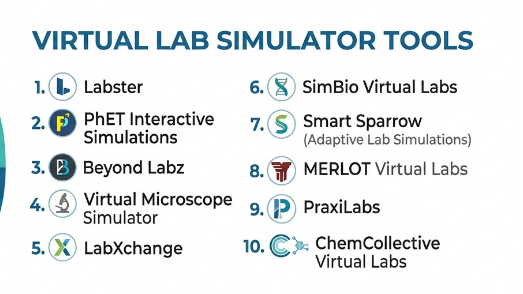
Top 10 Virtual Lab Simulator Tools
1- Labster
Short description: Labster offers a comprehensive suite of interactive, science‑focused virtual lab simulations designed for high school and higher education learners. It covers biology, chemistry, physics, and biotechnology with realistic scenarios and guided learning.
Key Features
- Fully interactive 3D lab environments
- Guided learning pathways and experiment walkthroughs
- Quizzes and embedded assessment tools
- LMS integration for grade syncing and reporting
- Real‑time analytics for instructors
- Cloud‑based access via web browsers
Pros
- Deep content library across STEM subjects
- Intuitive interface for students and instructors
Cons
- Some advanced simulations require strong device performance
- Content breadth may overwhelm new users
Platforms / Deployment
- Web / Cloud / PC / Tablet
Security & Compliance
Not publicly stated
Integrations & Ecosystem
Labster integrates with educational platforms to streamline instruction:
- LMS and gradebook sync
- Classroom rosters import
- Instructor dashboards
- API access for analytics
Support & Community
Comprehensive documentation, educator onboarding, and professional support
2- PhET Interactive Simulations
Short description: PhET provides free, research‑based interactive simulations in physics, chemistry, math, and other sciences. Developed by educational researchers, these tools emphasize conceptual understanding through manipulable simulations.
Key Features
- Highly interactive science simulations
- Focus on conceptual inquiry and exploration
- Accessible via web and offline options
- Teacher guides and classroom activities
- Cross‑platform HTML5 support
- No licensing cost
Pros
- Open access with broad subject scope
- Research‑backed pedagogical design
Cons
- Lacks formal assessment tracking
- Less realism than full 3D virtual labs
Platforms / Deployment
- Web / Cloud / Hybrid
Security & Compliance
Not publicly stated
Integrations & Ecosystem
- Classroom activity packs
- Teacher resources and lesson plans
- Exportable student worksheets
Support & Community
Large educator community and extensive classroom resources
3- Beyond Labz
Short description: Beyond Labz offers virtual labs for chemistry, biology, physics, and other disciplines with an emphasis on replicate lab procedures virtually. Content supports experiment sequences similar to traditional labs.
Key Features
- Detailed procedural simulations
- Pre‑lab and post‑lab activities
- Safety protocols and equipment orientation
- Report generation tools
- Instructor controls for assignments
Pros
- Structured labs mimic real‑world sequences
- Good for formal coursework integration
Cons
- Interface may feel dated compared to modern AR/VR tools
- Content licensing may be costly for smaller programs
Platforms / Deployment
- Windows / Mac / Cloud
Security & Compliance
Not publicly stated
Integrations & Ecosystem
- LMS assignment sync
- Instructor dashboards
- Lab report templates
Support & Community
Support portal and training materials available
4- Virtual Microscope Simulator
Short description: Focused on biology education, Virtual Microscope Simulator allows students to explore cell structures, tissues, and organisms using simulated microscopy tools with adjustable magnification and stain options.
Key Features
- Realistic microscope control interfaces
- Slide library with diverse biological samples
- Adjustable optics and imaging effects
- Guided exploration activities
- Annotation and labeling features
Pros
- Strong focus on practical microscopy skills
- Engaging visual interface
Cons
- Narrow subject focus (biology)
- Limited assessment features
Platforms / Deployment
- Web / Cloud
Security & Compliance
Not publicly stated
Integrations & Ecosystem
- Classroom activity guides
- Teacher dashboards
- Exportable annotations
Support & Community
Documentation and user guides available
5- LabXchange
Short description: LabXchange combines virtual labs with micro‑learning content, adaptive assessments, and social learning features. It emphasizes hybrid pathways linking simulations to real‑world lab preparation.
Key Features
- Virtual lab experiences
- Adaptive learning pathways
- Micro‑credentialing and badges
- Peer discussion spaces
- Instructor analytics
- Cloud‑based delivery
Pros
- Blends simulations with guided learning
- Social and collaborative learning tools
Cons
- Virtual labs less immersive than 3D environments
- Feature set broad but may require training to leverage fully
Platforms / Deployment
- Web / Cloud
Security & Compliance
Not publicly stated
Integrations & Ecosystem
- LMS sync
- Discussion forums
- Credly or internal badge systems
Support & Community
Active learner community and educator resources
6- SimBio Virtual Labs
Short description: SimBio provides virtual labs in biology focusing on ecology, genetics, and organismal studies with interactive models and experiment sequencing.
Key Features
- High‑fidelity biological system simulations
- Scenario‑based learning modules
- Data collection and graphing tools
- Pre‑lab knowledge checks
- Instructor management tools
Pros
- Realistic ecological and genetics simulations
- Strong scaffolding for learning progression
Cons
- Limited to biology subjects
- Resource demands vary by simulation
Platforms / Deployment
- Web / Cloud
Security & Compliance
Not publicly stated
Integrations & Ecosystem
- LMS assignment sync
- Data export tools
- Instructor oversight dashboards
Support & Community
Educator support and user guides
7- Smart Sparrow (Adaptive Lab Simulations)
Short description: Smart Sparrow delivers adaptive lab simulations with branching scenarios, personalized learning pathways, and formative feedback. Designed for higher education science and engineering courses.
Key Features
- Adaptive simulation branching logic
- Personalized feedback loops
- Data‑driven performance analytics
- Scenario‑based experiments
- Instructor customization tools
Pros
- Supports differentiated instruction
- Deep analytics for performance insights
Cons
- Customization can be complex for new users
- Content library may be smaller than general platforms
Platforms / Deployment
- Web / Cloud
Security & Compliance
Not publicly stated
Integrations & Ecosystem
- LMS connectivity
- Instructor dashboards
- API support
Support & Community
Training and documentation available
8- MERLOT Virtual Labs
Short description: MERLOT curates a broad collection of virtual lab resources across disciplines, allowing educators to select simulations that align with their curriculum. Resources are peer‑reviewed and community curated.
Key Features
- Curated simulation repository
- Peer‑reviewed resources
- Cross‑discipline content
- Teacher guides and lesson links
- Flexible integration into courses
Pros
- Extensive resource selection
- Educator‑focused curation
Cons
- Variable quality across entries
- Limited unified interface
Platforms / Deployment
- Web / Cloud
Security & Compliance
Not publicly stated
Integrations & Ecosystem
- LMS embedding
- Instructor resources
- Exportable guides
Support & Community
Large community of academics and contributors
9- PraxiLabs
Short description: PraxiLabs offers 3D interactive lab simulations across biology, chemistry, and physics with a focus on experiment realism and safety.
Key Features
- 3D interactive lab environments
- Realistic experiment sequencing
- Safety reminders and hazard identification
- Performance tracking and reporting
- Instructor assignment tools
Pros
- Focus on real‑world experiment workflows
- Engaging 3D interface
Cons
- Internet required for full functionality
- Premium subscription for full suite
Platforms / Deployment
- Web / Cloud
Security & Compliance
Not publicly stated
Integrations & Ecosystem
- LMS sync
- Gradebook integration
- Activity tracking
Support & Community
Dedicated support and help center
10- ChemCollective Virtual Labs
Short description: ChemCollective provides chemistry‑focused virtual labs, scenario activities, and solution builders aimed at conceptual understanding and lab technique practice.
Key Features
- Virtual chemistry apparatus and reagents
- Scenario‑based problem solving
- Performance measurement and feedback
- Multiple difficulty levels
- Teacher‑defined lab tasks
Pros
- Excellent for conceptual chemistry learning
- Free access for many features
Cons
- Less graphical realism than 3D platforms
- Limited to chemistry
Platforms / Deployment
- Web / Cloud
Security & Compliance
Not publicly stated
Integrations & Ecosystem
- Teacher guides
- Assessment support
- Lesson activity packs
Support & Community
Documentation and academic community resources
Comparison Table (Top 10)
| Tool Name | Best For | Platform(s) Supported | Deployment | Standout Feature | Public Rating |
|---|---|---|---|---|---|
| Labster | STEM virtual labs | Web, Cloud | Cloud | 3D interactive simulations | N/A |
| PhET | Science fundamentals | Web, Hybrid | Web/Cloud | Free research‑based sims | N/A |
| Beyond Labz | Structured procedural labs | Windows, Mac, Cloud | Hybrid | Stepwise lab sequences | N/A |
| Virtual Microscope Simulator | Microscopy | Web, Cloud | Cloud | Realistic microscope control | N/A |
| LabXchange | Learning pathways + labs | Web, Cloud | Cloud | Adaptive learning integration | N/A |
| SimBio Virtual Labs | Biology simulations | Web, Cloud | Cloud | High‑fidelity biology | N/A |
| Smart Sparrow | Adaptive science labs | Web, Cloud | Cloud | Personalized lab paths | N/A |
| MERLOT Virtual Labs | Educator resource hub | Web, Cloud | Cloud | Curated simulation repository | N/A |
| PraxiLabs | Realistic 3D labs | Web, Cloud | Cloud | Real‑world experiment workflows | N/A |
| ChemCollective | Chemistry learning | Web, Cloud | Web | Scenario‑based chemistry sims | N/A |
Evaluation & Scoring of Virtual Lab Simulators
| Tool Name | Core (25%) | Ease (15%) | Integrations (15%) | Security (10%) | Performance (10%) | Support (10%) | Value (15%) | Weighted Total (0–10) |
|---|---|---|---|---|---|---|---|---|
| Labster | 9 | 8 | 8 | 7 | 9 | 8 | 7 | 8.4 |
| PhET | 7 | 9 | 7 | 7 | 8 | 8 | 9 | 8.1 |
| Beyond Labz | 8 | 7 | 8 | 7 | 8 | 7 | 7 | 7.7 |
| Virtual Microscope Simulator | 7 | 8 | 7 | 7 | 7 | 7 | 8 | 7.6 |
| LabXchange | 8 | 8 | 8 | 7 | 7 | 8 | 8 | 8.0 |
| SimBio Virtual Labs | 8 | 7 | 7 | 7 | 8 | 7 | 7 | 7.7 |
| Smart Sparrow | 8 | 7 | 8 | 7 | 8 | 7 | 7 | 7.8 |
| MERLOT Virtual Labs | 7 | 8 | 7 | 7 | 7 | 8 | 9 | 7.9 |
| PraxiLabs | 8 | 8 | 8 | 7 | 8 | 8 | 7 | 8.0 |
| ChemCollective | 7 | 8 | 7 | 7 | 7 | 8 | 9 | 7.8 |
Interpretation: Scores help readers compare tools based on core capabilities, integration strength, performance, ease of use, and value. Higher weights on core features and value help identify platforms that balance content depth with usability and scalability.
Which Virtual Lab Simulator Is Right for You?
Solo / Freelancer
- PhET and ChemCollective provide free or low‑cost entry points for learners or educators developing independent content.
SMB
- LabXchange or PraxiLabs balance content depth with cost, suitable for small schools or training groups.
Mid‑Market
- Labster and Smart Sparrow offer deeper, immersive simulations with analytics and adaptive features ideal for structured courses.
Enterprise
- Labster, Beyond Labz, and SimBio Virtual Labs support broad curriculum mapping, institution‑wide adoption, and analytics for administrators.
Budget vs Premium
- PhET and ChemCollective offer budget‑friendly access with solid conceptual learning tools.
- Premium platforms like Labster deliver immersive 3D labs and analytics at higher cost.
Feature Depth vs Ease of Use
- Labster and PraxiLabs offer rich content with high realism.
- PhET and Virtual Microscope Simulator emphasize accessibility and ease.
Integrations & Scalability
- Platforms with LMS sync and cloud dashboards (Labster, LabXchange) scale better across classrooms and institutions.
Security & Compliance Needs
- Verify data privacy features and LMS access controls before institutional deployment. Many platforms support role‑based access and secure credential management.
Frequently Asked Questions (FAQs)
1. Are virtual labs effective for real science learning?
Yes—studies show that well‑designed virtual labs support conceptual understanding, reduce cognitive load, and prepare students for hands‑on labs when available.
2. Do virtual labs replace physical labs?
Virtual labs are complementary. They provide safe, scalable, and cost‑effective practice but do not fully replace tactile experience with real equipment.
3. Do these tools work on any device?
Many simulators are browser‑based for broad compatibility; some offer tablet or VR support for enhanced immersion.
4. Can educators track student performance?
Yes—platforms like Labster, Smart Sparrow, and LabXchange include analytics and reporting for instructor insight.
5. Is internet required for virtual labs?
Cloud‑based platforms require internet connectivity; some offer offline modes or hybrid content access.
6. Can virtual labs integrate with LMS?
Most enterprise tools support LMS integration, grade syncing, and roster import for seamless classroom management.
7. Are virtual lab simulators safe for learners?
Yes—simulations eliminate hazards found in real labs and often include safety prompts and risk‑free experimentation.
8. How much do virtual labs cost?
Pricing varies widely—from free academic resources like PhET to premium subscription models for immersive 3D labs.
9. Can virtual labs support assessments?
Yes—many offer embedded quizzes, performance tracking, and competency reports.
10. How do I choose the right simulator?
Consider subject needs, device access, curriculum alignment, budget, and scale of implementation when selecting.
Conclusion
Virtual Lab Simulators have become indispensable tools in modern education and training, offering scalable, safe, and engaging alternatives to traditional laboratory experiences. Whether for K‑12 science classes, university‑level research preparation, or corporate technical training, virtual labs support diverse learning needs. Pilot 2–3 platforms with your learners, assess compatibility with your LMS and classroom goals, and validate performance tracking and reporting tools for successful adoption. With careful selection and implementation, virtual labs enhance learning outcomes while expanding access to hands‑on experimentation for all learners.
