In the fast-paced world of IT operations and DevOps, incident management is crucial in ensuring seamless service delivery. OpsGenie is a modern incident response platform designed to help teams manage alerts, schedule on-call duties, and resolve issues efficiently. Whether you’re in IT, DevOps, or customer support, OpsGenie ensures that the right people are notified at the right time to minimize downtime and improve operational resilience.
OpsGenie integrates seamlessly with various monitoring and ticketing tools, making it a go-to solution for incident management and response. With its powerful features and flexible workflows, OpsGenie enhances incident response for organizations of all sizes.
What is OpsGenie?
OpsGenie is a cloud-based alerting and on-call management tool that helps teams manage and respond to critical incidents. Part of the Atlassian ecosystem, OpsGenie ensures that alerts are properly routed to the right team members based on schedules, escalation policies, and alert rules. It streamlines communication during incidents and reduces response times significantly.
By integrating with over 200 tools, including monitoring, ITSM, and DevOps platforms, OpsGenie becomes a central hub for managing alerts and improving collaboration during critical events.
Top 10 Use Cases of OpsGenie
- Incident Management
OpsGenie ensures quick resolution by routing alerts to the right individuals or teams based on predefined rules and schedules. - On-Call Scheduling
Automate and manage on-call rotations to ensure team members are always available for critical incidents without burnout. - Escalation Policies
Configure escalation policies to ensure unresolved alerts are escalated to higher-level teams or managers for faster resolution. - Integration with Monitoring Tools
OpsGenie integrates with tools like Datadog, Nagios, and Prometheus to centralize and prioritize alerts. - Service Reliability Tracking
Track and improve service reliability by analyzing incident trends and team performance metrics. - IT Service Management (ITSM)
Integrate OpsGenie with ITSM tools like Jira Service Management to streamline workflows and ensure efficient ticket resolution. - Incident Communication
Use OpsGenie’s communication features to notify stakeholders during critical incidents, reducing confusion and improving transparency. - Post-Incident Analysis
Generate reports and analytics to conduct post-incident reviews and continuously improve response processes. - Customer Support
Route customer-reported incidents to the appropriate support teams for quicker resolution. - Disaster Recovery
Ensure rapid and effective disaster recovery responses by automating notifications and escalation workflows.
What Are the Features of OpsGenie?
- Flexible On-Call Management
Create, manage, and automate on-call schedules with ease to balance workloads and avoid burnout. - Multi-Channel Notifications
Notify team members through SMS, email, mobile apps, or voice calls, ensuring no alert goes unnoticed. - Powerful Escalation Policies
Automatically escalate unresolved alerts to ensure critical incidents are handled promptly. - Integration Ecosystem
Seamlessly integrates with over 200 tools, including monitoring, ticketing, and collaboration platforms. - Alert Enrichment
Add context to alerts by including logs, graphs, or additional metadata, making it easier for teams to respond effectively. - Incident Analysis and Reporting
Generate detailed reports to analyze team performance, alert trends, and areas for improvement. - Customizable Alert Rules
Set up rules to filter, prioritize, and route alerts based on specific conditions. - Team Collaboration
Enable teams to collaborate effectively during incidents with built-in communication tools. - Mobile App
Manage incidents on the go with OpsGenie’s mobile app, which supports real-time alert management. - Compliance and Security
Built with enterprise-grade security and compliance features to meet organizational requirements.
How OpsGenie Works and Architecture
How OpsGenie Works:
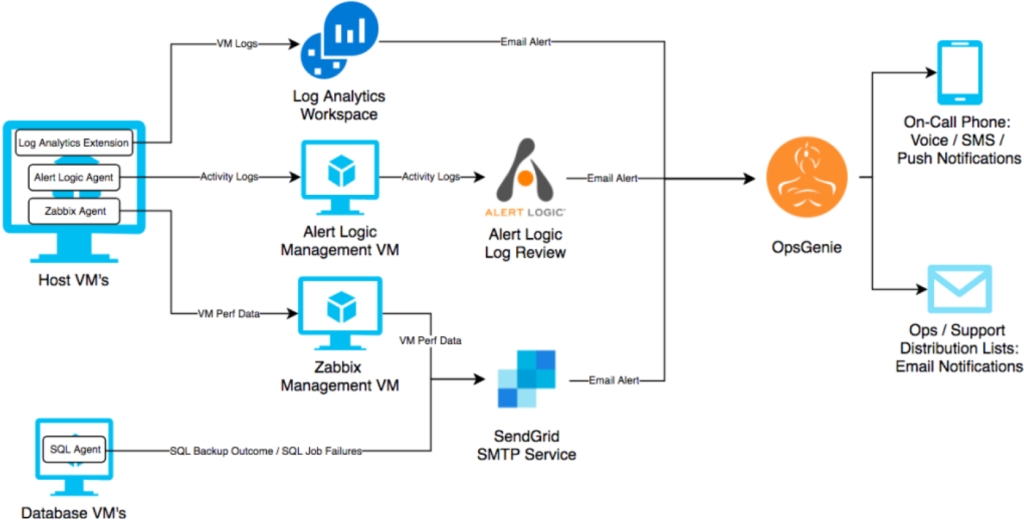
OpsGenie is a central hub for receiving, managing, and routing alerts from various integrated tools. When an alert is generated by a monitoring tool, OpsGenie processes the alert based on predefined rules, schedules, and escalation policies. Team members are notified through multiple channels, and unresolved alerts are escalated as per the policy.
Architecture Overview:
- Integration Layer: Connects OpsGenie to monitoring, ITSM, and communication tools.
- Alert Processing Engine: Filters, prioritizes, and routes alerts based on rules and schedules.
- Notification System: Sends alerts to team members through email, SMS, voice, or mobile push notifications.
- Analytics and Reporting: Tracks alert trends, team performance, and incident outcomes for continuous improvement.
How to Install OpsGenie?
Steps to Install OpsGenie:
- Sign Up: Visit the OpsGenie website and create an account.
- Integrate Tools: Connect OpsGenie to your monitoring and ITSM tools using its integration library.
- Set Up Teams and Schedules: Create teams, define on-call schedules, and assign roles.
- Configure Escalation Policies: Set up rules to handle unresolved alerts and escalate them appropriately.
- Test Alerts: Trigger a test alert to ensure your configurations are working correctly.
Deployment Options:
OpsGenie is a cloud-based tool, so no local installation is required. Simply sign in to your account and start configuring it for your organization.
Basic Tutorials of OpsGenie: Getting Started
- Creating an Account and Setting Up Teams
Sign up for OpsGenie and navigate to the team management section. Create teams and assign members to start managing alerts efficiently. - Integrating Monitoring Tools
Go to the integrations tab, select a tool (e.g., Datadog, Nagios), and follow the instructions to establish a connection with OpsGenie. - Defining Alert Rules and Escalation Policies
Configure rules to prioritize alerts and define escalation paths to ensure timely resolution. - Setting Up On-Call Schedules
Use the scheduling feature to automate on-call rotations, balancing workloads across the team. - Using the Mobile App
Download the OpsGenie mobile app, sign in, and manage alerts on the go with real-time notifications and actions.