Introduction
A VPN Client is software that allows users to securely connect to a Virtual Private Network, encrypting internet traffic and protecting data from interception. VPN clients have become essential for businesses, remote workers, privacy-conscious individuals, and organizations that need secure access to internal resources across public networks.
As organizations continue embracing hybrid work, cloud applications, and distributed teams, VPN clients remain a critical component of cybersecurity strategies. Modern VPN clients now offer advanced security controls, zero-trust integration, identity-based access policies, and AI-assisted threat detection capabilities.
Real-World Use Cases
- Secure remote employee access to corporate resources
- Protecting sensitive business communications
- Safeguarding public Wi-Fi connections
- Enabling secure access to cloud applications
- Supporting compliance and data protection initiatives
Evaluation Criteria for Buyers
When evaluating VPN clients, consider:
- Security architecture and encryption standards
- Performance and connection reliability
- Ease of deployment and management
- Cross-platform compatibility
- Authentication and identity integration
- Compliance and auditing capabilities
- Scalability for growing organizations
- Integration ecosystem
- Support and documentation
- Overall cost and value
Best for: Enterprises, SMBs, remote workforces, IT teams, security professionals, healthcare organizations, financial institutions, and businesses with distributed operations.
Not ideal for: Organizations that have fully adopted VPN-less Zero Trust Network Access solutions or users requiring only basic privacy protection without enterprise-grade controls.
Key Trends in VPN Clients
- AI-powered threat detection integrated into VPN sessions
- Growing adoption of Zero Trust Network Access alongside VPN technologies
- Identity-centric access controls replacing traditional network-based security
- Increased demand for cloud-native VPN deployments
- Enhanced mobile VPN experiences for hybrid workforces
- Automated compliance monitoring and reporting
- Integration with SASE platforms and security ecosystems
- Improved performance through optimized routing technologies
- Stronger MFA and passwordless authentication support
- Consolidation of VPN and endpoint security capabilities
How We Selected These Tools
The following VPN clients were evaluated using several criteria:
- Market adoption and industry reputation
- Security feature completeness
- Enterprise deployment capabilities
- Reliability and uptime performance
- Cross-platform support
- Integration ecosystem maturity
- Scalability across organization sizes
- Customer support and documentation quality
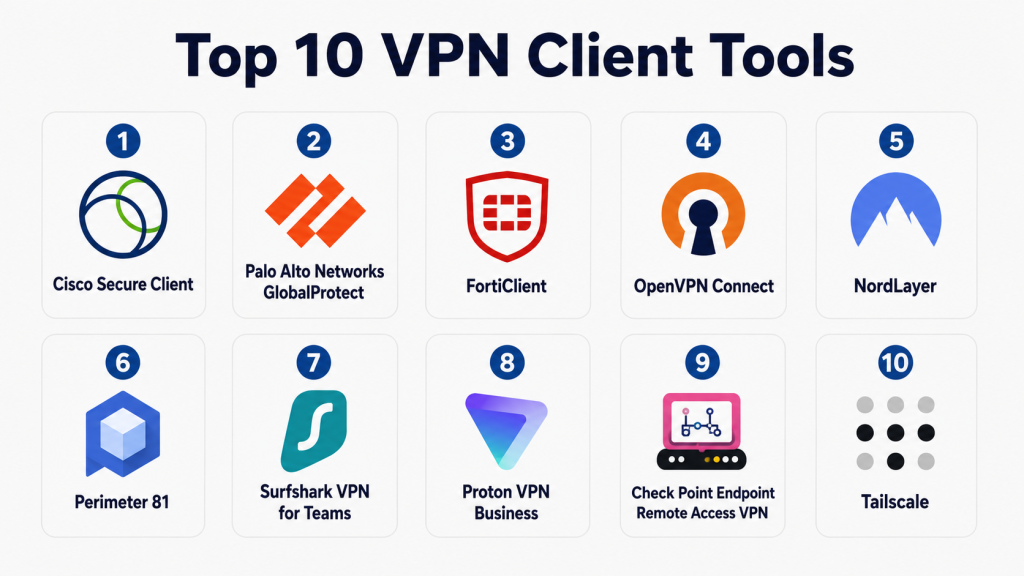
Top 10 VPN Client Tools
1- Cisco Secure Client
Short description: Cisco Secure Client, formerly AnyConnect, is one of the most widely deployed enterprise VPN clients worldwide. It provides secure remote access for organizations of all sizes and integrates deeply with Cisco’s broader security ecosystem. The platform is commonly used by enterprises requiring strong access controls, centralized management, and scalable remote connectivity. Its mature architecture and broad compatibility make it a preferred solution in highly regulated industries.
Key Features
- SSL and IPsec VPN support
- Centralized policy management
- Multi-factor authentication support
- Endpoint posture assessment
- Secure remote access controls
- Integration with Cisco security products
- Always-on VPN capabilities
Pros
- Enterprise-grade security
- Extensive deployment flexibility
- Mature ecosystem
Cons
- Can be complex to configure
- Licensing may be expensive
Platforms / Deployment
- Windows
- macOS
- Linux
- iOS
- Android
Security & Compliance
- MFA
- SAML support
- Encryption
- Audit capabilities
- RBAC support
Integrations & Ecosystem
Cisco Secure Client integrates closely with Cisco’s security portfolio and enterprise infrastructure.
- Cisco Secure Firewall
- Cisco Identity Services Engine
- Active Directory
- Azure AD
- SAML providers
Support & Community
Strong enterprise support, extensive documentation, and a large administrator community.
2- Palo Alto Networks GlobalProtect
Short description: GlobalProtect extends Palo Alto Networks security policies to remote users regardless of location. It enables secure access while maintaining consistent security enforcement across endpoints and networks. Organizations seeking integrated network security and VPN capabilities frequently choose GlobalProtect for centralized visibility and control.
Key Features
- User-based access control
- Endpoint compliance checks
- Always-on VPN
- Cloud-delivered security
- Integrated threat prevention
- Centralized policy management
- Identity-aware access
Pros
- Strong security integration
- Excellent visibility
- Enterprise scalability
Cons
- Requires Palo Alto ecosystem for maximum value
- Advanced features may require additional licensing
Platforms / Deployment
- Windows
- macOS
- Linux
- iOS
- Android
Security & Compliance
- MFA
- SAML
- Encryption
- Audit logging
Integrations & Ecosystem
Works extensively within Palo Alto Networks environments.
- Prisma Access
- Cortex products
- Azure AD
- Okta
- Active Directory
Support & Community
Comprehensive documentation and enterprise-grade support.
3- FortiClient
Short description: FortiClient combines VPN functionality with endpoint security capabilities. Designed as part of the Fortinet Security Fabric, it provides secure remote access while offering endpoint protection and centralized management. It is commonly used by organizations seeking integrated networking and security solutions.
Key Features
- SSL VPN
- IPsec VPN
- Endpoint protection
- Vulnerability scanning
- Centralized management
- Zero Trust support
- Fabric integration
Pros
- Security and VPN in one platform
- Strong integration with Fortinet products
- Flexible deployment
Cons
- Best suited for Fortinet environments
- Advanced management requires additional components
Platforms / Deployment
- Windows
- macOS
- Linux
- iOS
- Android
Security & Compliance
- MFA
- Encryption
- Endpoint compliance controls
Integrations & Ecosystem
- FortiGate
- FortiAnalyzer
- FortiManager
- Active Directory
- Azure AD
Support & Community
Strong enterprise support and active customer community.
4- OpenVPN Connect
Short description: OpenVPN Connect is based on the widely recognized OpenVPN protocol. It offers flexibility, strong encryption, and broad compatibility across devices and environments. Many organizations and technical users rely on OpenVPN due to its reliability and deployment versatility.
Key Features
- Open-source protocol
- Strong encryption
- Cross-platform support
- Flexible deployment
- Certificate-based authentication
- Cloud connectivity
- Centralized administration
Pros
- Highly flexible
- Large ecosystem
- Strong community adoption
Cons
- May require technical expertise
- Configuration complexity
Platforms / Deployment
- Windows
- macOS
- Linux
- iOS
- Android
Security & Compliance
- Encryption
- Certificate authentication
- MFA support
Integrations & Ecosystem
- Active Directory
- LDAP
- Cloud platforms
- Third-party authentication systems
Support & Community
Large open-source community and commercial support options.
5- NordLayer
Short description: NordLayer provides business-focused secure remote access and network security services. It delivers cloud-managed VPN capabilities with simplified deployment and administration. SMBs and growing businesses often select NordLayer for its ease of use and modern management interface.
Key Features
- Business VPN
- Centralized management
- Access controls
- MFA support
- Dedicated gateways
- Threat protection
- Cloud deployment
Pros
- Easy deployment
- User-friendly interface
- Strong remote workforce support
Cons
- Fewer enterprise customization options
- Cloud-focused model
Platforms / Deployment
- Windows
- macOS
- Linux
- iOS
- Android
Security & Compliance
- MFA
- Encryption
- Access controls
Integrations & Ecosystem
- Azure AD
- Google Workspace
- Okta
- Identity providers
Support & Community
Good customer support and onboarding resources.
6- Perimeter 81
Short description: Perimeter 81 focuses on secure access, Zero Trust principles, and cloud-native networking. It simplifies VPN deployment while providing centralized visibility and management capabilities. Organizations transitioning toward modern access architectures frequently consider Perimeter 81.
Key Features
- Zero Trust Network Access
- Secure web gateway
- Device posture checks
- Cloud management
- Multi-region gateways
- Identity integration
- Access segmentation
Pros
- Modern architecture
- Easy administration
- Strong cloud integration
Cons
- May not suit legacy environments
- Some advanced features require premium plans
Platforms / Deployment
- Windows
- macOS
- Linux
- iOS
- Android
Security & Compliance
- MFA
- Encryption
- RBAC
Integrations & Ecosystem
- Okta
- Azure AD
- Google Workspace
- SIEM tools
Support & Community
Strong documentation and responsive support.
7- Surfshark VPN for Teams
Short description: Surfshark VPN for Teams extends consumer VPN capabilities into business environments. It offers secure access, centralized administration, and device protection for small and medium-sized businesses. The platform emphasizes simplicity and affordability.
Key Features
- Business VPN
- Centralized management
- Dedicated IP options
- MFA support
- Cross-platform support
- Secure browsing
- Team administration
Pros
- Cost-effective
- Easy to use
- Quick deployment
Cons
- Fewer enterprise features
- Limited advanced networking controls
Platforms / Deployment
- Windows
- macOS
- Linux
- iOS
- Android
Security & Compliance
- MFA
- Encryption
Integrations & Ecosystem
- Identity providers
- Team management tools
Support & Community
Strong user support and knowledge base.
8- Proton VPN Business
Short description: Proton VPN Business focuses on privacy, security, and business-grade secure connectivity. Built by a security-focused company, it offers encrypted communication and centralized management for organizations requiring privacy-first networking solutions.
Key Features
- Business VPN
- Secure Core routing
- Centralized controls
- Device management
- High-speed servers
- MFA support
- Privacy-focused architecture
Pros
- Strong privacy focus
- Secure infrastructure
- User-friendly interface
Cons
- Smaller enterprise ecosystem
- Limited advanced enterprise controls
Platforms / Deployment
- Windows
- macOS
- Linux
- iOS
- Android
Security & Compliance
- Encryption
- MFA
Integrations & Ecosystem
- Identity management systems
- Business productivity platforms
Support & Community
Strong documentation and responsive support.
9- Check Point Endpoint Remote Access VPN
Short description: Check Point’s VPN client delivers secure remote access with enterprise security controls and centralized management. It integrates with Check Point security products and provides strong protection for distributed workforces.
Key Features
- Secure remote access
- Centralized management
- Endpoint compliance
- MFA integration
- Policy enforcement
- Encryption
- Identity awareness
Pros
- Strong enterprise security
- Mature management tools
- Reliable connectivity
Cons
- Best suited for Check Point customers
- Administrative complexity
Platforms / Deployment
- Windows
- macOS
- Linux
Security & Compliance
- MFA
- Encryption
- Audit controls
Integrations & Ecosystem
- Check Point gateways
- Identity providers
- Enterprise security systems
Support & Community
Comprehensive support and documentation.
10- Tailscale
Short description: Tailscale provides secure connectivity using WireGuard technology and modern identity-based networking. It simplifies VPN deployment while offering strong security and excellent user experience. Developer teams and modern organizations frequently adopt Tailscale for its ease of use.
Key Features
- WireGuard-based connectivity
- Identity-based access
- Mesh networking
- Device management
- SSO support
- Access controls
- Cross-platform support
Pros
- Extremely easy deployment
- Excellent performance
- Modern architecture
Cons
- Different approach from traditional VPNs
- Advanced enterprise controls may vary
Platforms / Deployment
- Windows
- macOS
- Linux
- iOS
- Android
Security & Compliance
- SSO
- MFA
- Encryption
Integrations & Ecosystem
Tailscale integrates with modern identity providers and cloud environments.
- Okta
- Google Workspace
- Microsoft Entra ID
- GitHub
- Cloud platforms
Support & Community
Active community and strong documentation.
Comparison Table
| Tool Name | Best For | Platforms Supported | Deployment | Standout Feature | Public Rating |
|---|---|---|---|---|---|
| Cisco Secure Client | Enterprise Remote Access | Multi-platform | Hybrid | Enterprise Scale | N/A |
| GlobalProtect | Security-Driven Enterprises | Multi-platform | Hybrid | Security Integration | N/A |
| FortiClient | Fortinet Customers | Multi-platform | Hybrid | Security Fabric | N/A |
| OpenVPN Connect | Flexible Deployments | Multi-platform | Cloud/Self-hosted | OpenVPN Protocol | N/A |
| NordLayer | SMBs | Multi-platform | Cloud | Ease of Use | N/A |
| Perimeter 81 | Zero Trust Adoption | Multi-platform | Cloud | ZTNA Features | N/A |
| Surfshark VPN Teams | Small Businesses | Multi-platform | Cloud | Affordability | N/A |
| Proton VPN Business | Privacy-Focused Organizations | Multi-platform | Cloud | Privacy Controls | N/A |
| Check Point VPN | Enterprise Security | Multi-platform | Hybrid | Policy Enforcement | N/A |
| Tailscale | Modern IT Teams | Multi-platform | Cloud | WireGuard Simplicity | N/A |
Evaluation & Scoring of VPN Clients
| Tool | Core | Ease | Integrations | Security | Performance | Support | Value | Weighted Total |
|---|---|---|---|---|---|---|---|---|
| Cisco Secure Client | 10 | 8 | 10 | 10 | 9 | 9 | 7 | 9.0 |
| GlobalProtect | 10 | 8 | 9 | 10 | 9 | 9 | 7 | 8.9 |
| FortiClient | 9 | 8 | 9 | 9 | 9 | 8 | 8 | 8.7 |
| OpenVPN Connect | 9 | 7 | 8 | 9 | 8 | 8 | 9 | 8.4 |
| NordLayer | 8 | 9 | 8 | 8 | 8 | 8 | 9 | 8.4 |
| Perimeter 81 | 9 | 9 | 8 | 9 | 8 | 8 | 8 | 8.6 |
| Surfshark Teams | 7 | 9 | 7 | 8 | 8 | 8 | 9 | 8.0 |
| Proton VPN Business | 8 | 8 | 7 | 9 | 8 | 8 | 8 | 8.1 |
| Check Point VPN | 9 | 7 | 8 | 9 | 8 | 8 | 7 | 8.1 |
| Tailscale | 9 | 10 | 8 | 9 | 9 | 8 | 9 | 8.9 |
These scores are comparative rather than absolute. Organizations should prioritize criteria aligned with their specific needs. Enterprise environments may value security and integrations more heavily, while SMBs may prioritize ease of use and value. A higher score does not automatically indicate the best fit for every deployment scenario.
Which VPN Client Tool Is Right for You?
Solo / Freelancer
NordLayer, Surfshark VPN Teams, and Proton VPN Business provide excellent simplicity, affordability, and security. Individual professionals benefit from straightforward deployment and minimal management overhead.
SMB
NordLayer, Perimeter 81, and Tailscale offer balanced functionality, strong security, and manageable administration. These solutions scale effectively without requiring large IT teams.
Mid-Market
FortiClient, Perimeter 81, and Tailscale provide a strong mix of advanced security, centralized management, and integration capabilities suitable for growing organizations.
Enterprise
Cisco Secure Client, GlobalProtect, and Check Point VPN remain strong choices for large-scale deployments requiring extensive controls, compliance support, and integration with existing security infrastructures.
Budget vs Premium
Budget-conscious organizations may prefer Surfshark Teams or NordLayer. Premium enterprise environments typically benefit from Cisco, Palo Alto Networks, or Check Point solutions.
Feature Depth vs Ease of Use
Tailscale and NordLayer emphasize usability. Cisco and GlobalProtect deliver deeper enterprise functionality but often require more administration.
Integrations & Scalability
Organizations with complex environments should prioritize Cisco, Palo Alto, Fortinet, or Check Point due to mature ecosystems and enterprise integrations.
Security & Compliance Needs
Highly regulated industries generally benefit from Cisco, Palo Alto Networks, Fortinet, and Check Point due to extensive security controls and governance capabilities.
Frequently Asked Questions
1. What is the primary purpose of a VPN client?
A VPN client creates a secure encrypted connection between a device and a trusted network. It protects sensitive data from interception and enables secure remote access to business resources.
2. Are VPN clients still relevant with Zero Trust architectures?
Yes. Many organizations use VPN clients alongside Zero Trust solutions. Modern VPN platforms increasingly incorporate identity-based access controls and Zero Trust principles.
3. How much do enterprise VPN solutions typically cost?
Pricing varies significantly depending on user count, features, deployment model, and support requirements. Most vendors provide customized enterprise pricing.
4. What security features should organizations prioritize?
Important capabilities include MFA, strong encryption, SSO integration, audit logging, device posture validation, and centralized policy management.
5. Can VPN clients impact network performance?
Yes. Encryption and routing processes can introduce overhead. However, modern VPN technologies have significantly improved performance and efficiency.
6. What is the difference between consumer and business VPN clients?
Business VPNs typically provide centralized administration, identity integration, compliance controls, policy enforcement, and support for large-scale deployments.
7. How difficult is VPN deployment?
Deployment complexity varies. Cloud-managed solutions often require minimal effort, while enterprise platforms may require extensive planning and configuration.
8. Can VPN clients integrate with identity providers?
Most modern VPN solutions integrate with providers such as Active Directory, Azure AD, Okta, and Google Workspace for authentication and access control.
9. What are common VPN implementation mistakes?
Common issues include weak authentication, inadequate monitoring, poor policy design, insufficient user training, and neglecting endpoint security requirements.
10. How should organizations evaluate VPN vendors?
Organizations should assess security capabilities, performance, scalability, integrations, management features, support quality, and long-term cost effectiveness.
Conclusion
VPN clients continue to play a critical role in securing remote access and protecting organizational data in modern hybrid work environments. While newer Zero Trust approaches are reshaping network security strategies, VPN technologies remain highly relevant when combined with strong identity management, access controls, and security monitoring. Enterprise organizations often gravitate toward Cisco Secure Client, GlobalProtect, FortiClient, and Check Point VPN for their extensive security capabilities and integration ecosystems. Meanwhile, SMBs and modern IT teams may find NordLayer, Perimeter 81, and Tailscale more attractive due to ease of deployment and operational simplicity. The right choice ultimately depends on organizational size, security requirements, compliance obligations, existing infrastructure, and available IT resources. Start by shortlisting two or three solutions, run a controlled pilot deployment, validate integration and security requirements, and then scale the platform that best aligns with your long-term networking and cybersecurity strategy.
