Introduction
Contact Management Software helps businesses organize, track, manage, and maintain customer and business relationship information from a centralized platform. These tools are designed to improve communication, streamline sales processes, enhance collaboration, and provide better visibility into customer interactions. Modern contact management platforms now go beyond simple address books by offering automation, analytics, integrations, AI-assisted workflows, and customer engagement tracking.
As organizations increasingly rely on digital communication and remote collaboration, contact management software has become a critical operational tool for sales teams, customer support departments, marketing organizations, agencies, startups, and enterprise relationship managers. Businesses need scalable systems capable of managing customer data securely while supporting personalized engagement and long-term relationship building.
Real World Use Cases
- Managing customer and prospect databases
- Tracking sales conversations and follow-ups
- Centralizing contact information across teams
- Improving lead management and pipeline visibility
- Automating customer communication workflows
Evaluation Criteria for Buyers
- Ease of use and onboarding
- Contact organization and segmentation
- Automation capabilities
- Integration ecosystem
- Mobile accessibility
- Reporting and analytics
- Security and compliance controls
- Scalability for growing teams
- AI-powered assistance and workflows
- Pricing flexibility and long-term value
Best for: Sales teams, startups, agencies, SMBs, enterprise customer management teams, recruiters, consultants, and customer-facing businesses.
Not ideal for: Individuals needing only basic address book functionality or businesses with extremely limited customer interaction workflows.
Key Trends in Contact Management Software
- AI-powered contact enrichment and automation are becoming standard features.
- CRM and contact management capabilities are increasingly merging into unified platforms.
- Mobile-first customer engagement tools are expanding rapidly.
- Workflow automation is reducing manual sales and customer management tasks.
- Cloud-native deployment continues dominating the market.
- Integration with communication platforms such as Slack and Teams is increasing.
- Businesses are prioritizing data privacy and compliance management.
- Embedded analytics and forecasting tools are becoming more accessible.
- Customer lifecycle visibility is improving through AI-driven insights.
- Subscription-based pricing models continue replacing perpetual licensing.
How We Selected These Tools
The tools in this list were selected using a practical evaluation framework focused on usability, scalability, integrations, and long-term business value.
- Strong market adoption and brand credibility
- Broad feature completeness
- Ease of onboarding and administration
- Integration ecosystem maturity
- Scalability across SMB and enterprise segments
- Security and governance readiness
- Workflow automation capabilities
- Mobile and remote accessibility support
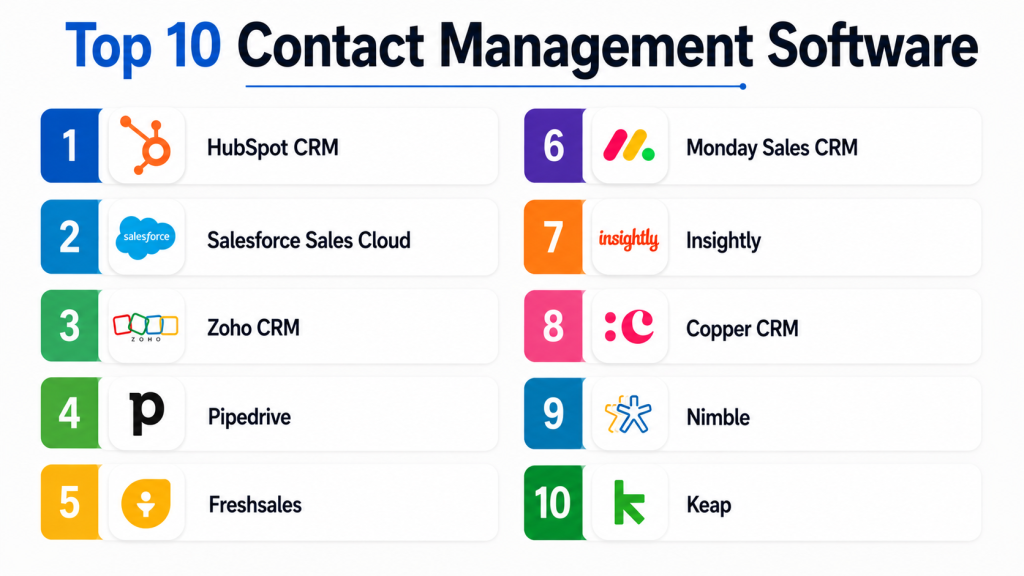
Top 10 Contact Management Software
1- HubSpot CRM
Short description:
HubSpot CRM is one of the most widely adopted contact management platforms for SMBs and growing businesses. The platform combines contact management, pipeline tracking, marketing automation, customer communication, and analytics into a unified environment. HubSpot is known for its user-friendly interface and scalable ecosystem. Businesses often adopt it because of its strong free plan and extensive integration marketplace. It is particularly attractive for marketing and sales alignment.
Key Features
- Contact and lead management
- Email tracking and automation
- Sales pipeline visibility
- Marketing automation tools
- AI-powered sales assistance
- Reporting dashboards
- Large integration marketplace
Pros
- Excellent ease of use
- Strong free plan availability
- Large ecosystem and integrations
Cons
- Costs can increase significantly with scaling
- Advanced automation requires premium plans
- Enterprise customization may become complex
Platforms / Deployment
- Web / iOS / Android
- Cloud
Security & Compliance
- MFA
- SSO
- RBAC
- Audit logging
- GDPR support
Integrations & Ecosystem
HubSpot supports a broad integration ecosystem for sales, marketing, and support operations.
- Gmail
- Outlook
- Slack
- Zoom
- Shopify
- Salesforce integrations
Support & Community
Large global user community with strong onboarding resources, certifications, and extensive documentation.
2- Salesforce Sales Cloud
Short description:
Salesforce Sales Cloud is an enterprise-grade CRM and contact management platform designed for organizations requiring scalability, workflow customization, analytics, and deep ecosystem integrations. It supports complex sales operations, automation, and customer engagement management. Salesforce remains one of the most dominant platforms in enterprise relationship management and offers extensive customization capabilities for large organizations.
Key Features
- Enterprise contact management
- Workflow automation
- AI-powered sales forecasting
- Opportunity and pipeline tracking
- Advanced reporting and analytics
- AppExchange ecosystem
- Multi-team collaboration tools
Pros
- Extremely scalable platform
- Strong enterprise customization
- Massive integration ecosystem
Cons
- Steeper learning curve
- Expensive enterprise licensing
- Complex administration for smaller teams
Platforms / Deployment
- Web / iOS / Android
- Cloud
Security & Compliance
- SSO
- MFA
- Encryption
- Audit logs
- GDPR support
- Role-based permissions
Integrations & Ecosystem
Salesforce offers one of the largest enterprise integration ecosystems available.
- Slack
- Microsoft 365
- Google Workspace
- Tableau
- Marketing automation tools
- ERP systems
Support & Community
Extensive enterprise support, partner ecosystem, training resources, and global user community.
3- Zoho CRM
Short description:
Zoho CRM provides affordable and scalable contact management functionality for SMBs and growing businesses. The platform includes lead tracking, workflow automation, analytics, communication tools, and AI-powered insights. Zoho is popular among organizations seeking value-focused CRM functionality with broad integration support. The ecosystem also includes finance, HR, helpdesk, and productivity applications.
Key Features
- Contact and lead management
- Workflow automation
- AI assistant capabilities
- Email marketing integration
- Multi-channel communication
- Reporting dashboards
- Mobile CRM functionality
Pros
- Affordable pricing structure
- Broad business application ecosystem
- Strong SMB usability
Cons
- UI can feel inconsistent
- Advanced customization requires setup effort
- Enterprise reporting less polished than larger competitors
Platforms / Deployment
- Web / iOS / Android
- Cloud
Security & Compliance
- MFA
- Encryption
- Access controls
- GDPR support
Integrations & Ecosystem
Zoho integrates across productivity, finance, marketing, and communication systems.
- Google Workspace
- Microsoft 365
- Slack
- QuickBooks
- Mailchimp
- Zoho ecosystem apps
Support & Community
Strong SMB support resources with large online documentation and implementation guidance.
4- Pipedrive
Short description:
Pipedrive is a sales-focused contact management platform designed for simplicity and pipeline visibility. It is especially popular among small sales teams and startups looking for a highly visual workflow experience. Pipedrive emphasizes usability, automation, and sales activity tracking while avoiding excessive enterprise complexity.
Key Features
- Visual sales pipelines
- Contact and lead management
- Email synchronization
- Workflow automation
- Sales forecasting
- Activity reminders
- Mobile accessibility
Pros
- Very easy to use
- Excellent sales pipeline visualization
- Fast onboarding process
Cons
- Limited enterprise governance features
- Advanced reporting less extensive
- Marketing automation capabilities are lighter
Platforms / Deployment
- Web / iOS / Android
- Cloud
Security & Compliance
- MFA
- Access permissions
- Encryption
- GDPR support
Integrations & Ecosystem
Pipedrive supports integrations focused on sales productivity and communication.
- Gmail
- Outlook
- Slack
- Trello
- Zoom
- QuickBooks
Support & Community
Strong SMB-focused support with practical onboarding and simple learning resources.
5- Freshsales
Short description:
Freshsales by Freshworks combines contact management, communication tracking, automation, and AI-assisted sales tools into a modern interface. It is designed primarily for SMBs and mid-market organizations seeking a balance between affordability and advanced CRM functionality. The platform includes integrated calling, email management, and pipeline tracking capabilities.
Key Features
- Contact and account management
- AI-powered lead scoring
- Built-in communication tools
- Workflow automation
- Sales pipeline tracking
- Reporting dashboards
- Integrated email and phone support
Pros
- Modern and clean interface
- Good value for growing businesses
- Integrated communication features
Cons
- Enterprise customization more limited
- Advanced analytics may require upgrades
- Smaller ecosystem than Salesforce
Platforms / Deployment
- Web / iOS / Android
- Cloud
Security & Compliance
- MFA
- Encryption
- Role-based permissions
- GDPR support
Integrations & Ecosystem
Freshsales integrates across customer communication and support environments.
- Gmail
- Outlook
- Slack
- Freshdesk
- Zapier
- Mailchimp
Support & Community
Good SMB and mid-market support with expanding implementation resources.
6- Monday Sales CRM
Short description:
Monday Sales CRM is built on the Monday.com work management platform and combines contact management with workflow collaboration and sales tracking. The platform is visually driven and highly customizable. Teams often choose Monday Sales CRM because of its flexibility and cross-functional collaboration capabilities.
Key Features
- Contact and lead management
- Workflow customization
- Sales activity tracking
- Team collaboration tools
- Dashboard reporting
- Automation workflows
- Visual project-style interface
Pros
- Highly customizable workflows
- Strong collaboration features
- Easy visual management
Cons
- CRM depth lighter than enterprise-focused platforms
- Large-scale reporting may feel limited
- Customization can become overwhelming
Platforms / Deployment
- Web / iOS / Android
- Cloud
Security & Compliance
- MFA
- SSO
- Audit logs
- Access controls
- GDPR support
Integrations & Ecosystem
Monday Sales CRM supports broad business productivity integrations.
- Slack
- Microsoft Teams
- Zoom
- Google Workspace
- Dropbox
- Jira
Support & Community
Strong onboarding resources and growing business productivity community.
7- Insightly
Short description:
Insightly combines contact management, CRM functionality, project tracking, and workflow automation for SMB and mid-market organizations. It is especially attractive for service-oriented businesses needing both relationship tracking and operational project visibility.
Key Features
- Contact and relationship management
- Workflow automation
- Project management integration
- Lead routing
- Reporting and dashboards
- Email tracking
- Mobile CRM tools
Pros
- Strong project and CRM combination
- Good SMB scalability
- Clean workflow management
Cons
- Advanced reporting less extensive
- Enterprise customization limited
- Smaller ecosystem than top competitors
Platforms / Deployment
- Web / iOS / Android
- Cloud
Security & Compliance
- MFA
- Encryption
- Access controls
- GDPR support
Integrations & Ecosystem
Insightly integrates with productivity and customer management systems.
- Gmail
- Outlook
- Slack
- Mailchimp
- QuickBooks
- Zapier
Support & Community
Reliable SMB support with practical implementation documentation.
8- Copper CRM
Short description:
Copper CRM is designed specifically for Google Workspace users and focuses on seamless Gmail integration and simplified contact management workflows. It is especially popular among startups, agencies, and SMBs operating within the Google ecosystem. Copper emphasizes usability and relationship visibility directly inside Gmail.
Key Features
- Native Gmail integration
- Contact relationship tracking
- Workflow automation
- Sales pipeline management
- Activity reminders
- Google Workspace synchronization
- Reporting dashboards
Pros
- Excellent Google Workspace integration
- Simple and intuitive experience
- Fast setup process
Cons
- Limited outside Google ecosystem
- Enterprise customization less advanced
- Smaller integration marketplace
Platforms / Deployment
- Web / iOS / Android
- Cloud
Security & Compliance
- MFA
- Encryption
- Access controls
- GDPR support
Integrations & Ecosystem
Copper focuses heavily on Google-centric workflows and collaboration.
- Gmail
- Google Calendar
- Google Drive
- Slack
- Mailchimp
- Zapier
Support & Community
Strong onboarding experience for Google Workspace-focused businesses.
9- Nimble
Short description:
Nimble is a relationship-focused contact management platform emphasizing social engagement, contact enrichment, and communication tracking. It is especially useful for consultants, agencies, small sales teams, and networking-focused businesses. Nimble provides streamlined relationship visibility across communication channels.
Key Features
- Social contact enrichment
- Relationship tracking
- Communication history management
- Email tracking
- Workflow reminders
- Pipeline management
- Contact segmentation
Pros
- Strong relationship-focused design
- Easy social contact enrichment
- Lightweight and easy to use
Cons
- Less enterprise scalability
- Limited advanced automation
- Reporting functionality more basic
Platforms / Deployment
- Web / iOS / Android
- Cloud
Security & Compliance
- MFA
- Encryption
- Access controls
Integrations & Ecosystem
Nimble integrates with communication and productivity tools.
- Microsoft 365
- Google Workspace
- Mailchimp
- Zapier
- Social media platforms
Support & Community
Good SMB support and simple onboarding process for smaller teams.
10- Keap
Short description:
Keap combines contact management, CRM functionality, sales automation, and marketing automation into a unified SMB-focused platform. It is widely used by entrepreneurs, service businesses, and small agencies looking to automate customer communication and follow-up processes.
Key Features
- Contact and client management
- Marketing automation
- Appointment scheduling
- Email campaigns
- Workflow automation
- Payment integrations
- Sales pipeline tracking
Pros
- Strong automation capabilities
- Good small business fit
- Unified sales and marketing workflows
Cons
- Learning curve for automation setup
- Pricing may increase with scaling
- Enterprise functionality more limited
Platforms / Deployment
- Web / iOS / Android
- Cloud
Security & Compliance
- MFA
- Encryption
- Access permissions
- GDPR support
Integrations & Ecosystem
Keap integrates with sales, scheduling, and communication environments.
- Gmail
- Outlook
- QuickBooks
- Zapier
- Stripe
- Calendly
Support & Community
Strong SMB training resources and onboarding support for automation-focused workflows.
Comparison Table
| Tool Name | Best For | Platform(s) Supported | Deployment | Standout Feature | Public Rating |
|---|---|---|---|---|---|
| HubSpot CRM | SMBs and startups | Web / iOS / Android | Cloud | Free CRM ecosystem | N/A |
| Salesforce Sales Cloud | Enterprises | Web / iOS / Android | Cloud | Enterprise scalability | N/A |
| Zoho CRM | Budget-conscious SMBs | Web / iOS / Android | Cloud | Broad business ecosystem | N/A |
| Pipedrive | Sales-focused SMBs | Web / iOS / Android | Cloud | Visual sales pipelines | N/A |
| Freshsales | Growing businesses | Web / iOS / Android | Cloud | Integrated communication tools | N/A |
| Monday Sales CRM | Collaborative teams | Web / iOS / Android | Cloud | Workflow customization | N/A |
| Insightly | Service businesses | Web / iOS / Android | Cloud | CRM plus project management | N/A |
| Copper CRM | Google Workspace users | Web / iOS / Android | Cloud | Native Gmail integration | N/A |
| Nimble | Relationship-focused teams | Web / iOS / Android | Cloud | Social contact enrichment | N/A |
| Keap | Entrepreneurs and SMBs | Web / iOS / Android | Cloud | Sales and marketing automation | N/A |
Evaluation & Scoring of Contact Management Software
| Tool Name | Core 25% | Ease 15% | Integrations 15% | Security 10% | Performance 10% | Support 10% | Value 15% | Weighted Total |
| HubSpot CRM | 9.0 | 9.0 | 9.0 | 8.5 | 9.0 | 9.0 | 8.0 | 8.8 |
| Salesforce Sales Cloud | 9.5 | 7.0 | 10.0 | 9.5 | 9.5 | 9.0 | 6.5 | 8.7 |
| Zoho CRM | 8.5 | 8.0 | 8.5 | 8.0 | 8.0 | 8.0 | 9.0 | 8.3 |
| Pipedrive | 8.0 | 9.0 | 8.0 | 8.0 | 8.5 | 8.0 | 8.5 | 8.3 |
| Freshsales | 8.0 | 8.5 | 8.0 | 8.0 | 8.0 | 8.0 | 8.5 | 8.1 |
| Monday Sales CRM | 8.0 | 8.5 | 8.5 | 8.0 | 8.0 | 8.0 | 8.0 | 8.1 |
| Insightly | 7.5 | 8.0 | 7.5 | 7.5 | 8.0 | 7.5 | 8.5 | 7.8 |
| Copper CRM | 7.5 | 8.5 | 7.5 | 7.5 | 8.0 | 7.5 | 8.0 | 7.8 |
| Nimble | 7.0 | 8.5 | 7.0 | 7.0 | 7.5 | 7.5 | 8.5 | 7.5 |
| Keap | 8.0 | 7.5 | 8.0 | 8.0 | 8.0 | 8.0 | 8.0 | 7.9 |
These scores are comparative and designed to help buyers evaluate platforms based on organizational priorities. Enterprise-focused platforms generally score higher in scalability and governance, while SMB-focused tools often provide better usability and pricing value. Businesses should validate integrations, automation requirements, and scalability before finalizing a platform.
Which Contact Management Software Is Right for You?
Solo / Freelancer
Freelancers and consultants often benefit from lightweight and easy-to-manage platforms such as Nimble, Copper CRM, or Keap. These tools simplify relationship management without excessive complexity.
SMB
Small and mid-sized businesses should prioritize usability, automation, and affordability. HubSpot CRM, Zoho CRM, Freshsales, and Pipedrive are strong choices for growing customer-facing teams.
Mid-Market
Mid-market organizations typically require stronger workflow automation, collaboration tools, and reporting. Monday Sales CRM and Insightly offer balanced operational management and scalability.
Enterprise
Large enterprises requiring advanced customization, governance, analytics, and scalability should evaluate Salesforce Sales Cloud or enterprise HubSpot deployments.
Budget vs Premium
Budget-conscious teams may prefer Zoho CRM or Pipedrive because of their strong value proposition. Premium enterprise platforms justify higher pricing through deeper customization and larger ecosystems.
Feature Depth vs Ease of Use
Organizations prioritizing simplicity should consider HubSpot CRM or Pipedrive. Businesses requiring extensive customization and advanced analytics may prefer Salesforce.
Integrations & Scalability
Microsoft-centric organizations may prioritize Salesforce or HubSpot integrations, while Google Workspace-focused teams often prefer Copper CRM.
Security & Compliance Needs
Organizations handling sensitive customer data should prioritize platforms offering RBAC, MFA, encryption, audit logging, and governance capabilities.
Frequently Asked Questions
1. What is contact management software?
Contact management software is a platform that helps businesses organize, track, and manage customer and business relationship information. Modern platforms often include automation, communication tracking, analytics, and workflow management capabilities.
2. How is contact management different from CRM software?
Contact management software focuses mainly on storing and organizing relationship information, while CRM platforms often include sales forecasting, marketing automation, customer service tools, and advanced analytics.
3. Why do businesses need contact management software?
Businesses use these tools to centralize customer information, improve communication, streamline sales processes, automate follow-ups, and maintain visibility across customer relationships and opportunities.
4. Which industries benefit most from contact management tools?
Sales organizations, agencies, recruiters, real estate firms, consulting businesses, healthcare providers, financial services firms, and customer-focused businesses benefit heavily from contact management software.
5. Are cloud-based contact management platforms secure?
Most modern platforms implement encryption, MFA, access controls, and audit logging. Organizations should still review compliance capabilities and data governance controls before deployment.
6. Can contact management software integrate with email platforms?
Yes. Most leading platforms integrate with Gmail, Outlook, Microsoft 365, and Google Workspace to synchronize contacts, conversations, meetings, and communication history.
7. What are common implementation mistakes?
Organizations often underestimate data cleanup requirements, user training needs, workflow planning, and integration complexity. Poor onboarding processes can reduce adoption rates significantly.
8. Is free contact management software good enough?
Free plans can work well for startups and very small teams. However, growing businesses often require automation, reporting, governance, and integration capabilities available only in paid tiers.
9. How important are mobile applications?
Mobile accessibility is critical for sales teams, remote workers, and field staff. Strong mobile support improves responsiveness, customer engagement, and operational flexibility.
10. How should businesses evaluate pricing?
Organizations should review licensing models, user limits, storage costs, automation restrictions, integration pricing, and long-term scalability expenses before making a final decision.
Conclusion
Contact management software has evolved far beyond traditional digital address books and now serves as a foundational business platform for relationship management, communication tracking, automation, and customer engagement. Modern businesses require scalable, secure, and integration-friendly systems capable of supporting sales operations, marketing workflows, customer communication, and long-term relationship visibility. Platforms such as Salesforce and HubSpot dominate enterprise and growth-focused environments, while Zoho CRM, Pipedrive, Freshsales, and Copper CRM provide strong value for SMBs and modern remote teams. The best platform ultimately depends on business size, operational complexity, integration requirements, workflow preferences, and long-term scalability goals. Before making a final investment decision, businesses should shortlist two or three platforms, validate integration compatibility, test automation workflows, review mobile usability, and run pilot implementations to ensure the software aligns with operational and growth requirements.
