Introduction
Function-as-a-Service, also known as FaaS, is a cloud computing model that allows developers to run small pieces of code as functions without managing servers, virtual machines, operating systems, or runtime infrastructure. Instead of keeping applications running all the time, FaaS platforms execute code only when a specific event happens, such as an API request, file upload, database update, queue message, scheduled job, or user action.
FaaS matters because modern applications are becoming more event-driven, automated, API-first, and globally distributed. Businesses use FaaS to build scalable backend services, automate workflows, process data in real time, connect cloud applications, and reduce infrastructure management. It helps teams move faster because developers can focus on business logic instead of server maintenance, patching, scaling, or provisioning.
Real-world use cases include:
- API backends: Build lightweight REST APIs, GraphQL endpoints, webhook handlers, and microservice functions.
- Event automation: Trigger functions when files are uploaded, queues receive messages, databases change, or SaaS events occur.
- Data processing: Resize images, process documents, transform files, run ETL jobs, and handle streaming data.
- AI workflow automation: Trigger AI models, summarize content, classify documents, enrich customer data, or automate decisions.
- Scheduled tasks: Replace traditional cron jobs with managed scheduled functions for reports, cleanup, notifications, and alerts.
What buyers should evaluate:
- Runtime support: Programming languages, custom runtimes, and container support.
- Cold start performance: How quickly functions respond after inactivity.
- Pricing model: Invocation cost, execution time, memory usage, and hidden service costs.
- Observability: Logs, metrics, traces, alerts, and debugging tools.
- Security controls: IAM, RBAC, secrets management, encryption, audit logs, and private networking.
- Integration ecosystem: Databases, queues, object storage, API gateways, CI/CD, and monitoring tools.
- Deployment workflow: CLI tools, Git workflows, infrastructure-as-code support, and rollback options.
- Scalability limits: Concurrency, timeout limits, regional availability, and quota controls.
- Vendor lock-in risk: Portability across clouds, runtimes, and deployment models.
- Support and documentation: Enterprise support, onboarding material, community examples, and learning resources.
Best for: FaaS platforms are best for developers, DevOps engineers, cloud architects, SaaS teams, startups, SMBs, and enterprises that want to build event-driven applications, APIs, automation workflows, and scalable backend services without managing servers.
Not ideal for: FaaS is not ideal for long-running workloads, applications requiring persistent local state, highly customized server environments, complex monoliths, or workloads where ultra-low latency and full infrastructure control are mandatory. In those cases, containers, Kubernetes, virtual machines, or dedicated services may be a better fit.
Key Trends in Function-as-a-Service FaaS Platforms
- Event-driven application design is becoming standard: More teams are building applications around events from storage, databases, queues, IoT devices, SaaS platforms, and user actions.
- AI workflows are increasing FaaS adoption: Functions are now used to trigger AI inference, document summarization, content classification, recommendation workflows, and automated customer support tasks.
- Edge functions are becoming more important: Businesses want faster global user experiences, so FaaS platforms that run logic closer to users are gaining attention.
- Container-based functions are expanding: Developers want more runtime flexibility, so platforms that support container images or custom runtimes are becoming more practical.
- Security and compliance expectations are rising: Buyers now expect stronger identity controls, secrets management, audit logs, encryption, network isolation, and governance features.
- Hybrid and multi-cloud strategies are growing: Enterprises want to avoid being locked into one provider, so open-source and Kubernetes-based FaaS options are becoming more relevant.
- Observability is no longer optional: Teams need logs, metrics, tracing, alerts, error tracking, and cost monitoring to manage distributed serverless applications.
- Cost governance is becoming a priority: FaaS can reduce idle infrastructure cost, but high-volume functions can become expensive without usage alerts and architecture planning.
- Developer experience is a major differentiator: Better local testing, faster deployments, preview environments, Git-based workflows, and simple CLI tools are now important selection factors.
- Serverless and Kubernetes are converging: Many teams use FaaS for event-driven tasks while keeping Kubernetes for long-running services, internal platforms, and complex workloads.
How We Selected These Tools Methodology
The tools in this list were selected based on practical buyer value, market recognition, ecosystem maturity, and suitability for modern FaaS workloads. The goal is to provide a balanced list for startups, SMBs, enterprise teams, developers, platform engineers, and cloud-native organizations.
- Market adoption and mindshare: Platforms with strong usage among developers, enterprises, cloud teams, and product teams were prioritized.
- Core FaaS capabilities: Trigger types, runtime support, auto-scaling, execution model, deployment options, and event handling were evaluated.
- Reliability and performance: Platforms with mature cloud infrastructure, regional or edge availability, and production-ready execution models were favored.
- Security posture: Identity management, access controls, secrets handling, logging, encryption, and governance features were considered.
- Integrations and ecosystem: Strong connectivity with databases, queues, APIs, object storage, CI/CD tools, observability platforms, and cloud services was important.
- Customer fit: The list includes enterprise cloud platforms, web-focused platforms, edge platforms, and open-source options.
- Deployment flexibility: Cloud-native, edge, self-hosted, hybrid, and Kubernetes-friendly options were included.
- Practical usability: Tools were evaluated for documentation, developer experience, onboarding simplicity, and real-world implementation value.
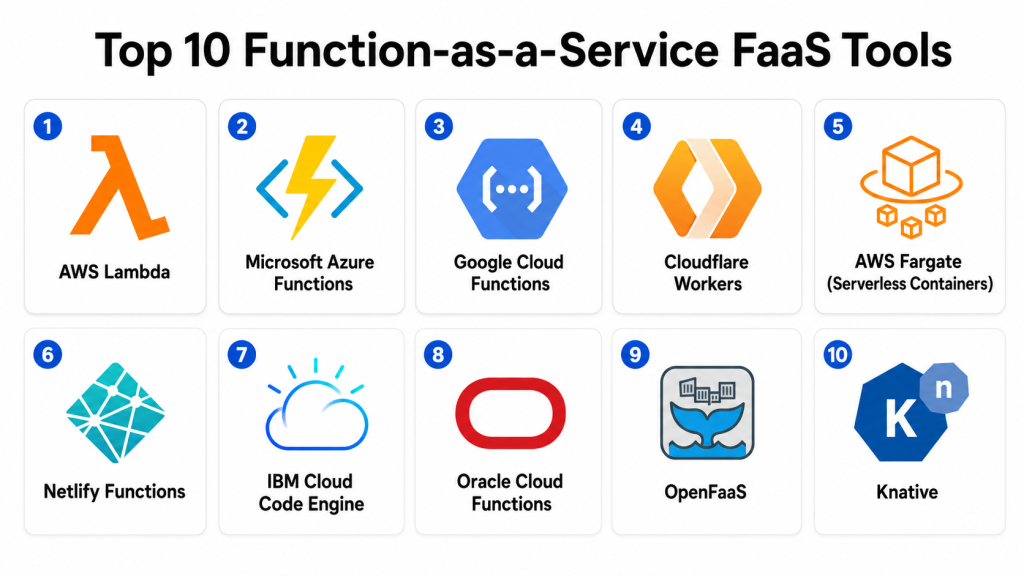
Top 10 Function-as-a-Service FaaS Tools
1- AWS Lambda
Short description:
AWS Lambda is one of the most widely used FaaS platforms for running event-driven code inside the AWS ecosystem. It allows teams to execute functions in response to events from services such as API gateways, object storage, databases, queues, and event buses. AWS Lambda is suitable for APIs, backend automation, file processing, stream processing, scheduled jobs, and microservice components. It is popular with startups, SaaS teams, enterprises, and cloud-native engineering teams that already use AWS. The platform provides automatic scaling and deep integration with AWS services. It is especially useful when a business wants serverless compute closely connected with the rest of its AWS architecture.
Key Features
- Event-driven execution from AWS services
- Support for multiple programming languages and custom runtimes
- Automatic scaling based on workload demand
- API backend support through API gateway integrations
- Container image support for flexible packaging
- Built-in logging and monitoring through AWS observability services
- Fine-grained access control through AWS identity and permission systems
Pros
- Strong integration with the AWS ecosystem.
- Mature scalability for production-grade workloads.
- Flexible runtime and packaging options.
Cons
- Can create vendor lock-in for AWS-heavy architectures.
- Debugging distributed serverless systems may be complex.
- Cost requires monitoring for high-frequency workloads.
Platforms / Deployment
Cloud / AWS-native / Serverless
Security & Compliance
AWS Lambda supports identity-based access controls, permissions management, encryption options through AWS services, logging, monitoring, and private networking patterns. Specific compliance alignment depends on the broader AWS account setup, workload design, region, and customer configuration.
Integrations & Ecosystem
AWS Lambda has one of the deepest serverless ecosystems because it connects with many AWS services and developer tools. It is commonly used as the compute layer for APIs, automation workflows, backend jobs, and data processing pipelines.
- API gateway services
- Object storage services
- NoSQL and relational databases
- Message queues and notification services
- Event bus services
- Logging and monitoring tools
- CI/CD and infrastructure-as-code tools
Support & Community
AWS Lambda has extensive documentation, strong community adoption, many tutorials, official support options, and a mature ecosystem of frameworks, examples, and third-party tooling.
2- Microsoft Azure Functions
Short description:
Microsoft Azure Functions is a serverless compute platform for building event-driven applications within the Azure ecosystem. It supports HTTP triggers, timer-based functions, queue triggers, storage events, database events, and enterprise integration workflows. Azure Functions is especially useful for organizations already using Microsoft Azure, Microsoft identity services, .NET, Visual Studio, GitHub, or Azure DevOps. It supports APIs, background jobs, automation workflows, data processing, and stateful serverless processes through durable workflow capabilities. Enterprises often choose Azure Functions because it fits naturally into Microsoft-centered cloud environments. It is a strong option for teams that want managed compute with enterprise-friendly controls.
Key Features
- HTTP, queue, timer, storage, and event-based triggers
- Support for multiple programming languages
- Durable Functions for stateful workflows
- Integration with Azure monitoring and logging tools
- Local development support through Microsoft tooling
- Flexible hosting plans for different workload patterns
- Strong fit for enterprise application integration
Pros
- Excellent fit for Microsoft and Azure-centered organizations.
- Durable workflow support helps with complex processes.
- Good developer experience for .NET and Visual Studio users.
Cons
- Best value is usually achieved inside the Azure ecosystem.
- Hosting plan choices can be confusing for new users.
- Performance and cost depend on configuration and workload type.
Platforms / Deployment
Cloud / Azure-native / Serverless / Hybrid options through Azure ecosystem
Security & Compliance
Azure Functions can use Azure identity services, managed identities, role-based access control, encryption options, private networking patterns, and audit-friendly logging. Specific compliance suitability depends on Azure configuration, selected services, and customer governance requirements.
Integrations & Ecosystem
Azure Functions integrates strongly with Microsoft cloud services, developer tools, enterprise systems, and automation workflows. It is commonly used for APIs, background jobs, event processing, and business application integrations.
- Azure storage services
- Azure messaging services
- Azure database services
- Azure monitoring tools
- GitHub Actions
- Azure DevOps
- Microsoft identity services
Support & Community
Azure Functions has strong official documentation, Microsoft learning resources, enterprise support options, active developer discussions, and broad adoption among Microsoft cloud users.
3- Google Cloud Functions
Short description:
Google Cloud Functions is a managed FaaS platform for running event-driven code inside Google Cloud. It is commonly used for lightweight APIs, automation tasks, cloud service triggers, data workflows, and backend event processing. The platform works well with Google Cloud storage, messaging, database, logging, and build services. It is useful for teams already using Google Cloud for applications, analytics, data engineering, AI services, or cloud-native development. Google Cloud Functions offers a relatively simple serverless model with automatic scaling and managed infrastructure. It is a practical choice for businesses that want event-driven compute inside the Google Cloud ecosystem.
Key Features
- HTTP-triggered functions for APIs and webhooks
- Event-driven execution from Google Cloud services
- Messaging-based workflows through event triggers
- Automatic scaling and managed infrastructure
- Support for common programming languages
- Logging and monitoring through Google Cloud tools
- Deployment through Google Cloud CLI and build services
Pros
- Strong fit for Google Cloud-native applications.
- Simple model for APIs and event automation.
- Good connection with data, messaging, and storage services.
Cons
- Less attractive for teams not using Google Cloud.
- Complex architectures may require additional Google Cloud services.
- Enterprise governance depends on broader cloud configuration.
Platforms / Deployment
Cloud / Google Cloud-native / Serverless
Security & Compliance
Google Cloud Functions can use Google Cloud IAM, service accounts, encryption through Google Cloud services, audit logging, and network controls. Compliance suitability depends on the customer’s Google Cloud setup, policies, regions, and workload design.
Integrations & Ecosystem
Google Cloud Functions integrates with Google Cloud’s data, storage, messaging, build, and monitoring services. It is often used for automation, APIs, event handlers, and data processing.
- Cloud storage services
- Messaging and event services
- Database services
- Logging and monitoring tools
- API management services
- Cloud build workflows
- Data and AI services
Support & Community
Google Cloud Functions has official documentation, cloud support options, tutorials, examples, and a growing developer ecosystem around Google Cloud serverless applications.
4- Cloudflare Workers
Short description:
Cloudflare Workers is an edge-focused serverless platform that runs application logic across Cloudflare’s global network. It is designed for low-latency execution close to users, making it useful for globally distributed applications. Developers use Cloudflare Workers for API routing, redirects, authentication checks, personalization, A/B testing, lightweight APIs, webhooks, and edge security logic. It works well with Cloudflare’s storage, queue, object, and edge application services. Unlike many regional FaaS platforms, Cloudflare Workers focuses strongly on edge performance and web-native workloads. It is especially useful for teams building fast user-facing applications, global APIs, and edge-first architectures.
Key Features
- Edge-based serverless execution
- Global deployment across Cloudflare’s network
- Strong fit for web, API, and routing logic
- Support for modern JavaScript-oriented development
- Integration with Cloudflare storage and queue services
- Low-latency execution for global users
- Developer-friendly deployment workflow
Pros
- Strong choice for latency-sensitive edge workloads.
- Excellent fit for modern web applications and APIs.
- Global execution model supports distributed applications.
Cons
- Runtime model may differ from traditional server environments.
- Not ideal for heavy backend compute workloads.
- Best value often comes with broader Cloudflare adoption.
Platforms / Deployment
Cloud / Edge / Cloudflare network
Security & Compliance
Cloudflare Workers benefits from Cloudflare account security, traffic protection, encryption, access controls, and edge security features. Specific compliance needs should be validated based on plan, architecture, and customer requirements.
Integrations & Ecosystem
Cloudflare Workers integrates with Cloudflare’s developer platform and web performance ecosystem. It is useful for building globally distributed application logic, edge APIs, and web automation.
- Edge storage services
- Object storage services
- Queue services
- Web application platforms
- API routing workflows
- CI/CD tools
- Modern web frameworks
Support & Community
Cloudflare Workers has strong documentation, growing developer adoption, community examples, and support options that vary by plan.
5- Vercel Functions
Short description:
Vercel Functions is a serverless function platform built around modern frontend and full-stack web development. It is especially popular with teams building applications using Next.js and similar web frameworks. Vercel Functions allows developers to deploy backend logic, API routes, server-side rendering logic, webhook handlers, and authentication workflows alongside frontend applications. It is useful for SaaS products, marketing applications, content platforms, internal tools, and modern web apps. The platform is known for fast Git-based deployment, preview environments, and a smooth developer workflow. It is a strong choice for frontend-led teams that want backend capabilities without managing infrastructure.
Key Features
- Serverless functions integrated with frontend deployments
- Strong support for modern web frameworks
- Git-based deployment and preview environments
- API route support for full-stack applications
- Edge and serverless execution options
- Environment variable management
- Deployment logs and visibility
Pros
- Excellent developer experience for modern web teams.
- Strong fit for frontend-led full-stack applications.
- Fast deployment workflow with preview environments.
Cons
- Less suitable for complex backend infrastructure workloads.
- Best fit is web application development.
- High-volume usage requires careful cost and limit review.
Platforms / Deployment
Cloud / Serverless / Edge options / Web-focused deployment
Security & Compliance
Vercel provides team permissions, environment variable management, HTTPS, access controls, and account-level security features. Specific compliance requirements should be checked based on the selected plan and customer needs.
Integrations & Ecosystem
Vercel Functions integrates well with frontend frameworks, Git platforms, headless CMS tools, authentication providers, databases, and observability services. It is commonly used for fast-moving web product teams.
- Modern frontend frameworks
- Git-based source control platforms
- Headless CMS platforms
- Authentication providers
- Serverless databases
- Monitoring tools
- API services
Support & Community
Vercel has strong documentation, a large frontend developer community, many examples, framework-focused learning resources, and support options that vary by plan.
6- Netlify Functions
Short description:
Netlify Functions provides serverless backend capabilities for Jamstack, static-site, and modern frontend applications. It allows developers to add lightweight APIs, form handlers, webhook endpoints, scheduled jobs, and third-party service integrations without managing backend servers. Netlify Functions is useful for marketing websites, SaaS frontends, documentation portals, e-commerce experiences, and content-driven applications. It fits teams that want a simple connection between frontend deployment and backend logic. The platform is especially appealing for small teams, agencies, and web developers who want serverless features with minimal setup. It is best for lightweight backend tasks rather than complex enterprise compute workloads.
Key Features
- Serverless functions integrated with Netlify deployments
- HTTP-based functions for APIs and webhooks
- Scheduled function support
- Git-based deployment workflow
- Environment variable management
- Strong fit for Jamstack applications
- Integration with Netlify build and hosting pipeline
Pros
- Simple onboarding for frontend and web teams.
- Good fit for lightweight APIs and automation.
- Smooth deployment workflow for static and Jamstack sites.
Cons
- Not designed for complex enterprise backend systems.
- Smaller ecosystem compared with large cloud providers.
- Advanced scaling may require external services.
Platforms / Deployment
Cloud / Serverless / Web-focused deployment
Security & Compliance
Netlify provides team access controls, HTTPS, environment variable management, and account-level security features. Specific compliance details vary by plan and should be validated for enterprise requirements.
Integrations & Ecosystem
Netlify Functions integrates with modern web development tools, source control platforms, content systems, form workflows, payment providers, and external APIs.
- Git-based source control platforms
- Headless CMS platforms
- Form workflows
- Payment services
- Authentication tools
- External APIs
- Build and deployment pipelines
Support & Community
Netlify has useful documentation, community examples, developer tutorials, and support options that depend on the plan and customer needs.
7- IBM Cloud Code Engine
Short description:
IBM Cloud Code Engine is a managed serverless platform that supports applications, jobs, and container-based workloads. While it is broader than a traditional FaaS platform, it supports many serverless and function-style use cases by allowing teams to run code without managing Kubernetes or infrastructure directly. It is suitable for APIs, event-driven jobs, background processing, automation, and containerized workloads. IBM Cloud Code Engine is especially relevant for organizations already using IBM Cloud or working in enterprise environments where governance and managed cloud controls matter. It gives teams packaging flexibility through containers while still offering serverless execution benefits. It is a practical option for IBM Cloud-aligned teams.
Key Features
- Serverless execution for apps, jobs, and container workloads
- Container-based deployment support
- Automatic scaling based on workload demand
- Integration with IBM Cloud services
- Support for APIs, background jobs, and automation
- Managed infrastructure without direct Kubernetes operations
- Enterprise-oriented cloud environment
Pros
- Good fit for containerized serverless workloads.
- Useful for organizations already using IBM Cloud.
- More flexible than simple function-only platforms.
Cons
- Smaller ecosystem than AWS, Azure, or Google Cloud.
- Less familiar to many general developers.
- Best fit is IBM Cloud-aligned environments.
Platforms / Deployment
Cloud / IBM Cloud / Serverless container platform
Security & Compliance
IBM Cloud Code Engine can use IBM Cloud identity and access management, encryption options, private connectivity patterns, logging, and cloud security controls. Specific compliance suitability depends on configuration and customer requirements.
Integrations & Ecosystem
IBM Cloud Code Engine integrates with IBM Cloud services, container registries, CI/CD workflows, event-driven jobs, and cloud-native application patterns.
- IBM Cloud services
- Container registries
- Cloud identity services
- Monitoring tools
- CI/CD pipelines
- Event-driven workloads
- API workloads
Support & Community
IBM provides official documentation, enterprise support options, professional services, and cloud guidance. Community adoption is more focused compared with broader hyperscale platforms.
8- Oracle Cloud Functions
Short description:
Oracle Cloud Functions is Oracle Cloud Infrastructure’s managed serverless functions platform. It helps teams run event-driven code for automation, APIs, backend processing, and integrations inside Oracle Cloud. The platform is especially relevant for enterprises that already use Oracle Cloud Infrastructure, Oracle databases, or Oracle business applications. Oracle Cloud Functions can support modernization projects by adding serverless automation around existing enterprise systems. It is useful for organizations that want managed function execution close to Oracle data and application environments. It is best evaluated by teams already committed to OCI or planning Oracle-centered cloud transformation.
Key Features
- Serverless function execution on Oracle Cloud Infrastructure
- Event-driven workload support
- Integration with OCI services
- Useful for automation and backend services
- Managed scaling and infrastructure abstraction
- Suitable for Oracle-centered enterprise environments
- Support for cloud-native deployment workflows
Pros
- Strong fit for Oracle Cloud users.
- Useful for extending Oracle workloads with automation.
- Practical for enterprise cloud modernization.
Cons
- Less broadly adopted than major hyperscale FaaS platforms.
- Best suited for OCI-aligned organizations.
- Ecosystem depth may vary by use case.
Platforms / Deployment
Cloud / Oracle Cloud Infrastructure / Serverless
Security & Compliance
Oracle Cloud Functions can use OCI identity and access controls, encryption capabilities, logging, monitoring, and network controls. Compliance suitability depends on OCI configuration, selected services, and customer governance requirements.
Integrations & Ecosystem
Oracle Cloud Functions integrates with OCI services and enterprise cloud workflows. It is commonly relevant for companies already invested in Oracle databases, Oracle applications, and Oracle Cloud Infrastructure.
- OCI services
- Oracle databases
- OCI identity services
- Event services
- Logging and monitoring tools
- CI/CD workflows
- Enterprise application workflows
Support & Community
Oracle provides documentation, enterprise support, professional services, and cloud architecture guidance. Community strength is more enterprise-focused than developer-first platforms.
9- OpenFaaS
Short description:
OpenFaaS is an open-source framework for building and running serverless functions on Kubernetes or container-based infrastructure. It is designed for teams that want the FaaS development model while keeping control over deployment, runtime behavior, networking, and infrastructure. OpenFaaS is useful for organizations that want to avoid deep vendor lock-in or run serverless workloads in private, hybrid, or self-hosted environments. Developers can package functions as containers and run them across supported infrastructure. It is especially useful for platform engineering teams, DevOps teams, and Kubernetes-experienced organizations. OpenFaaS provides flexibility, but it also requires more operational ownership than fully managed platforms.
Key Features
- Open-source FaaS framework
- Kubernetes-friendly deployment model
- Container-based function packaging
- HTTP and event-driven functions
- Support for multiple programming languages
- CLI and developer workflow tools
- Self-hosted and hybrid deployment flexibility
Pros
- Strong control over infrastructure and deployment.
- Helps reduce dependency on one public cloud provider.
- Good fit for Kubernetes and platform engineering teams.
Cons
- Requires more operational responsibility than managed FaaS.
- Kubernetes knowledge may be needed for production use.
- Support and governance depend on deployment approach.
Platforms / Deployment
Self-hosted / Kubernetes / Hybrid / Container-based
Security & Compliance
Security depends on the self-hosted environment, Kubernetes configuration, ingress controls, secrets management, role-based access, container security, and operational governance. Universal compliance status is not publicly stated.
Integrations & Ecosystem
OpenFaaS integrates with Kubernetes, container registries, CI/CD systems, event gateways, message queues, and observability platforms. It is a strong option where teams want serverless architecture with infrastructure control.
- Kubernetes
- Container registries
- CI/CD pipelines
- Message queues
- Event gateways
- Monitoring tools
- Infrastructure-as-code workflows
Support & Community
OpenFaaS has open-source documentation, community resources, examples, and commercial support options depending on edition and deployment model.
10- Knative
Short description:
Knative is an open-source Kubernetes-based platform that provides building blocks for serverless workloads. It helps teams run containerized services with serverless-style scaling, eventing, and workload management. Knative is not a simple hosted FaaS product like traditional cloud functions, but it is important for enterprises and platform engineering teams building internal serverless platforms. It supports scale-to-zero patterns, event-driven services, and portable application deployment across Kubernetes environments. Knative is best for organizations with Kubernetes expertise that want control, portability, and cloud-native flexibility. It is usually better suited for mature engineering teams than small teams looking for a simple hosted FaaS service.
Key Features
- Kubernetes-native serverless building blocks
- Scale-to-zero workload behavior
- Event-driven application support
- Containerized service deployment
- Useful for internal developer platforms
- Portable serverless architecture
- Strong cloud-native ecosystem alignment
Pros
- Good portability across Kubernetes environments.
- Strong control for advanced cloud-native teams.
- Useful for internal platform engineering strategies.
Cons
- Requires Kubernetes expertise and operational maturity.
- More complex than fully managed FaaS platforms.
- Implementation effort can be high for smaller teams.
Platforms / Deployment
Self-hosted / Kubernetes / Hybrid / Cloud-native
Security & Compliance
Security depends on Kubernetes configuration, identity controls, network policies, ingress setup, secrets management, RBAC, and platform governance. Compliance is environment-dependent and not publicly stated as a universal guarantee.
Integrations & Ecosystem
Knative works within the Kubernetes ecosystem and integrates with container platforms, eventing tools, observability stacks, CI/CD pipelines, and cloud-native infrastructure.
- Kubernetes
- Container registries
- CI/CD systems
- Event brokers
- Service mesh tools
- Observability platforms
- Internal developer platforms
Support & Community
Knative has open-source documentation, community support, cloud-native ecosystem adoption, and enterprise support through vendors or managed Kubernetes providers where applicable.
Comparison Table Top 10
| Tool Name | Best For | Platforms Supported | Deployment | Standout Feature | Public Rating |
|---|---|---|---|---|---|
| AWS Lambda | AWS-native serverless applications | Cloud | Cloud | Deep AWS service integration | N/A |
| Microsoft Azure Functions | Microsoft and Azure-centered enterprises | Cloud | Cloud / Hybrid options | Durable workflow support | N/A |
| Google Cloud Functions | Google Cloud event-driven workloads | Cloud | Cloud | Simple Google Cloud triggers | N/A |
| Cloudflare Workers | Edge APIs and low-latency applications | Cloud / Edge | Cloud / Edge | Global edge execution | N/A |
| Vercel Functions | Frontend-led full-stack web applications | Web / Cloud | Cloud / Edge options | Web framework deployment workflow | N/A |
| Netlify Functions | Jamstack and lightweight web backends | Web / Cloud | Cloud | Simple frontend-to-backend workflow | N/A |
| IBM Cloud Code Engine | Serverless containers and IBM Cloud workloads | Cloud | Cloud | Serverless apps, jobs, and containers | N/A |
| Oracle Cloud Functions | Oracle Cloud enterprise environments | Cloud | Cloud | OCI integration for enterprise automation | N/A |
| OpenFaaS | Self-hosted serverless on Kubernetes | Linux / Kubernetes | Self-hosted / Hybrid | Open-source FaaS control | N/A |
| Knative | Kubernetes-native serverless platforms | Linux / Kubernetes | Self-hosted / Hybrid | Kubernetes-based scale-to-zero | N/A |
Evaluation & Scoring of Function-as-a-Service FaaS Platforms
The scoring below is comparative and intended to help buyers shortlist platforms. A higher score does not mean the tool is universally better for every organization. The best platform depends on your cloud provider, developer skills, workload type, compliance needs, architecture, latency requirements, and budget. Managed cloud platforms often score higher for ecosystem and support, while open-source platforms may score better for control and portability.
| Tool Name | Core 25% | Ease 15% | Integrations 15% | Security 10% | Performance 10% | Support 10% | Value 15% | Weighted Total 0–10 |
| AWS Lambda | 9.5 | 8.5 | 9.5 | 9.0 | 9.0 | 9.0 | 8.5 | 9.05 |
| Microsoft Azure Functions | 9.0 | 8.5 | 9.0 | 9.0 | 8.5 | 9.0 | 8.5 | 8.75 |
| Google Cloud Functions | 8.5 | 8.5 | 8.5 | 8.5 | 8.5 | 8.5 | 8.5 | 8.50 |
| Cloudflare Workers | 8.5 | 8.5 | 8.0 | 8.5 | 9.5 | 8.0 | 8.5 | 8.50 |
| Vercel Functions | 8.0 | 9.0 | 8.0 | 8.0 | 8.5 | 8.5 | 8.0 | 8.30 |
| Netlify Functions | 7.5 | 8.5 | 7.5 | 7.5 | 8.0 | 8.0 | 8.0 | 7.85 |
| IBM Cloud Code Engine | 8.0 | 7.5 | 7.5 | 8.5 | 8.0 | 8.0 | 7.5 | 7.85 |
| Oracle Cloud Functions | 7.5 | 7.5 | 7.5 | 8.5 | 8.0 | 8.0 | 7.5 | 7.75 |
| OpenFaaS | 8.0 | 7.0 | 7.5 | 7.0 | 8.0 | 7.5 | 8.5 | 7.70 |
| Knative | 8.0 | 6.5 | 8.0 | 7.5 | 8.0 | 7.5 | 8.0 | 7.65 |
How to interpret the scores:
- 8.5 and above: Strong general-purpose FaaS options for many production workloads.
- 8.0 to 8.4: Strong tools with clear strengths for specific use cases or ecosystems.
- 7.5 to 7.9: Good choices when the platform matches your infrastructure and team skills.
- Below 7.5: May still be useful, but requires careful validation before production use.
- Always combine the score with real pilot testing, integration checks, security review, and total cost analysis.
Which Function-as-a-Service FaaS Tool Is Right for You?
Solo / Freelancer
Solo developers and freelancers usually need low setup effort, simple deployment, and quick results. Vercel Functions and Netlify Functions are strong choices for web apps, landing pages, SaaS MVPs, portfolio projects, and lightweight APIs. If you are building with modern frontend frameworks, Vercel Functions can be very practical. If your project is content-heavy or Jamstack-oriented, Netlify Functions may be easier.
SMB
Small and mid-sized businesses should prioritize ease of use, predictable cost, integration depth, and support. AWS Lambda, Microsoft Azure Functions, and Google Cloud Functions are strong options when the business already uses one of those cloud providers. For web-first SMBs, Vercel Functions and Netlify Functions can reduce development time and make deployment simpler.
Mid-Market
Mid-market companies often need stronger governance, monitoring, integration with existing systems, and more scalable deployment workflows. AWS Lambda is a strong fit for AWS-heavy teams, while Azure Functions fits Microsoft-oriented organizations. Google Cloud Functions works well for teams already using Google Cloud data, analytics, and application services. Cloudflare Workers is worth considering for global edge workloads.
Enterprise
Enterprises should evaluate FaaS platforms based on identity integration, private networking, auditability, compliance readiness, support, and operational governance. AWS Lambda, Microsoft Azure Functions, and Google Cloud Functions are strong managed options for large organizations. IBM Cloud Code Engine and Oracle Cloud Functions may fit enterprises already invested in those ecosystems. Knative and OpenFaaS are better for enterprises building Kubernetes-based internal developer platforms.
Budget vs Premium
Budget-conscious teams should compare free tiers, execution limits, memory pricing, invocation volume, and related service costs. Netlify Functions, Vercel Functions, and entry-level cloud FaaS plans can work well for smaller workloads. Premium buyers should focus on governance, observability, support, private networking, security controls, and predictable scaling rather than only runtime cost.
Feature Depth vs Ease of Use
If you need deep cloud integration, advanced triggers, and enterprise-grade backend capabilities, AWS Lambda, Azure Functions, and Google Cloud Functions are stronger choices. If ease of use and fast web deployment matter more, Vercel Functions, Netlify Functions, and Cloudflare Workers may be better. Open-source tools offer more control but require more platform engineering effort.
Integrations & Scalability
Choose the FaaS platform closest to your existing ecosystem. AWS-heavy teams should evaluate AWS Lambda, Azure-heavy teams should evaluate Azure Functions, and Google Cloud teams should evaluate Google Cloud Functions. For global low-latency workloads, Cloudflare Workers is strong. For Kubernetes-centered teams, OpenFaaS and Knative provide portability and infrastructure control.
Security & Compliance Needs
Security-sensitive teams should review IAM, RBAC, secrets management, encryption, audit logs, private networking, dependency controls, and monitoring. Managed cloud platforms provide strong security building blocks, but correct configuration remains the customer’s responsibility. Self-hosted tools such as OpenFaaS and Knative give more control, but also require mature Kubernetes security practices.
Frequently Asked Questions FAQs
1. What is Function-as-a-Service FaaS?
Function-as-a-Service is a cloud computing model where developers run code as small functions without managing servers. The platform handles provisioning, scaling, execution, and infrastructure operations while developers focus on business logic.
2. How is FaaS different from traditional server hosting?
Traditional hosting requires teams to manage servers, operating systems, runtime environments, scaling, and maintenance. FaaS runs code only when triggered by events, reducing idle infrastructure and operational work.
3. What are common FaaS pricing models?
Most FaaS platforms use consumption-based pricing based on invocations, execution duration, memory usage, and sometimes network or related service usage. Some platforms also offer free tiers, plan limits, or enterprise pricing.
4. Is FaaS good for startups?
Yes, FaaS is often useful for startups because it reduces infrastructure management and helps teams launch faster. Startups should still monitor costs, execution limits, vendor lock-in, and application architecture as usage grows.
5. Can enterprises use FaaS for production workloads?
Yes, enterprises can use FaaS for APIs, automation, data processing, integrations, and event-driven systems. They should validate identity controls, audit logs, compliance needs, private networking, monitoring, and support before scaling.
6. What are common mistakes when using FaaS?
Common mistakes include creating too many small functions without structure, ignoring observability, overusing synchronous calls, failing to monitor costs, and not planning for retries, timeouts, permissions, and error handling.
7. Does FaaS replace Kubernetes?
FaaS can replace Kubernetes for some event-driven workloads, but not all. Kubernetes is still useful for long-running services, complex networking, custom infrastructure, and teams that need deeper platform control.
8. What security features should buyers check?
Buyers should check identity access controls, role-based permissions, secrets management, encryption, audit logs, private networking, dependency scanning, runtime isolation, and integration with existing security tools.
9. What integrations matter most for FaaS platforms?
Important integrations include API gateways, databases, object storage, queues, event buses, CI/CD pipelines, monitoring tools, identity providers, secrets managers, and logging platforms.
10. Is open-source FaaS better than managed FaaS?
Open-source FaaS is better for teams that need control, portability, and self-hosting. Managed FaaS is usually better for teams that want faster adoption, less infrastructure work, and cloud-native integrations.
Conclusion
Function-as-a-Service platforms help teams build scalable, event-driven applications without managing traditional servers, but the right choice depends on your cloud ecosystem, workload type, developer skills, governance needs, performance expectations, and budget. AWS Lambda, Microsoft Azure Functions, and Google Cloud Functions are strong managed options for cloud-native teams, while Cloudflare Workers is excellent for edge and low-latency workloads. Vercel Functions and Netlify Functions are practical for frontend-led web applications, and OpenFaaS or Knative are better suited for Kubernetes-focused teams that want control and portability. IBM Cloud Code Engine and Oracle Cloud Functions are useful for organizations already aligned with those cloud ecosystems. The best next step is to shortlist two or three platforms, run a pilot with a real workload, validate integrations and security controls, review cost behavior, and then scale the platform that fits your long-term application strategy.
