Introduction
LLM Data Leakage Prevention tools help organizations stop sensitive information from being shared with large language models, AI chatbots, copilots, agents, and generative AI applications. These tools monitor prompts, responses, file uploads, API calls, browser activity, SaaS usage, and AI workflows to prevent confidential data from leaving the organization.
This category matters because employees increasingly use tools like AI assistants, coding copilots, document summarizers, and customer-service bots in daily work. Without controls, users may accidentally paste source code, customer records, API keys, financial data, legal documents, HR details, or internal strategy into AI systems.
Common use cases include blocking PII in prompts, redacting secrets before LLM submission, monitoring ChatGPT-style tools, securing Microsoft Copilot usage, preventing source-code leakage, protecting RAG applications, and enforcing AI usage policies.
Best for: CISOs, security teams, data protection teams, compliance officers, AI governance teams, legal teams, and enterprises using public or private LLM tools.
Not ideal for: very small teams using AI only for nonsensitive tasks with no customer data, confidential files, source code, regulated data, or production integrations.
What’s Changed in LLM Data Leakage Prevention
- Traditional DLP is no longer enough because LLM prompts are conversational and context-heavy.
- Employees can leak data through prompts, file uploads, screenshots, browser sessions, and AI plugins.
- AI assistants can expose sensitive information through generated responses.
- RAG systems create new risks when retrieval permissions are misconfigured.
- Prompt injection can trick AI systems into revealing hidden instructions or private context.
- Source code and credentials are now major leakage categories.
- Enterprises need real-time controls, not only after-the-fact alerts.
- Browser-level AI monitoring is becoming more important.
- AI agents require permission monitoring and output filtering.
- Data classification must understand meaning, not only keywords.
- Redaction, masking, and allow/block policies are now standard requirements.
- Audit trails are necessary for governance and regulatory review.
Quick Buyer Checklist
- Does the tool monitor prompts, responses, file uploads, and browser usage?
- Can it detect PII, PHI, PCI, secrets, source code, credentials, and confidential documents?
- Does it support public AI tools and internal LLM applications?
- Can it redact or block sensitive data before submission?
- Does it support Microsoft Copilot, ChatGPT, Gemini, Claude, and custom AI apps?
- Can it monitor RAG and agent workflows?
- Does it integrate with SIEM, SOAR, IAM, browser security, SaaS, and endpoint tools?
- Does it provide audit logs and policy reports?
- Can policies be customized by role, department, region, or data type?
- Does it support real-time enforcement?
- Does it preserve employee productivity while reducing risk?
- Can it handle multilingual prompts and documents?
- Does it provide explainable alerts?
- Are data retention and training-use policies clearly stated?
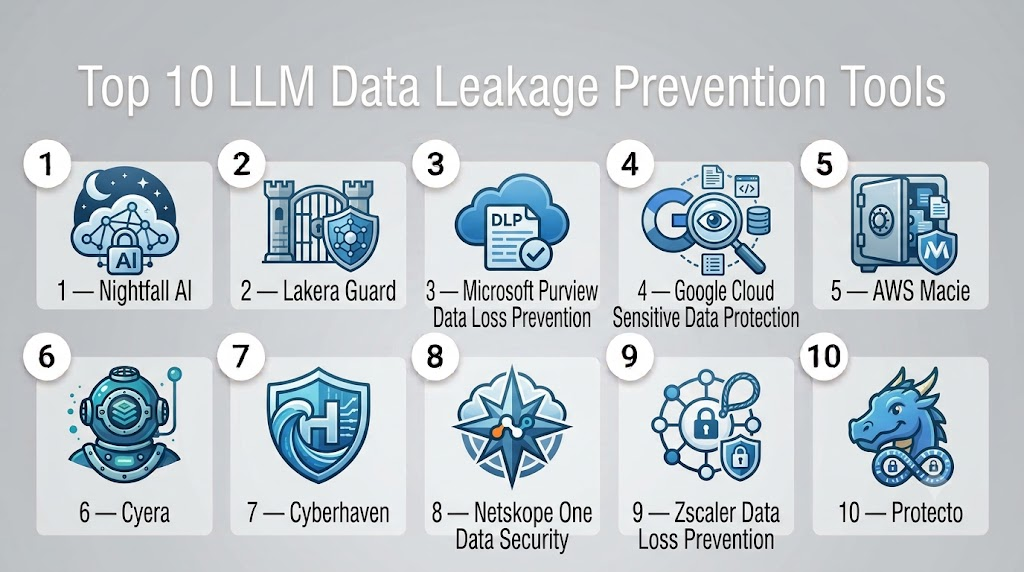
Top 10 LLM Data Leakage Prevention Tools
1 — Nightfall AI
One-line verdict: Best for AI-native DLP across SaaS, endpoints, browsers, email, and generative AI tools.
Short description:
Nightfall AI focuses on detecting and preventing sensitive-data exposure across modern cloud and AI environments. It is especially relevant for organizations that need DLP coverage across ChatGPT-style tools, SaaS apps, endpoints, and browser-based workflows.
Standout Capabilities
- AI-native sensitive-data detection
- Prompt and file-upload monitoring
- DLP for AI applications and SaaS tools
- Browser and endpoint coverage
- Detection for PII, PHI, PCI, secrets, and credentials
- Real-time policy enforcement
- Enterprise reporting and audit logs
- Workflow automation for remediation
AI-Specific Depth
- Model support: Public AI apps, enterprise AI apps, and SaaS AI workflows
- RAG / knowledge integration: Varies / N/A
- Evaluation: Sensitive-data classification, policy detection, leakage alerts
- Guardrails: Blocking, redaction, masking, and policy enforcement
- Observability: Prompt logs, DLP events, user activity, alert dashboards
Pros
- Strong fit for enterprise GenAI DLP
- Broad coverage across SaaS, endpoints, and browser workflows
- Useful for real-time prevention
Cons
- Exact pricing is not publicly stated
- Advanced integrations may require setup
- Not a dedicated AI red-teaming platform
Security & Compliance
Enterprise controls may include RBAC, audit logs, policy management, and integration with security workflows. Certifications should be verified directly.
Deployment & Platforms
- Cloud platform
- Browser and endpoint coverage
- SaaS and AI application integrations
Integrations & Ecosystem
- ChatGPT-style AI tools
- Microsoft Copilot-style workflows
- SaaS applications
- Email systems
- Endpoint environments
- SIEM and SOAR tools
- Security ticketing systems
Pricing Model
Commercial pricing. Exact pricing is not publicly stated.
Best-Fit Scenarios
- Preventing employees from pasting sensitive data into AI tools
- Monitoring AI usage across SaaS and browsers
- Building enterprise GenAI DLP controls
2 — Lakera Guard
One-line verdict: Best for developers protecting LLM applications from prompt injection, data leakage, and unsafe outputs.
Short description:
Lakera Guard is an AI security layer for LLM applications. It helps detect prompt injection, sensitive-data exposure, jailbreaks, unsafe instructions, and policy violations in inputs and outputs.
Standout Capabilities
- Prompt injection defense
- LLM data leakage detection
- Input and output scanning
- Custom policy guardrails
- Sensitive-data redaction
- Jailbreak detection
- Developer-friendly API integration
- Threat intelligence updates
AI-Specific Depth
- Model support: LLM applications and API-based AI systems
- RAG / knowledge integration: Supports application-level protection; RAG coverage depends on integration
- Evaluation: Prompt risk, leakage risk, policy violations, jailbreak attempts
- Guardrails: Prompt injection defense, data leakage prevention, redaction, policy enforcement
- Observability: Logs, detections, audit fields, and security events
Pros
- Strong focus on LLM-specific threats
- Developer-friendly integration
- Useful for production AI applications
Cons
- Not a full traditional enterprise DLP suite
- Coverage depends on where it is integrated
- Pricing is not publicly stated
Security & Compliance
Enterprise deployment and privacy controls may vary by product edition. Certifications should be verified directly.
Deployment & Platforms
- Cloud API
- Self-hosted or private deployment options may vary
- Developer integration into LLM applications
Integrations & Ecosystem
- LLM APIs
- Chatbots
- AI agents
- RAG applications
- Custom AI apps
- Security logging tools
- Developer pipelines
Pricing Model
Commercial pricing. Exact pricing is not publicly stated.
Best-Fit Scenarios
- Protecting LLM apps before production
- Blocking sensitive-data leakage in prompts and outputs
- Adding security guardrails to AI agents
3 — Microsoft Purview Data Loss Prevention
One-line verdict: Best for Microsoft-heavy enterprises protecting sensitive data across Microsoft 365 and Copilot environments.
Short description:
Microsoft Purview DLP helps organizations classify, monitor, and protect sensitive data across Microsoft services. It is especially useful for enterprises using Microsoft 365, Teams, SharePoint, OneDrive, Exchange, and Copilot-related workflows.
Standout Capabilities
- Enterprise DLP policies
- Sensitive-information type detection
- Microsoft 365 integration
- Insider risk and compliance workflows
- Data classification and labeling
- Policy tips and user coaching
- Audit and compliance reporting
- Copilot ecosystem relevance
AI-Specific Depth
- Model support: Microsoft ecosystem and Copilot-connected data environments
- RAG / knowledge integration: Useful for governing Microsoft 365 data accessed by AI assistants
- Evaluation: Policy matches, sensitive-data detection, audit events
- Guardrails: DLP policies, labels, access controls, and user warnings
- Observability: Compliance reports, audit logs, alerts, and data activity views
Pros
- Strong fit for Microsoft-first organizations
- Mature compliance and data governance ecosystem
- Good alignment with enterprise identity and permissions
Cons
- Less specialized for non-Microsoft LLM apps
- Configuration can be complex
- AI-specific controls depend on Microsoft ecosystem usage
Security & Compliance
Supports enterprise security, compliance, identity, labeling, and audit workflows. Specific certifications depend on Microsoft service configuration.
Deployment & Platforms
- Cloud-based Microsoft 365 environment
- Enterprise admin console
- Endpoint, email, collaboration, and document workflows
Integrations & Ecosystem
- Microsoft 365
- Teams
- SharePoint
- OneDrive
- Exchange
- Microsoft Defender
- Microsoft Sentinel
- Microsoft Copilot ecosystem
Pricing Model
Subscription-based Microsoft licensing. Exact cost depends on plan and tenant configuration.
Best-Fit Scenarios
- Governing sensitive data used by Microsoft Copilot
- Enforcing DLP across Microsoft 365
- Supporting compliance-heavy enterprise workflows
4 — Google Cloud Sensitive Data Protection
One-line verdict: Best for Google Cloud teams needing sensitive-data discovery, classification, masking, and inspection.
Short description:
Google Cloud Sensitive Data Protection helps identify, classify, inspect, redact, tokenize, and protect sensitive data across cloud workloads. It can support LLM leakage prevention when used inside AI pipelines and cloud-based applications.
Standout Capabilities
- Sensitive-data inspection
- PII detection and classification
- Redaction and masking
- Tokenization support
- Cloud-native scanning
- Data discovery across repositories
- API-driven integration
- Useful for AI preprocessing and output filtering
AI-Specific Depth
- Model support: Google Cloud AI applications and custom AI pipelines
- RAG / knowledge integration: Can classify and protect data used in retrieval pipelines
- Evaluation: Sensitive-data detection, classification, and policy matching
- Guardrails: Redaction, masking, tokenization, and data minimization
- Observability: Inspection results, findings, logs, and cloud monitoring integrations
Pros
- Strong cloud-native data classification
- Useful for AI pipelines before LLM submission
- Good fit for Google Cloud environments
Cons
- Not a standalone LLM runtime guardrail
- Requires engineering integration
- Best suited for Google Cloud workloads
Security & Compliance
Security and compliance depend on Google Cloud configuration, IAM, logging, encryption, and deployment settings.
Deployment & Platforms
- Google Cloud
- API-based integration
- Cloud-native data workflows
Integrations & Ecosystem
- Google Cloud Storage
- BigQuery
- Dataflow
- Vertex AI pipelines
- Cloud Functions
- Cloud Logging
- Security Command Center
Pricing Model
Usage-based cloud pricing. Exact cost depends on data volume and API usage.
Best-Fit Scenarios
- Redacting sensitive data before LLM processing
- Protecting RAG source data
- Building cloud-native AI DLP workflows
5 — AWS Macie
One-line verdict: Best for AWS teams discovering and protecting sensitive data before it reaches AI systems.
Short description:
AWS Macie helps identify sensitive data such as PII in Amazon S3. While it is not a dedicated LLM guardrail, it is valuable for preventing leakage from data lakes, RAG sources, training data, and AI application storage.
Standout Capabilities
- Sensitive-data discovery
- S3 data classification
- PII detection
- Security findings and alerts
- Automated data inventory
- AWS-native integration
- Risk prioritization
- Useful for AI data-source governance
AI-Specific Depth
- Model support: AWS AI pipelines and data environments
- RAG / knowledge integration: Useful for scanning S3-based knowledge sources and retrieval datasets
- Evaluation: Sensitive-data findings and classification
- Guardrails: Preventive control requires integration with IAM, workflows, or data pipelines
- Observability: Findings, alerts, dashboards, and AWS security integrations
Pros
- Strong AWS-native sensitive-data discovery
- Useful for AI data lake governance
- Helps reduce leakage before data reaches models
Cons
- Focused mainly on S3
- Not a direct LLM prompt firewall
- Requires additional tools for runtime AI monitoring
Security & Compliance
Uses AWS-native IAM, logging, encryption, and security controls. Compliance depends on account configuration and usage.
Deployment & Platforms
- AWS cloud
- S3-focused data environments
- AWS security console
Integrations & Ecosystem
- Amazon S3
- AWS Security Hub
- Amazon EventBridge
- AWS Organizations
- CloudWatch
- IAM
- AI/ML pipelines using AWS data
Pricing Model
Usage-based AWS pricing. Exact cost depends on data volume and scanning configuration.
Best-Fit Scenarios
- Scanning RAG source documents in S3
- Finding PII before model training or indexing
- Governing AI data lakes on AWS
6 — Cyera
One-line verdict: Best for data security posture management that identifies sensitive data exposure across AI-connected environments.
Short description:
Cyera provides data security posture management focused on discovering, classifying, and protecting sensitive data across enterprise environments. It can support LLM leakage prevention by helping security teams understand where sensitive data resides and how it may be exposed to AI systems.
Standout Capabilities
- Sensitive-data discovery
- Data security posture management
- Context-aware data classification
- Exposure and access analysis
- Cloud and SaaS data visibility
- Risk prioritization
- Compliance reporting
- AI-related data exposure support
AI-Specific Depth
- Model support: AI-connected enterprise data environments
- RAG / knowledge integration: Useful for classifying data sources used by RAG systems
- Evaluation: Sensitive-data exposure, access risks, and classification findings
- Guardrails: Primarily posture and data-risk controls rather than prompt-level blocking
- Observability: Data maps, exposure dashboards, risk reports, and compliance evidence
Pros
- Strong visibility into sensitive enterprise data
- Useful before deploying AI over internal knowledge bases
- Good fit for regulated organizations
Cons
- Not a pure LLM prompt monitoring tool
- Runtime enforcement requires integration
- Pricing is not publicly stated
Security & Compliance
Enterprise security controls and compliance workflows may be available. Certifications should be verified directly.
Deployment & Platforms
- Cloud-based enterprise platform
- Data security environments
- Cloud, SaaS, and data platform integrations
Integrations & Ecosystem
- Cloud data stores
- SaaS systems
- Data warehouses
- Security workflows
- Compliance tools
- Identity systems
- AI governance processes
Pricing Model
Commercial enterprise pricing. Exact pricing is not publicly stated.
Best-Fit Scenarios
- Finding sensitive data before AI indexing
- Reducing RAG data exposure
- Supporting enterprise AI data governance
7 — Cyberhaven
One-line verdict: Best for tracking data lineage and preventing sensitive information from flowing into AI tools.
Short description:
Cyberhaven focuses on data detection and response by tracking how sensitive information moves across endpoints, browsers, cloud apps, and user workflows. This makes it relevant for preventing data from being copied into generative AI tools.
Standout Capabilities
- Data lineage tracking
- Endpoint and browser visibility
- Sensitive-data movement analysis
- GenAI usage monitoring
- Insider risk detection
- Context-aware policy enforcement
- Data exfiltration prevention
- User behavior visibility
AI-Specific Depth
- Model support: Public AI tools and browser-based AI workflows
- RAG / knowledge integration: Varies / N/A
- Evaluation: Sensitive-data movement, prompt exposure, and user activity
- Guardrails: Blocking, warnings, and policy enforcement
- Observability: Data lineage, user actions, browser activity, alerts, and reports
Pros
- Strong context around how data moves
- Useful for shadow AI and browser-based leakage
- Good fit for insider-risk use cases
Cons
- Not a dedicated LLM application firewall
- Integration depth depends on environment
- Pricing is not publicly stated
Security & Compliance
Enterprise controls may include audit logs, policy management, and role-based administration. Certifications should be verified directly.
Deployment & Platforms
- Endpoint and browser-focused deployment
- Cloud management console
- Enterprise data security workflows
Integrations & Ecosystem
- Browsers
- Endpoints
- SaaS applications
- Security operations tools
- DLP workflows
- Insider-risk systems
- AI usage monitoring
Pricing Model
Commercial enterprise pricing. Exact pricing is not publicly stated.
Best-Fit Scenarios
- Preventing employees from pasting sensitive data into AI tools
- Monitoring data movement into GenAI platforms
- Reducing insider and accidental leakage risk
8 — Netskope One Data Security
One-line verdict: Best for enterprises securing GenAI usage through cloud, SaaS, browser, and network controls.
Short description:
Netskope provides cloud access security, data security, and secure access controls that can help monitor and control generative AI usage. It is useful for organizations that want DLP enforcement across cloud apps, web traffic, and AI services.
Standout Capabilities
- Cloud and web DLP
- SaaS and GenAI app controls
- Sensitive-data classification
- Real-time policy enforcement
- User coaching and blocking
- Cloud access security controls
- Data movement visibility
- Enterprise security integrations
AI-Specific Depth
- Model support: Public AI tools, SaaS AI apps, and web-based AI workflows
- RAG / knowledge integration: Varies / N/A
- Evaluation: Data classification, policy violation detection, and user activity monitoring
- Guardrails: DLP controls, block/allow policies, coaching, and access enforcement
- Observability: Cloud activity logs, DLP alerts, user activity, and risk dashboards
Pros
- Strong enterprise network and cloud security ecosystem
- Useful for controlling public GenAI tool usage
- Good fit for existing SASE and CASB programs
Cons
- Not specialized only for LLM application security
- Setup can be complex
- Exact AI controls depend on configuration
Security & Compliance
Enterprise security controls may include access policies, logging, audit support, identity integration, and data protection workflows. Certifications should be verified directly.
Deployment & Platforms
- Cloud security platform
- Browser, SaaS, network, and web traffic workflows
- Enterprise access control environments
Integrations & Ecosystem
- SaaS applications
- Web gateways
- CASB workflows
- Identity providers
- SIEM tools
- Endpoint systems
- GenAI web applications
Pricing Model
Commercial pricing. Exact pricing is not publicly stated.
Best-Fit Scenarios
- Controlling public AI tool access
- Enforcing DLP across cloud and web traffic
- Securing GenAI use inside SASE programs
9 — Zscaler Data Loss Prevention
One-line verdict: Best for organizations enforcing AI usage controls through secure web, SaaS, and cloud access layers.
Short description:
Zscaler DLP helps organizations detect and prevent sensitive-data exposure across web, SaaS, cloud, and user traffic. It can support LLM data leakage prevention by controlling what employees send to generative AI tools.
Standout Capabilities
- Cloud-delivered DLP
- Web and SaaS traffic inspection
- Sensitive-data classification
- GenAI app access control
- Policy enforcement at traffic layer
- User coaching and blocking
- Enterprise reporting
- Secure access integration
AI-Specific Depth
- Model support: Public GenAI tools and web-based AI applications
- RAG / knowledge integration: Varies / N/A
- Evaluation: Sensitive-data matches, policy violations, and web usage analysis
- Guardrails: DLP enforcement, access control, block/allow policies, and user coaching
- Observability: DLP logs, user activity, AI app usage reports, and alerts
Pros
- Strong for web and SaaS AI leakage control
- Good fit for secure internet access programs
- Useful for shadow AI visibility
Cons
- Not a dedicated LLM application-layer guardrail
- AI-specific coverage depends on deployment setup
- Enterprise configuration can be complex
Security & Compliance
Enterprise security controls may include audit logs, policy enforcement, identity integration, and compliance reporting. Certifications should be verified directly.
Deployment & Platforms
- Cloud security platform
- Secure web gateway
- SaaS and internet traffic workflows
Integrations & Ecosystem
- Identity providers
- SIEM systems
- SaaS apps
- Web security workflows
- Endpoint environments
- Cloud access security
- GenAI usage controls
Pricing Model
Commercial enterprise pricing. Exact pricing is not publicly stated.
Best-Fit Scenarios
- Blocking sensitive data sent to AI websites
- Monitoring shadow AI usage
- Extending existing secure web gateway DLP into GenAI
10 — Protecto
One-line verdict: Best for privacy engineering teams that need sensitive-data masking and privacy controls in AI pipelines.
Short description:
Protecto focuses on privacy and data protection for AI workflows by helping teams detect, mask, tokenize, and protect sensitive information before it reaches AI systems.
Standout Capabilities
- Sensitive-data detection
- PII masking and tokenization
- Privacy-preserving AI workflows
- Data minimization support
- AI pipeline integration
- API-based protection
- Compliance-oriented data controls
- Support for safe LLM usage
AI-Specific Depth
- Model support: LLM applications and AI data pipelines
- RAG / knowledge integration: Can support masking and privacy controls for RAG data
- Evaluation: Sensitive-data detection, masking quality, privacy policy checks
- Guardrails: Masking, redaction, tokenization, and privacy controls
- Observability: Processing logs, privacy events, and policy outputs
Pros
- Strong fit for privacy-first AI design
- Useful before sending data to LLMs
- Helps reduce exposure in AI pipelines
Cons
- Less focused on browser-level employee monitoring
- Enterprise integrations may require engineering work
- Pricing is not publicly stated
Security & Compliance
Security and compliance details should be verified directly, especially for regulated deployments and data retention.
Deployment & Platforms
- API-based platform
- AI pipeline integration
- Cloud and enterprise environments
Integrations & Ecosystem
- LLM applications
- RAG pipelines
- Data preprocessing workflows
- APIs
- Privacy engineering systems
- Compliance workflows
- Enterprise AI platforms
Pricing Model
Commercial pricing. Exact pricing is not publicly stated.
Best-Fit Scenarios
- Masking PII before LLM processing
- Building privacy-preserving RAG systems
- Reducing sensitive-data exposure in AI applications
Comparison Table
| Tool Name | Best For | Deployment | Model Flexibility | Strength | Watch-Out | Public Rating |
|---|---|---|---|---|---|---|
| Nightfall AI | GenAI DLP across SaaS, browser, endpoint | Cloud | Public AI apps and enterprise tools | Broad AI DLP coverage | Pricing not public | N/A |
| Lakera Guard | LLM app guardrails | Cloud / Self-hosted options vary | LLM apps and APIs | Prompt and leakage defense | Needs app integration | N/A |
| Microsoft Purview DLP | Microsoft 365 and Copilot governance | Cloud | Microsoft ecosystem | Compliance depth | Microsoft-focused | N/A |
| Google Sensitive Data Protection | Cloud data inspection and masking | Cloud | Google Cloud AI workflows | Sensitive-data classification | Needs engineering integration | N/A |
| AWS Macie | AWS data lake protection | Cloud | AWS AI data sources | S3 sensitive-data discovery | Not prompt-level DLP | N/A |
| Cyera | Data security posture for AI exposure | Cloud | Enterprise data environments | Sensitive-data visibility | Runtime blocking varies | N/A |
| Cyberhaven | Data lineage and GenAI leakage control | Cloud / Endpoint | Browser and endpoint AI usage | Data movement context | Not LLM firewall only | N/A |
| Netskope One Data Security | GenAI control in SASE/CASB | Cloud | Web and SaaS AI apps | Network-layer enforcement | Setup complexity | N/A |
| Zscaler DLP | Secure web AI leakage control | Cloud | Public GenAI tools | Web traffic control | App-layer depth varies | N/A |
| Protecto | Privacy-preserving AI pipelines | API / Cloud | LLM and RAG workflows | Masking and tokenization | Less endpoint focused | N/A |
Scoring & Evaluation
The scores below are comparative, not absolute. They reflect LLM leakage prevention coverage, sensitive-data detection, AI workflow relevance, integrations, ease of adoption, policy enforcement, security administration, and enterprise readiness.
A high score does not mean one tool is best for every organization. Some tools are stronger for public AI tool monitoring, while others are better for application guardrails, cloud data discovery, privacy masking, or Microsoft ecosystem governance.
| Tool | Core | Reliability/Eval | Guardrails | Integrations | Ease | Perf/Cost | Security/Admin | Support | Weighted Total |
|---|---|---|---|---|---|---|---|---|---|
| Nightfall AI | 9 | 9 | 9 | 9 | 8 | 8 | 9 | 8 | 8.75 |
| Lakera Guard | 9 | 9 | 10 | 8 | 8 | 8 | 8 | 8 | 8.65 |
| Microsoft Purview DLP | 9 | 8 | 8 | 10 | 7 | 8 | 10 | 9 | 8.65 |
| Google Sensitive Data Protection | 8 | 8 | 8 | 9 | 7 | 8 | 9 | 8 | 8.10 |
| AWS Macie | 8 | 8 | 7 | 9 | 8 | 8 | 9 | 8 | 8.05 |
| Cyera | 8 | 8 | 7 | 8 | 8 | 8 | 9 | 8 | 7.95 |
| Cyberhaven | 9 | 8 | 9 | 8 | 8 | 8 | 8 | 8 | 8.30 |
| Netskope One Data Security | 9 | 8 | 9 | 9 | 7 | 8 | 9 | 8 | 8.35 |
| Zscaler DLP | 8 | 8 | 9 | 9 | 7 | 8 | 9 | 8 | 8.15 |
| Protecto | 8 | 8 | 8 | 7 | 8 | 8 | 7 | 7 | 7.65 |
Which LLM Data Leakage Prevention Tool Is Right for You?
Solo / Freelancer
Solo users usually do not need enterprise DLP unless they handle client data, legal documents, source code, credentials, or regulated information. The safest starting point is to avoid pasting confidential material into public AI tools and use local redaction before submitting prompts.
For developers building AI apps, Lakera Guard or Protecto-style controls are useful because they can inspect prompts and outputs inside the application workflow.
SMB
Small and medium businesses should focus on practical leakage points: employees using public AI tools, customer data in prompts, file uploads, and source-code sharing.
Nightfall AI is a strong fit for broad GenAI DLP. Lakera Guard is better when the SMB is building its own LLM-powered product. Microsoft Purview DLP is useful when the company already runs on Microsoft 365.
Mid-Market
Mid-market companies usually need multiple layers. Browser and SaaS monitoring help control employee AI usage, while API guardrails protect internal LLM applications.
A practical stack may include Nightfall AI or Cyberhaven for employee usage visibility, Lakera Guard for application-layer protection, and cloud-native tools like Macie or Google Sensitive Data Protection for data-source scanning.
Enterprise
Enterprises should avoid relying on one tool alone. A strong LLM data leakage prevention architecture usually includes:
- AI-native DLP for prompts and file uploads
- Cloud data discovery for RAG and training sources
- Browser and endpoint monitoring
- Microsoft 365 or Google Workspace data governance
- LLM application guardrails
- SIEM integration
- Audit reporting
- Human review for high-risk workflows
Nightfall AI, Microsoft Purview DLP, Netskope, Zscaler, Cyberhaven, Lakera Guard, and cloud-native data tools may all play different roles.
Regulated Industries
Finance, healthcare, insurance, legal, public sector, and education teams must prioritize auditability, privacy, and data minimization.
Important requirements include:
- PII, PHI, PCI, and secrets detection
- Prompt and response logging
- Redaction before LLM submission
- Data retention controls
- Role-based policies
- Audit evidence
- Incident workflows
- Approved AI tool lists
- Vendor risk review
- Regional data handling controls
Regulated teams should verify every vendor’s data usage, retention, and subprocessors before deployment.
Budget vs Premium
Budget-conscious teams should begin by protecting the riskiest workflows: public AI tool usage, sensitive document uploads, source code, customer data, and internal RAG systems.
Premium platforms provide stronger dashboards, workflow automation, integrations, policy controls, and support. They are better suited when AI usage is widespread across departments.
Build vs Buy
Build custom controls when you operate a narrow internal AI workflow and have strong engineering resources. For example, a custom redaction layer before LLM calls may be enough for a single application.
Buy a platform when AI usage is broad, users interact with many tools, compliance evidence is required, or leakage prevention must cover SaaS, browsers, endpoints, and cloud storage.
Implementation Playbook
First 30 Days: Discovery and Pilot
- Identify all AI tools used by employees.
- List sensitive data categories that must not enter LLMs.
- Select one high-risk workflow for a pilot.
- Enable prompt and file-upload monitoring.
- Test detection for PII, credentials, source code, and confidential documents.
- Define block, warn, redact, and allow policies.
- Review false positives and false negatives.
- Build an initial AI usage report.
- Assign business owners for AI applications.
- Create employee guidance for safe AI usage.
First 60 Days: Policy and Enforcement
- Expand monitoring to browsers, SaaS, endpoints, and custom LLM apps.
- Integrate alerts with SIEM or ticketing tools.
- Add redaction and masking for sensitive fields.
- Scan RAG source documents before indexing.
- Review Microsoft 365, Google Workspace, AWS, or cloud data permissions.
- Add role-based policies for departments.
- Create exception workflows.
- Train users with in-product coaching.
- Test prompt injection and data exfiltration scenarios.
- Establish incident response steps for AI data leaks.
First 90 Days: Governance and Scale
- Expand coverage across all major AI tools.
- Add audit dashboards for compliance teams.
- Review vendor data retention and training policies.
- Build risk scoring for AI interactions.
- Track repeated policy violations.
- Add human review for high-risk prompts.
- Integrate with identity and access management.
- Review agent permissions and tool access.
- Validate RAG access controls.
- Measure leakage reduction and productivity impact.
- Update policies based on real usage patterns.
- Create a quarterly AI data protection review process.
Common Mistakes and How to Avoid Them
- Only blocking public AI websites: Employees may use browser extensions, SaaS AI features, copilots, and APIs.
- Ignoring file uploads: Sensitive data often leaks through documents, spreadsheets, PDFs, images, and code files.
- Not monitoring responses: LLMs can leak retrieved data or confidential context in outputs.
- Relying only on keyword matching: LLM data leakage requires context-aware classification.
- No RAG data controls: Retrieval systems can expose documents users should not access.
- Ignoring source code: Code, secrets, API keys, and configuration files are high-risk leakage categories.
- No user coaching: Blocking without explanation creates workarounds.
- No audit trail: Compliance teams need evidence, not just alerts.
- Overblocking AI usage: Excessive blocking pushes users toward shadow AI.
- Ignoring multilingual prompts: Sensitive data can be leaked in many languages.
- No vendor review: AI tools may store prompts or use data differently.
- Skipping redaction: Blocking is not always the best answer; masking may preserve productivity.
- No incident process: Teams need a clear response plan for AI data leakage.
- No policy ownership: AI DLP must be owned jointly by security, legal, privacy, and business teams.
FAQs
1. What is LLM data leakage prevention?
LLM data leakage prevention is the process of stopping sensitive data from being shared with, exposed by, or retrieved through large language models and generative AI systems.
2. How is LLM DLP different from traditional DLP?
Traditional DLP often relies on file, endpoint, email, or network rules. LLM DLP must understand conversational prompts, context, uploaded files, model outputs, RAG data, and AI agent workflows.
3. What data can leak through LLMs?
PII, PHI, PCI, source code, trade secrets, credentials, legal documents, financial data, HR records, product roadmaps, customer data, and internal policies can all leak through LLM usage.
4. Can LLM DLP block prompts in real time?
Yes, many modern tools can block, redact, warn, or allow prompts in real time depending on policy and integration method.
5. Does LLM DLP work with ChatGPT and Copilot?
Some tools support public AI tools and Microsoft Copilot-style workflows. Coverage varies by vendor, deployment, browser controls, SaaS integrations, and enterprise configuration.
6. Can LLM DLP protect custom AI applications?
Yes. Developer-focused tools can be embedded into custom LLM applications to inspect prompts, responses, retrieved context, and tool outputs.
7. Can sensitive data be redacted before reaching the model?
Yes. Many tools support masking, tokenization, or redaction before submitting data to an LLM. This is often better than simply blocking all usage.
8. What is RAG data leakage?
RAG data leakage happens when a retrieval system exposes confidential documents, private records, or unauthorized context through an AI response.
9. Can prompt injection cause data leakage?
Yes. Prompt injection can trick an AI system into revealing hidden instructions, retrieved documents, secrets, or internal context if protections are weak.
10. Should companies ban public AI tools?
A full ban may reduce risk but often creates shadow AI. A better approach is usually controlled usage with monitoring, approved tools, DLP, redaction, and clear policies.
11. Do LLM DLP tools store prompts?
Some tools may store logs, metadata, or detections for audit purposes. Retention, encryption, masking, and training-use policies must be verified directly with each vendor.
12. Can LLM DLP prevent source-code leakage?
Yes, many tools can detect code, secrets, API keys, tokens, credentials, and repository content before it is shared with AI tools.
13. Is browser monitoring important for AI DLP?
Yes. Many AI interactions happen in browsers, so browser-level monitoring is important for detecting public AI usage and file uploads.
14. Can one tool solve all LLM leakage risks?
No. Strong protection usually combines AI-native DLP, cloud data discovery, app guardrails, identity controls, RAG governance, endpoint monitoring, and user training.
15. How often should AI DLP policies be reviewed?
Policies should be reviewed whenever new AI tools, models, agents, data sources, or business workflows are introduced. A quarterly review is a practical baseline for most organizations.
Conclusion
LLM Data Leakage Prevention tools are becoming essential because generative AI has changed how employees interact with sensitive information. Data no longer leaves only through email, USB drives, or file-sharing apps. It can now leave through prompts, uploaded documents, code snippets, AI agents, copilots, browser sessions, and retrieval systems.
The best tool depends on where the risk is highest. Nightfall AI is strong for broad AI-native DLP. Lakera Guard is useful for securing custom LLM applications. Microsoft Purview DLP is important for Microsoft-first organizations. Netskope, Zscaler, Cyberhaven, Cyera, AWS Macie, Google Sensitive Data Protection, and Protecto each solve different parts of the leakage problem.
