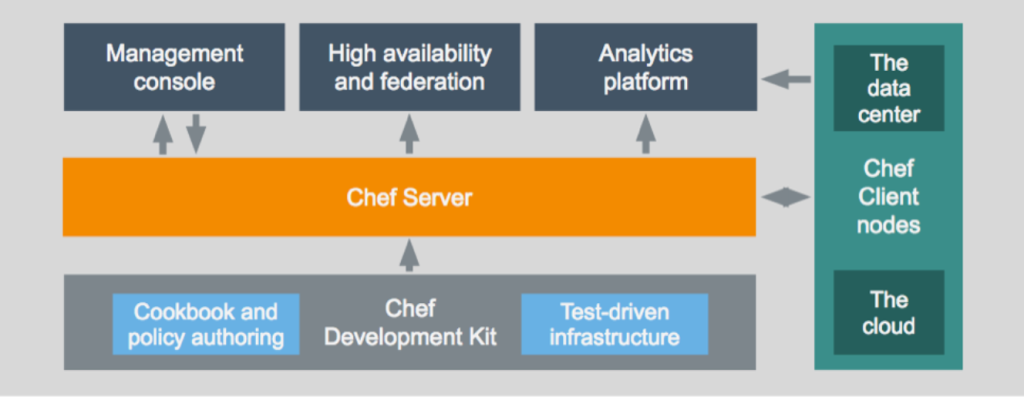
As businesses scale, managing infrastructure efficiently and ensuring consistency across systems becomes increasingly challenging. Chef, a powerful configuration management and automation tool, helps IT teams automate the configuration, deployment, and maintenance of infrastructure. It enables organizations to manage infrastructure as code (IaC), ensuring speed, consistency, and reliability in IT operations. In this blog, we’ll explore what Chef is, its top use cases, features, architecture, and installation process, and provide basic tutorials to get started.
What is a Chef?
Chef is a configuration management and automation tool designed to help IT teams define infrastructure as code. It allows users to automate tasks like provisioning, configuration, and application deployment across diverse environments. Chef’s declarative language ensures that the infrastructure is consistent, repeatable, and manageable at scale.
Chef uses cookbooks (collections of recipes) to define the desired state of systems and enforces this state by applying configurations to managed nodes. It supports hybrid environments, including on-premises, cloud, and containerized systems, making it a versatile solution for modern IT operations.
Key highlights of Chef:
- Infrastructure as Code (IaC) for managing infrastructure declaratively.
- Automation of provisioning, configuration, and deployment tasks.
- Scalability for enterprise-grade environments.
- Integration with major cloud providers and DevOps tools.
Top 10 Use Cases of Chef
- Configuration Management
Automates the configuration of servers, applications, and infrastructure components. - Infrastructure as Code (IaC)
Enables teams to define, version, and manage infrastructure like software code. - Application Deployment
Simplifies deploying multi-tier applications by automating dependencies and configurations. - Cloud Resource Automation
Manages and provisions resources across AWS, Azure, Google Cloud, and other platforms. - Continuous Integration and Continuous Deployment (CI/CD)
Integrates with CI/CD pipelines to automate infrastructure provisioning and application deployment. - Compliance Automation
Enforces security and compliance policies across all systems, ensuring regulatory adherence. - Scaling Infrastructure
Automatically configures new nodes when scaling environments up or down. - Patch Management
Deploys patches and updates across systems with minimal downtime. - DevOps Enablement
Supports DevOps practices by integrating with tools like Jenkins, Kubernetes, and Docker. - Hybrid and Multi-Cloud Management
Provides consistent configuration and management across hybrid and multi-cloud environments.
What Are the Features of Chef?
- Declarative Language (Ruby DSL)
Uses a human-readable domain-specific language to define configurations. - Cookbooks and Recipes
Encapsulates configurations as reusable code blocks for modular automation. - Policy-Based Management
Ensures consistency by defining and enforcing policies for infrastructure and applications. - Scalable Architecture
Supports large-scale environments with distributed nodes. - Cross-Platform Support
Manages Linux, Windows, macOS, and other platforms. - Integration Ecosystem
Integrates with cloud providers, container platforms, and DevOps tools. - Compliance and Security
Automates compliance checks and remediates non-compliant configurations. - Chef Infra Client
Runs on managed nodes to enforce desired configurations. - Chef Workstation
A centralized tool for developing, testing, and deploying cookbooks and recipes. - Open Source and Enterprise Versions
Offers both community-driven open-source and enterprise-grade solutions.
How Chef Works and Its Architecture
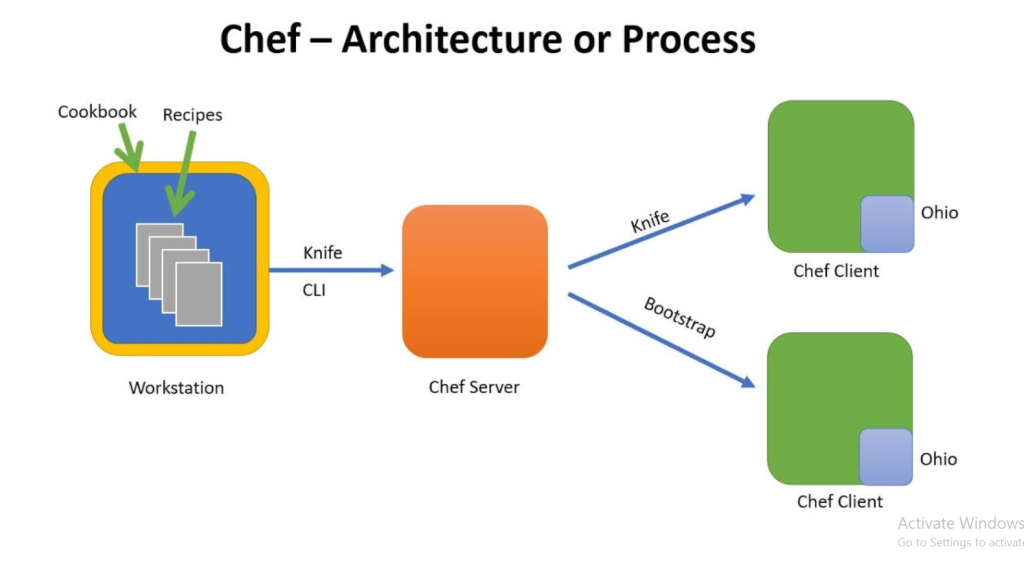
Chef follows a client-server architecture designed to automate and manage infrastructure. Here’s an overview of its components and workflow:
- Chef Server:
Acts as the central hub where configurations (cookbooks and recipes) are stored. The server communicates with nodes and manages their configurations. - Chef Workstation:
The development environment where administrators and developers create, test, and deploy cookbooks and recipes. Tools like ChefDK (Development Kit) provide utilities to write and test code. - Chef Client (Node):
Installed on managed nodes (servers, virtual machines, containers). The client communicates with the Chef Server, applies configurations, and reports back. - Cookbooks and Recipes:
Cookbooks are collections of recipes written in Ruby that define the desired state of a system. - Knife Command-Line Tool:
A command-line tool used to manage nodes, upload cookbooks to the Chef Server, and perform various administrative tasks. - Ohai:
A system profiling tool that gathers system information, such as memory, CPU, and OS details, and provides it to the Chef Server. - Execution Flow:
- Nodes request configurations from the Chef Server.
- The Chef Server provides the appropriate cookbooks.
- The Chef Client applies the configurations locally.
- Nodes send reports back to the Chef Server.
How to Install Chef
Chef installation involves setting up the Chef Server, Workstation, and Client. Here’s a step-by-step guide:
Installing Chef Workstation:
1. Download the Installer:
Visit the Chef Downloads page and download the Chef Workstation installer for your platform.
2. Run the Installer:
Execute the installer and follow the prompts to complete the installation.
3. Verify Installation:
chef --version4. Set Up the Chef Repository:
Create a directory to store cookbooks and configuration files:
mkdir chef-repo
cd chef-repo
Installing Chef Server:
1. Download and Install Chef Server:
sudo wget https://packages.chef.io/files/stable/chef-server/<version>/chef-server-core_<version>.deb
sudo dpkg -i chef-server-core_<version>.deb
2. Start the Server:
chef-server-ctl reconfigure3. Create an Admin User and Organization:
chef-server-ctl user-create USER_NAME FIRST_NAME LAST_NAME EMAIL PASSWORD --filename FILE_NAME.pem
chef-server-ctl org-create ORG_NAME "ORG_DESCRIPTION" --association_user USER_NAME --filename ORG_NAME-validator.pem
Installing Chef Client on Nodes:
1. Download the Chef Client:
Install the Chef Client package on the node.
2. Configure the Client:
Edit the /etc/chef/client.rb file to point to the Chef Server.
3. Run the Chef Client:
chef-clientBasic Tutorials of Chef: Getting Started
1. Writing a Simple Recipe Create a file named default.rb in a cookbook:
package 'nginx' do
  action :install
end

service 'nginx' do
  action [:enable, :start]
end
2. Uploading Cookbooks Upload the cookbook to the Chef Server:
knife cookbook upload <cookbook_name>3. Running Chef Infra Client Apply the recipe on a node:
sudo chef-client4. Testing with Test Kitchen Test cookbooks locally using Test Kitchen:
kitchen test5. Creating Roles Define roles to group configurations:
{
  "name": "webserver",
  "run_list": ["recipe[nginx]"]
}
6. Using Chef Supermarket Download prebuilt cookbooks from Chef Supermarket for common tasks.
7. Automating Compliance Checks Use InSpec for compliance testing and security validations.
