Introduction
Transcoding & encoding tools are essential software solutions that convert multimedia files between formats, resolutions, and bitrates for optimal playback and distribution. These tools power workflows across streaming platforms, broadcast media, video production, and enterprise content delivery. By transforming raw video/audio into standardized, efficient formats, transcoding ensures compatibility with different devices, networks, and streaming protocols while balancing quality and file size.
As digital media consumption grows, content must be optimized for diverse platforms — from mobile screens to 4K TVs. Efficient encoding/transcoding reduces bandwidth usage, speeds delivery, and enhances user experience with adaptive streaming. For businesses, professional tools automate conversion tasks, support batch processing, and integrate with media pipelines, making them critical in modern content operations.
Real World Use Cases
- OTT & Streaming Services: Converting master files into HLS, DASH, and adaptive bitrate formats.
- Broadcast & Live Events: Real‑time encoding for broadcast distribution and multi‑platform delivery.
- Video Production: Rendering final deliverables in required client formats with presets.
- Corporate Communication: Preparing internal videos for internal portals and mobile devices.
- Archiving & Preservation: Re‑encoding legacy formats into modern, storage‑efficient codecs.
Evaluation Criteria for Buyers
- Format & Codec Support: Ability to handle H.264, H.265/HEVC, AV1, AAC, ProRes, and more.
- Performance: Speed of encoding, hardware acceleration support (GPU/ASIC).
- Output Quality: Preservation of visual fidelity at lower bitrates.
- Automation & Workflow Integration: API, watch folders, batch processing.
- Scalability & Cloud Support: Distributed transcoding across servers or cloud.
- User Experience: Ease of setup, presets, UI/UX.
- Security & Compliance: Secure processing, access con
Key Trends
- Hardware‑accelerated encoding (GPUs, AI ASICs) for faster processing.
- Cloud‑native transcoding with elastic scaling.
- Adoption of next‑gen codecs (AV1, VVC) for better compression.
- Real‑time live transcoding for broadcast and events.
- AI‑assisted quality optimization and noise reduction.
Methodology
We evaluated tools based on codec support, performance benchmarks, workflow integration, scalability, security, and user experience. Each tool’s real‑world adoption, update cadence, and community/enterprise support were also considered.
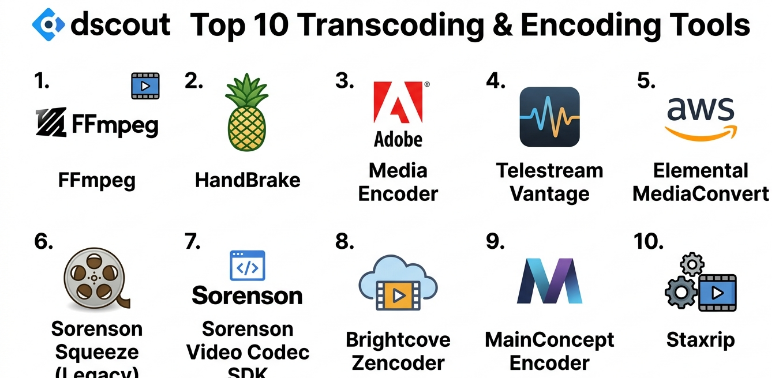
Top 10 Transcoding & Encoding Tools
1- FFmpeg
Short description: FFmpeg is the industry‑standard open‑source multimedia framework that supports nearly all codecs and formats for encoding, decoding, and transcoding.
Key Features:
- Extremely broad codec and container support
- Command‑line automation and scripting
- Filters for scaling, cropping, overlay, subtitles
- Real‑time stream processing
- Cross‑platform compatibility
Pros:
- Free and open‑source
- Unmatched format support
- Very powerful scripting and automation
Cons:
- Command‑line only (no native GUI)
- Steeper learning curve for beginners
Platforms / Deployment: Windows, macOS, Linux
Security & Compliance: Controlled via execution environment; no built‑in access restrictions
Integrations & Ecosystem: Basis for many other tools and frameworks
Support & Community: Massive community support, extensive documentation
2- HandBrake
Short description: HandBrake is a free, open‑source encoder with a user‑friendly interface, ideal for converting videos into popular formats with presets.
Key Features:
- Presets for devices and streaming
- H.264, H.265, VP9 support
- Batch queue and simple UI
- Basic filter options (deinterlace, denoise)
Pros:
- Easy to use
- Good quality presets
- Cross‑platform support
Cons:
- Limited advanced features compared to FFmpeg
- No live transcoding
Platforms / Deployment: Windows, macOS, Linux
Security & Compliance: Local processing, no remote controls
Integrations & Ecosystem: Standalone desktop utility
Support & Community: Community forums, documentation
3- Adobe Media Encoder
Short description: Adobe Media Encoder is a professional, integrated encoding solution that works seamlessly with Adobe tools like Premiere Pro and After Effects.
Key Features:
- Deep integration with Adobe Creative Cloud
- Broad codec support including ProRes and MXF
- Watch folder automation
- Presets library, export queues
- GPU acceleration
Pros:
- Professional quality output
- Excellent integration for editors
- User‑friendly interface
Cons:
- Subscription‑based
- Requires modern hardware for best performance
Platforms / Deployment: Windows, macOS
Security & Compliance: Enterprise‑grade security via Creative Cloud controls
Integrations & Ecosystem: Adobe suite, team projects
Support & Community: Adobe support, tutorials, active user base
4- Telestream Vantage
Short description: Vantage is an enterprise‑grade, scalable transcoding platform designed for broadcasters and large media operations.
Key Features:
- Distributed processing and clustering
- Extensive codec/format support
- Automated workflows and rules engine
- High‑availability architecture
- Monitoring and reporting
Pros:
- Designed for high‑volume enterprise use
- Scales across servers
- Robust automation
Cons:
- High cost
- Requires professional setup
Platforms / Deployment: On‑premises servers
Security & Compliance: Role‑based access, audit trails
Integrations & Ecosystem: Broadcast systems, automation engines
Support & Community: Enterprise support services
5- AWS Elemental MediaConvert
Short description: AWS Elemental MediaConvert is a cloud‑based service for scalable, high‑quality file transcoding with pay‑as‑you‑go pricing.
Key Features:
- Cloud scalability
- Adaptive bitrate outputs (HLS, DASH)
- Presets and APIs
- Integration with AWS services
- Advanced quality tuning
Pros:
- Scales instantly in cloud
- Supports next‑gen codecs
- Flexible APIs
Cons:
- Cloud costs can add up
- Requires AWS ecosystem knowledge
Platforms / Deployment: AWS Cloud
Security & Compliance: AWS security standards, IAM controls
Integrations & Ecosystem: AWS media workflow suite
Support & Community: AWS support tiers, docs
6- Sorenson Squeeze (Legacy)
Short description: Sorenson Squeeze was a high‑quality professional encoder known for efficient compression and wide format support (now discontinued but still used in legacy workflows).
Key Features:
- Excellent encoding quality
- Device‑specific presets
- Batch processing
- Closed caption support
Pros:
- Professional encoding quality
- Easy preset management
Cons:
- Discontinued (no longer updated)
- Limited future support
Platforms / Deployment: Windows, macOS (legacy)
Security & Compliance: Standard local processing
Integrations & Ecosystem: Older NLE integration
Support & Community: Legacy docs, community forums
7- Sorensen Video Codec SDK
Short description: A professional encoding SDK used in broadcast and enterprise applications to integrate encoding into custom software.
Key Features:
- SDK for developers
- High‑quality codec library
- Custom pipeline integration
Pros:
- Built for integration
- High‑performance library
Cons:
- Requires development effort
- Licensing costs
Platforms / Deployment: Libraries for integration
Security & Compliance: Depends on host application
Integrations & Ecosystem: Custom media applications
Support & Community: Vendor support
8- Brightcove Zencoder
Short description: Zencoder is a cloud‑based transcoding API service that handles large‑scale conversions with adaptive bitrate packaging.
Key Features:
- REST API for automation
- Multi‑format outputs
- CDN integration support
- Scalable cloud processing
Pros:
- Easy API integration
- Scales with demand
- Supports adaptive bundles
Cons:
- Ongoing service costs
- Dependent on internet connectivity
Platforms / Deployment: Cloud service
Security & Compliance: Secure API, token auth
Integrations & Ecosystem: OTT and apps
Support & Community: Enterprise support
9- MainConcept Encoder
Short description: MainConcept delivers high‑quality codec libraries and encoders used in professional broadcast and production environments.
Key Features:
- Leading codec performance (H.264, HEVC)
- SDK and standalone tools
- Broadcast‑ready outputs
- Regulatory compliance formats
Pros:
- Excellent quality and compliance
- Widely adopted codec tech
Cons:
- Licensing required
- More technical than consumer tools
Platforms / Deployment: SDK and apps
Security & Compliance: Industry standards
Integrations & Ecosystem: NLEs and media suites
Support & Community: Vendor support
10- Staxrip
Short description: Staxrip is a free, Windows‑based graphical frontend to FFmpeg designed for advanced encoding with presets and filters.
Key Features:
- GUI management of FFmpeg tasks
- Advanced filters and scripting
- Batch queue
- Multiple codec support
Pros:
- Leverages FFmpeg power in a GUI
- Free and capable
Cons:
- Windows only
- Advanced options can overwhelm beginners
Platforms / Deployment: Windows
Security & Compliance: Local processing
Integrations & Ecosystem: FFmpeg backend
Support & Community: Community forums
Comparison Table
| Tool | Formats/Codecs | Automation | Live Support | Cloud | Enterprise Ready | Ease of Use |
|---|---|---|---|---|---|---|
| FFmpeg | Excellent | High | No | No | Yes | Medium |
| HandBrake | Good | Medium | No | No | No | High |
| Adobe Media Encoder | Very Good | High | Yes | No | Yes | High |
| Telestream Vantage | Excellent | Very High | Yes | No | Yes | Medium |
| AWS Elemental MediaConvert | Excellent | Very High | Yes | Yes | Yes | Medium |
| Sorenson Squeeze | Good | Medium | No | No | No | High |
| Sorensen Video SDK | Good | High | Vendor | No | Yes | Low |
| Brightcove Zencoder | Very Good | Very High | Yes | Yes | Yes | Medium |
| MainConcept Encoder | Excellent | High | Vendor | No | Yes | Medium |
| Staxrip | Very Good | Medium | No | No | No | Medium |
Evaluation & Scoring Table
| Tool | Core 25% | Performance 20% | Automation 15% | Ecosystem 15% | Security 10% | Support 10% | Value 5% | Total |
|---|---|---|---|---|---|---|---|---|
| FFmpeg | 25 | 18 | 15 | 15 | 8 | 9 | 5 | 95 |
| Adobe Media Encoder | 23 | 18 | 14 | 14 | 9 | 9 | 4 | 91 |
| AWS MediaConvert | 24 | 17 | 15 | 14 | 9 | 8 | 4 | 91 |
| Telestream Vantage | 23 | 19 | 15 | 14 | 9 | 8 | 3 | 91 |
| Brightcove Zencoder | 22 | 17 | 15 | 13 | 9 | 8 | 3 | 87 |
| MainConcept Encoder | 21 | 17 | 14 | 13 | 8 | 7 | 3 | 83 |
| Staxrip | 20 | 16 | 13 | 12 | 8 | 7 | 5 | 81 |
| HandBrake | 19 | 14 | 12 | 11 | 8 | 7 | 5 | 76 |
| Sorenson Squeeze | 17 | 13 | 12 | 10 | 7 | 6 | 3 | 68 |
| Sorensen Video SDK | 18 | 14 | 13 | 12 | 7 | 6 | 2 | 72 |
Which Transcoding & Encoding Tool Is Right for You?
- Open‑Source & Flexible: FFmpeg or Staxrip for powerful, no‑cost workflows.
- Beginner / Desktop Conversion: HandBrake for easy, standalone jobs.
- Creative Professionals: Adobe Media Encoder for seamless integration with editing tools.
- Cloud‑first & Scalable: AWS Elemental MediaConvert or Brightcove Zencoder for large‑scale processing.
- Enterprise Broadcast: Telestream Vantage or MainConcept for mission‑critical, high‑volume encoding.
Implementation Playbook
30 Days:
- Install chosen tool, define codec presets.
- Build initial test workflows and sample outputs.
- Validate quality and format compatibility.
60 Days:
- Scale batch processing and automate watch folders or API triggers.
- Integrate into existing media pipelines.
- Monitor performance and resource usage.
90 Days:
- Optimize hardware acceleration.
- Implement monitoring and logging.
- Document standards, train teams, and refine workflows.
Common Mistakes
- Choosing tools without required codec support.
- Ignoring hardware acceleration, leading to slow jobs.
- Not automating repetitive tasks.
- Failing to test outputs on target devices.
- Overlooking file naming and versioning standards.
Frequently Asked Questions
- What’s the difference between encoding and transcoding?
Encoding converts raw media into a specific format; transcoding converts between compressed formats. - Is hardware acceleration important?
Yes — GPU/ASIC support dramatically speeds processing and reduces CPU load. - Can I automate transcoding workflows?
Yes, many tools support watch folders, APIs, and batch queues. - What codecs should I prioritize?
H.264 for compatibility, HEVC/AV1 for efficiency, ProRes for production quality. - Are cloud encoding services secure?
Cloud services offer secure processing with access controls and encryption when configured properly. - Do these tools support adaptive streaming?
Yes — most professional tools generate HLS and DASH adaptive outputs. - Is FFmpeg suitable for beginners?
FFmpeg is powerful but has a learning curve; GUIs like Staxrip help beginners leverage it. - What affects encoding quality the most?
Bitrate, codec choice, and encoder settings directly influence output quality. - Can I process live streams?
Some tools support real‑time encoding/transcoding, especially in broadcast/cloud solutions. - How do I reduce file size without losing quality?
Use efficient codecs like HEVC/AV1, adjust bitrate, and enable two‑pass encoding.
Conclusion
Transcoding & encoding tools are foundational for modern digital media workflows, powering everything from video production to large‑scale streaming services. Choosing the right tool demands careful evaluation of codec support, performance, automation, and integration with your media pipeline. Whether you prefer flexible open‑source solutions like FFmpeg, professional desktop tools like Adobe Media Encoder, or scalable cloud services like AWS Elemental MediaConvert, there’s a solution to match your needs. Start by defining your format requirements and workflows, pilot your chosen tool, and refine processes over time to ensure efficient, high‑quality media delivery that scales with your demands. The right transcoding strategy not only improves delivery and compatibility but also future‑proofs your media infrastructure
