
Upgrade & Secure Your Future with DevOps, SRE, DevSecOps, MLOps!

We spend hours on Instagram and YouTube and waste money on coffee and fast food, but won’t spend 30 minutes a day learning skills to boost our careers.
Master in DevOps, SRE, DevSecOps & MLOps!

Learn from Guru Rajesh Kumar and double your salary in just one year.

Get Started Now!

What is a dev environment and its type?

What is a dev environment?

A development environment refers to a separate setup where you can safely build, test, and modify your website without impacting the live or production site. It is essentially a local or remote environment where you can experiment with themes, plugins, code changes, and various configurations before deploying them to the live site.

Types of dev environment?
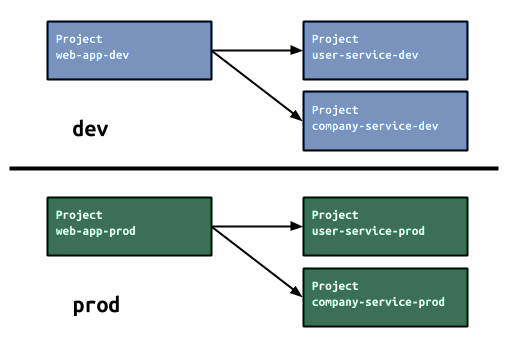
1. Dev Environment (Local Development Environment):

  • Separate copy of your site.
  • Runs on your own computer using software like: Local by Flywheel, DevKinsta, DesktopServer, XAMPP, MAMP, WAMP
  • Only we can it.
  • Private

Advantages:

  • No internet connection required
  • Fast performance
  • Full control over setup
  • Free to use

2. Production Environment (Remote Development Environment)

  • Your real, Public website
  • Hosted on a remote server, often provided by hosting companies or specialized services. For Examples: WP Engine, Pantheon, Kinsta, ServerPilot, SpinupWP.
  • Everyone can see it.
  • Public

Advantages:

  • Easier setup
  • Access from anywhere
  • Often includes maintenance and security features

Related Posts

How to Enable User Registration and Manage Roles in WordPress

To enable user registration and manage roles in WordPress, follow these steps: 1. Enable User Registration Step 1: Allow User Registration in WordPress Settings This allows visitors Read More

Read More

Creating a WordPress Post with Google Image Search Results in PHP

In this blog post, we will explore a PHP script that utilizes the Google Custom Search API to search for images based on user-defined keywords. We’ll also Read More

Read More

How to Automatically Generate Image Search Queries Based on Keywords Using Google API

To automatically generate image search queries using Google API, you can use the Custom Search JSON API. Here’s a step-by-step guide: Step 1: Create a Google Cloud Read More

Read More

How to Fix Composer Installation Errors: Resolving Missing PHP Extensions Like ext-sodium

The error you’re seeing indicates that Composer was unable to install the package due to a missing or unsupported PHP extension (in this case, ext-sodium). Here are Read More

Read More

How to Enhance Comment Security on WordPress Using WPDiscuz and CAPTCHA

Here’s a step-by-step guide to adding CAPTCHA to your WordPress comment section using WPDiscuz to enhance security: Step 1: Install WPDiscuz Plugin Step 2: Install Google reCAPTCHA Read More

Read More
Subscribe
Notify of
guest
0 Comments
Oldest
Newest Most Voted
0
Would love your thoughts, please comment.x
()
x