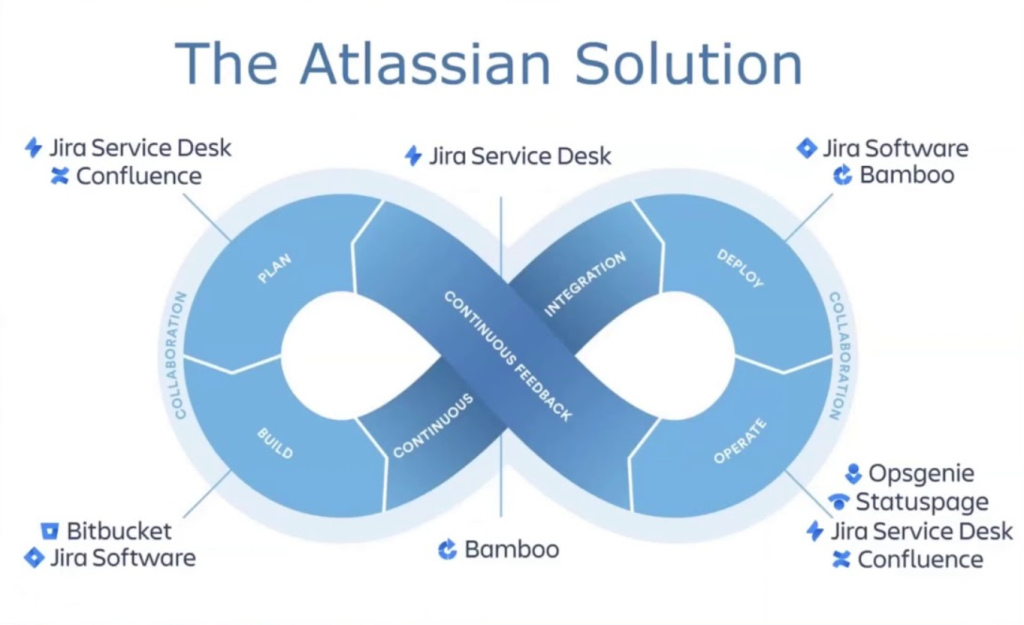
Efficient IT service management (ITSM) is vital for modern businesses, and Jira Service Desk is one of the leading tools that simplifies this process. Developed by Atlassian, Jira Service Desk is a collaborative ITSM platform designed to streamline request management, incident resolution, and change control. It empowers teams to deliver exceptional service experiences while ensuring operational efficiency.
Built on Jira’s robust platform, Jira Service Desk combines flexibility, scalability, and ease of use. It’s suitable for IT teams, HR departments, customer service, and any team that needs a powerful tool for managing service requests and workflows.
What is Jira Service Desk?
Jira Service Desk is a cloud-based ITSM solution that helps organizations manage service requests, incidents, problems, and changes efficiently. It supports ITIL-compliant workflows and provides self-service portals, SLA management, and automation features to ensure seamless operations. Whether you’re managing IT issues, onboarding employees, or resolving customer queries, Jira Service Desk centralizes and automates the process.
As part of the Atlassian ecosystem, Jira Service Desk integrates seamlessly with other Atlassian tools like Jira Software, Confluence, and Bitbucket, enabling end-to-end collaboration across teams.
Top 10 Use Cases of Jira Service Desk
- IT Service Management (ITSM)
Manage incidents, requests, and changes with ITIL-compliant workflows, ensuring quick resolution and minimal downtime. - Customer Support Management
Provide exceptional customer support by automating ticket routing, prioritizing tasks, and using SLA tracking to meet deadlines. - Employee Onboarding
Streamline the onboarding process by automating tasks like account setup, equipment allocation, and training schedules. - Change Management
Plan, approve, and execute changes with clear workflows and built-in approval mechanisms to reduce risk. - Incident Management
Centralize incident reporting, prioritize issues, and resolve problems faster with automated escalation workflows. - Service Request Management
Enable employees and customers to submit service requests through a user-friendly portal, reducing manual workloads. - Knowledge Management
Integrate with Confluence to create a centralized knowledge base, empowering users with self-service resources. - Facilities Management
Track and resolve facilities-related issues like maintenance requests, ensuring smooth operations. - HR Service Delivery
Manage HR-related requests like benefits queries, leave approvals, and employee feedback with tailored workflows. - DevOps and Agile Integration
Link with Jira Software to connect development and operations teams, enabling faster incident resolution and better collaboration.
What Are the Features of Jira Service Desk?
- Self-Service Portal
Provide users with an intuitive portal to raise requests, check status, and access knowledge base articles. - SLA Management
Set and track SLAs to ensure timely responses and resolutions, improving service delivery performance. - Automation Rules
Automate repetitive tasks such as ticket assignment, status updates, and notifications to save time and reduce errors. - Customizable Workflows
Design workflows tailored to your team’s unique needs using Jira’s drag-and-drop workflow editor. - Knowledge Base Integration
Integrate with Confluence to provide a searchable knowledge base, empowering users with self-service capabilities. - Multi-Channel Support
Accept requests through various channels, including email, chat, and the self-service portal, ensuring accessibility. - ITIL Compliance
Supports ITIL practices like incident, problem, change, and service request management for structured operations. - Reporting and Analytics
Gain insights into performance metrics with built-in dashboards and reporting tools to identify trends and areas for improvement. - Integration Ecosystem
Seamlessly integrate with Atlassian tools and third-party applications like Slack, Microsoft Teams, and AWS. - Scalability
Scales easily to accommodate growing teams and evolving business needs, making it suitable for organizations of all sizes.
How Jira Service Desk Works and Architecture
How It Works:
Jira Service Desk functions as a centralized hub for managing service requests, incidents, and tasks. Users submit requests via a self-service portal, which are then routed to the appropriate teams based on predefined workflows and rules. Automation, SLAs, and collaboration tools ensure timely responses and efficient resolutions.
Architecture Overview:
- Cloud Infrastructure: Built on Atlassian’s cloud platform for high availability and scalability.
- Workflow Engine: Handles ticket routing, task assignments, and status updates.
- Integration Layer: Connects with Atlassian and third-party tools for enhanced functionality.
- User Interface: Intuitive portals for both users and agents to manage requests and workflows.
- Reporting Layer: Provides real-time insights into SLA performance, workload distribution, and resolution trends.
How to Install Jira Service Desk
Steps to Install Jira Service Desk:
- Sign Up: Create an Atlassian account and sign up for Jira Service Desk.
- Configure Projects: Set up service desk projects tailored to your team’s needs (e.g., IT, HR, customer service).
- Define Workflows: Customize workflows for requests, incidents, and changes to align with your processes.
- Integrate Tools: Connect Jira Service Desk with Confluence, Jira Software, or other third-party tools.
- Set Up SLAs and Automation: Configure SLAs and automation rules to streamline task management.
- Test and Launch: Conduct test runs to ensure workflows, notifications, and integrations are functioning as expected.
Deployment Options:
Jira Service Desk is available as a cloud-based solution or on-premises through Atlassian’s Data Center offering, allowing organizations to choose based on their preferences and compliance needs.
Basic Tutorials of Jira Service Desk: Getting Started
- Creating a Project
Log in to Jira Service Desk, navigate to the projects section, and create a new project based on your team’s requirements. - Setting Up Workflows
Use the workflow editor to customize workflows for managing requests, incidents, and changes. - Configuring SLAs
Define SLAs for response and resolution times, and set escalation rules for unmet deadlines. - Building a Knowledge Base
Integrate with Confluence to create a knowledge base that empowers users with self-service resources. - Using Automation
Set up automation rules for tasks like ticket routing, status updates, and notifications. - Exploring Dashboards
Access real-time dashboards to monitor team performance and identify areas for improvement.
