Introduction
User Experience (UX) Research Tools help teams gather qualitative and quantitative data about how real users interact with digital products — including websites, mobile apps, desktop software, and web services. They provide insights into user behavior, motivations, pain points, and usability issues so that teams can design better experiences, reduce abandonment, improve conversion, and validate assumptions with evidence.
In and beyond, UX research is essential. With products serving a growing variety of devices, cultures, and accessibility needs, teams require evidence-driven insights to understand why users behave in certain ways. UX research informs design, prioritizes fixes, and validates flows before launch.
Real-world use cases include:
- Remote usability testing for web and mobile products
- Session replay and heatmap analysis to visualize behavior
- Surveys and feedback collection from real users
- Prototype testing before coding begins
- Information architecture validation via card sorting and tree tests
- A/B and multivariate UX experiments to compare alternatives
- Accessibility audits integrated into research workflows
What buyers should evaluate:
- Qualitative vs quantitative coverage
- Remote vs in-person support
- Participant recruitment and panels
- Workflow support for planning, analysis, and reporting
- Design and product tool integrations
- Security and compliance
- Accessibility testing support
- Reporting clarity and export options
- Cost and scalability
- Usability for cross-functional teams
Best for: Product managers, UX designers, UX researchers, product analysts, growth teams, and agencies seeking evidence-based insights.
Not ideal for: Backend-focused teams, API-only products, or teams that do not engage with real users.
Key Trends in UX Research Tools
- AI-assisted insight generation to summarize sessions and surface patterns
- Remote research as the default, supporting synchronous and asynchronous methods
- Unified research workspaces for session recordings, notes, and reporting
- Integrated participant recruitment and panels
- Cross-channel research for mobile, web, voice, and hybrid interfaces
- Visual behavior signals like heatmaps and attention maps
- Continuous in-product feedback collection
- Emotion and sentiment analysis via facial coding or linguistic analysis
- Design tool integrations for prototypes and handoff workflows
- Inclusive research workflows with accessibility and assistive technologies
How We Selected These Tools (Methodology)
- Feature breadth: surveys, usability, prototyping, session recordings
- Support for complete research workflows: planning, execution, analysis, reporting
- Ease of use for non-technical researchers
- Integration with design and product tools
- Enterprise security and compliance features
- Scalability for teams from small startups to global enterprises
- Participant management capabilities
- AI-assisted insights and automation features
- Community support and documentation
- Practical value across team sizes and project types
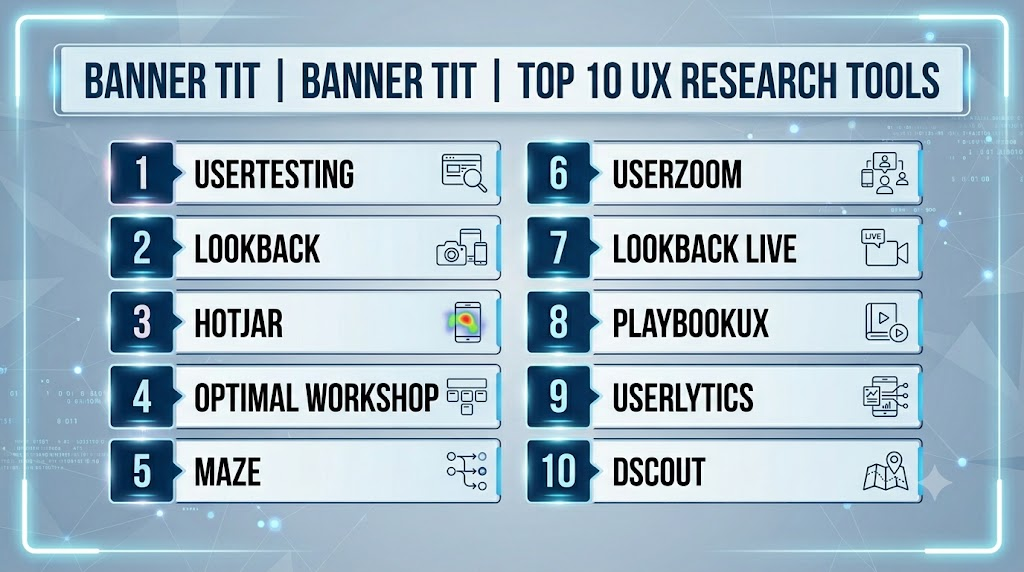
Top 10 UX Research Tools
1- UserTesting
Short description:
UserTesting provides a research platform for usability tests, surveys, and interviews with real participants. It delivers video, voice, and task-based feedback for product validation.
Key Features
- On-demand participant panel
- Video-based usability tests
- Task rating and follow-up questions
- Live conversation testing
- Reporting and highlight reels
Pros
- Built-in participant pool
- Rich video and voice feedback
- Rapid test setup
Cons
- Costs increase with test frequency
- Automation limited compared to quantitative-focused tools
Platforms / Deployment
Web / Cloud
Security & Compliance
Permission-based access, data privacy controls
Integrations & Ecosystem
Design tools, research repositories, analytics platforms
Support & Community
Documentation, templates, onboarding guidance
2- Lookback
Short description:
Lookback supports moderated and unmoderated usability testing, remote interviews, and diary studies with collaborative research capabilities and session recording.
Key Features
- Live interviews with observers
- Unmoderated usability tests
- Screen and face recording
- Notes and tagging
- Research repository
Pros
- Strong support for moderated research
- Consolidates recordings and notes
- Collaborative workflows
Cons
- Participant recruitment external
- Less focus on automation
- Requires session planning
Platforms / Deployment
Web / Cloud / Mobile
Security & Compliance
Access control, session privacy
Integrations & Ecosystem
Design and CRM tools
Support & Community
Documentation, best practice guides
3- Hotjar
Short description:
Hotjar captures user behavior via heatmaps, session replays, surveys, and feedback widgets. It provides quantitative insights on user interactions for web products.
Key Features
- Heatmaps (click, scroll, move)
- Session replays
- In-product surveys and feedback
- Conversion funnel analytics
- Feedback widgets
Pros
- Strong visual behavior analytics
- Easy setup
- Complements qualitative research
Cons
- Limited participant recruitment
- Not a full qualitative research suite
Platforms / Deployment
Web / Cloud
Security & Compliance
Configurable data privacy and session capture
Integrations & Ecosystem
Analytics tools, product platforms
Support & Community
Knowledge base and community
4- Optimal Workshop
Short description:
Optimal Workshop offers card sorting, tree testing, first-click testing, and surveys for information architecture and early UX validation.
Key Features
- Card sorting
- Tree testing
- First-click testing
- Surveys
- Participant management
Pros
- Excellent for navigation and IA validation
- Multiple UX research methods
- Visual reporting
Cons
- Limited automation
- Recruitment features vary
Platforms / Deployment
Web / Cloud
Security & Compliance
Role-based access, privacy controls
Integrations & Ecosystem
Research repositories, survey tools
Support & Community
Documentation, webinars
5- Maze
Short description:
Maze enables rapid testing of prototypes with quantitative metrics, including task completion, heatmaps, and feedback collection.
Key Features
- Prototype tests (Figma, Adobe XD, Sketch)
- Task success metrics
- Heatmaps and path analysis
- Surveys and open-ended feedback
- Participant flows and cohorts
Pros
- Fast prototype validation
- Quantitative metrics for task performance
- Design tool integrations
Cons
- Less qualitative depth
- Nuanced insights require manual follow-up
Platforms / Deployment
Web / Cloud
Security & Compliance
Project access controls
Integrations & Ecosystem
Design tools, collaboration platforms
Support & Community
Documentation, onboarding
6- UserZoom
Short description:
UserZoom is an enterprise-grade UX research platform that supports moderated and unmoderated testing, surveys, analytics, and benchmarking for web and mobile.
Key Features
- Remote and moderated usability testing
- Survey and questionnaire tools
- Session analytics and benchmarks
- Participant recruitment and management
- UX metrics dashboards
Pros
- Enterprise-grade scalability
- Broad testing modalities
- Built-in participant management
Cons
- Enterprise pricing
- Complex for small teams
Platforms / Deployment
Web / Cloud
Security & Compliance
Enterprise governance, access controls
Integrations & Ecosystem
Analytics platforms, design systems
Support & Community
Enterprise support, training resources
7- Lookback Live
Short description:
A specialized module of Lookback, enabling live moderated user testing with collaborative note-taking and session recordings for immediate insights.
Key Features
- Live moderated sessions
- Observer collaboration
- Recording and tagging
- Immediate playback and notes
Pros
- Real-time feedback collection
- Collaborative annotation
- Good for stakeholder engagement
Cons
- Requires scheduling
- Limited automation
Platforms / Deployment
Web / Mobile / Cloud
Security & Compliance
Access control, secure sessions
Integrations & Ecosystem
Product and design tools
Support & Community
Documentation, guides
8- PlaybookUX
Short description:
PlaybookUX provides moderated, unmoderated testing, surveys, and diary studies with automated transcription and analysis features.
Key Features
- Remote moderated and unmoderated testing
- Surveys and diary studies
- Automated transcription
- Highlight reels and tagging
- Participant panel and management
Pros
- Supports a wide range of UX methods
- Automated analysis features
- Includes participant recruitment
Cons
- Less visual analytics than Hotjar or Maze
- Small learning curve for onboarding
Platforms / Deployment
Web / Cloud
Security & Compliance
Secure participant data handling
Integrations & Ecosystem
Design tools, analytics systems
Support & Community
Docs, templates, customer support
9- Userlytics
Short description:
Userlytics enables remote UX testing, prototype evaluations, surveys, and live interviews, with cross-platform device coverage.
Key Features
- Remote moderated and unmoderated tests
- Device and browser testing
- Surveys and participant targeting
- Video and screen capture recordings
Pros
- Strong cross-platform coverage
- Flexible testing types
- Participant recruitment available
Cons
- Enterprise-focused pricing
- Analytics dashboards less polished
Platforms / Deployment
Web / Mobile / Cloud
Security & Compliance
Session and data privacy features
Integrations & Ecosystem
Design and analytics tools
Support & Community
Documentation and support
10- dscout
Short description:
dscout focuses on qualitative research and diary studies, enabling participants to record experiences in context over time for mobile and web research.
Key Features
- Diary studies
- Video and photo capture by participants
- Surveys and journaling
- Mobile-friendly interface
Pros
- Rich qualitative insights
- Contextual, in-the-moment feedback
- Good for longitudinal studies
Cons
- Less structured automation
- Requires participant engagement for success
Platforms / Deployment
Web / Mobile / Cloud
Security & Compliance
Data privacy and participant consent management
Integrations & Ecosystem
Research repositories, analytics systems
Support & Community
Documentation, onboarding, community
Comparison Table (Top 10)
| Tool Name | Best For | Platforms Supported | Deployment | Standout Feature | Public Rating |
|---|---|---|---|---|---|
| UserTesting | Rapid usability tests | Web / Mobile | Cloud | Video-based participant insights | N/A |
| Lookback | Moderated & unmoderated research | Web / Mobile | Cloud | Collaborative session recording | N/A |
| Hotjar | Behavior analytics | Web | Cloud | Heatmaps & session replays | N/A |
| Optimal Workshop | IA & navigation research | Web | Cloud | Card sorting & tree testing | N/A |
| Maze | Rapid prototype testing | Web | Cloud | Prototype task metrics | N/A |
| UserZoom | Enterprise-scale UX research | Web / Mobile | Cloud | Benchmarking & participant panels | N/A |
| Lookback Live | Real-time moderated sessions | Web / Mobile | Cloud | Live observation & notes | N/A |
| PlaybookUX | Automated transcription & analysis | Web / Mobile | Cloud | Participant panel & mixed research | N/A |
| Userlytics | Cross-platform remote testing | Web / Mobile | Cloud | Video & screen capture | N/A |
| dscout | Diary and longitudinal studies | Web / Mobile | Cloud | Contextual participant feedback | N/A |
Evaluation & Scoring of UX Research Tools
| Tool Name | Core Features (25%) | Ease (15%) | Integrations (15%) | Security (10%) | Performance & Reliability (10%) | Support (10%) | Value (15%) | Weighted Total |
|---|---|---|---|---|---|---|---|---|
| UserTesting | 9.5 | 8.5 | 9.0 | 8.5 | 9.0 | 8.5 | 8.0 | 8.80 |
| Lookback | 9.0 | 8.0 | 8.5 | 8.0 | 8.5 | 8.0 | 8.0 | 8.25 |
| Hotjar | 8.0 | 9.0 | 8.0 | 7.5 | 8.0 | 8.0 | 8.0 | 8.10 |
| Optimal Workshop | 8.5 | 8.0 | 8.0 | 7.5 | 8.0 | 8.0 | 7.5 | 8.05 |
| Maze | 8.5 | 8.5 | 8.0 | 7.5 | 8.0 | 7.5 | 8.0 | 8.05 |
| UserZoom | 9.0 | 7.5 | 8.5 | 8.5 | 8.5 | 8.0 | 7.5 | 8.20 |
| Lookback Live | 8.5 | 8.0 | 8.0 | 7.5 | 8.0 | 7.5 | 8.0 | 8.05 |
| PlaybookUX | 8.0 | 8.0 | 8.0 | 7.5 | 8.0 | 7.5 | 8.0 | 7.95 |
| Userlytics | 8.0 | 7.5 | 7.5 | 7.5 | 7.5 | 7.5 | 8.0 | 7.80 |
| dscout | 7.5 | 8.0 | 7.5 | 7.5 | 7.5 | 7.0 | 8.0 | 7.70 |
Which UX Research Tool Is Right for You?
Solo / Freelancer
Hotjar, Maze, and dscout are lightweight and affordable for small teams or individual designers.
SMB
UserTesting, Lookback, and PlaybookUX provide scalable research with participant management for growing teams.
Mid-Market
Maze, UserZoom, and Optimal Workshop offer structured workflows and advanced analytics for mid-sized organizations.
Enterprise
UserTesting, UserZoom, and Lookback Live provide large-scale research programs with participant panels, automated insights, and governance.
Budget vs Premium
Budget-conscious teams can use Hotjar, Maze, or dscout. Premium enterprise teams benefit from UserTesting, UserZoom, and Lookback.
Feature Depth vs Ease of Use
Deep automation and analytics: UserTesting, UserZoom. Visual, prototype, and rapid feedback: Maze, Hotjar.
Integrations & Scalability
For CI/CD, design tool integration, and multi-method workflows: UserTesting, UserZoom, Lookback.
Security & Compliance Needs
Teams handling sensitive user data should choose UserTesting or UserZoom for enterprise governance and audit logs.
Frequently Asked Questions (FAQs)
- What is UX research?
UX research studies how users interact with products to identify pain points, needs, and opportunities. - What types of research exist?
Qualitative (interviews, usability testing) and quantitative (surveys, analytics, task metrics). - Do these tools require real users?
Most do; some allow internal testing or synthetic scenarios. - Can UX research tools integrate with prototypes?
Yes, many integrate with Figma, Sketch, Adobe XD, and InVision. - Are they suitable for mobile apps?
Yes, most support web and mobile prototypes or live apps. - Do these tools support remote testing?
Yes, most enable remote moderated and unmoderated sessions. - Can results be automated?
Quantitative insights can often be automated; qualitative insights require analysis. - Are participants provided by the tools?
Some tools (UserTesting, PlaybookUX) offer participant panels; others require external recruitment. - Do they include accessibility testing?
Many integrate accessibility checks or support testing with assistive technology. - How often should UX research be conducted?
Ongoing, ideally during design sprints, prior to release, and for major feature changes.
Conclusion
UX Research Tools are essential for building user-centered products. UserTesting and UserZoom excel for enterprise research with participant panels and analytics. Lookback and Lookback Live are strong for moderated sessions and collaboration. Hotjar delivers behavioral insights via heatmaps and session recordings. Maze supports rapid prototype testing with task metrics. Optimal Workshop validates information architecture. PlaybookUX, Userlytics, and dscout provide diverse qualitative and quantitative research capabilities. To select the right tools, pilot 2–3 platforms, integrate findings into design and development workflows, validate participant engagement, and ensure reporting aligns with usability, accessibility, and product objectives. Evidence-based UX research ensures inclusive, high-performing, and user-friendly products.
