Introduction
Academic writing tools are digital solutions that assist students, researchers, educators, and professional authors in creating high-quality, structured, and publish-ready scholarly content. They provide grammar and style guidance, readability improvements, citation and reference management, plagiarism detection, and sometimes AI-assisted drafting. In , academic writing has become increasingly collaborative, cross-disciplinary, and subject to strict publishing standards, making these tools essential for efficiency, accuracy, and credibility.
Real-world use cases:
- Graduate students preparing theses, dissertations, and journal papers.
- Researchers drafting manuscripts for publication in peer-reviewed journals.
- Editors reviewing academic manuscripts for clarity, style, and consistency.
- Teams collaborating on multi-author papers, proposals, or grant applications.
- Non-native English writers improving fluency, tone, and academic expression.
What buyers should evaluate:
- Grammar, syntax, and style correction capabilities
- Structure, readability, and logical flow analysis
- Reference and citation management
- Plagiarism detection and originality checks
- Collaboration and version control
- Research organization and note management
- AI-assisted writing and paraphrasing support
- Platform compatibility (web, desktop, mobile)
- Data privacy and security compliance
- Pricing, subscription, or institutional licensing
Best for: Students, researchers, editors, and institutions seeking polished, credible, and publish-ready academic content.
Not ideal for: Casual writers or users who only need basic spell-checking without structural or academic support.
Key Trends in Academic Writing Tools
- AI-powered contextual suggestions for clarity, tone, and conciseness
- Real-time multi-author collaboration with versioning and commenting
- Automatic reference and citation formatting for APA, MLA, Chicago, and other styles
- Integrated plagiarism detection with access to large academic databases
- Multi-platform support for web, desktop, and mobile
- Analytics for readability, repetition, and logical flow of writing
- Multi-language support for non-native English writers
- Enhanced security, including encryption and SSO for institutional adoption
- Integration with research databases, LaTeX editors, and content management systems
- Subscription flexibility for students, individuals, teams, and institutions
How We Selected These Tools (Methodology)
- Market adoption and mindshare among academic communities
- Feature completeness: grammar, style, structure, citations, and plagiarism checks
- Integration capabilities with word processors, reference managers, and collaboration tools
- Security posture and privacy standards
- Performance and reliability in handling long-form academic writing
- Ease of use, onboarding experience, and adaptability
- Innovation: AI assistance, paraphrasing, and analytics
- Support and community: tutorials, documentation, and peer communities
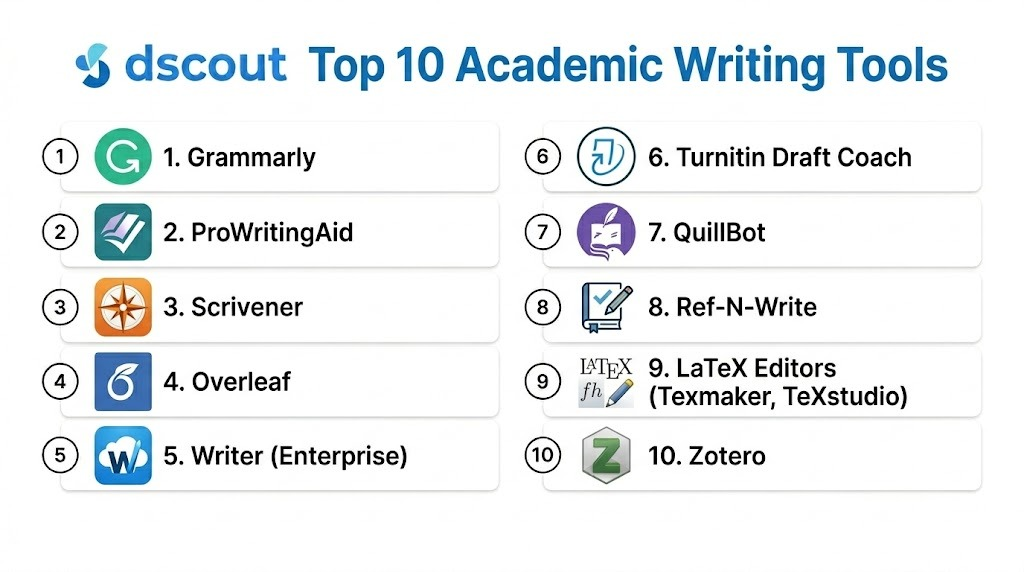
Top 10 Academic Writing Tools
#1 — Grammarly
Short description : Grammarly is an AI-driven writing assistant providing grammar, spelling, style, and clarity suggestions. It integrates with web browsers, desktop editors, Microsoft Office, and mobile apps, helping students and researchers polish academic drafts efficiently.
Key Features
- Real-time grammar, punctuation, and spelling checks
- Style, tone, and academic formality guidance
- Plagiarism detection (premium)
- Citation suggestions and formatting guidance
- Multi-platform support (desktop, web, mobile)
- Writing analytics for clarity and readability
- Vocabulary enhancement and suggestions
Pros
- Highly accurate AI-powered suggestions
- Integrates with multiple writing platforms
- Improves readability and formal tone
Cons
- Premium subscription required for full features
- Tone suggestions may feel prescriptive
- Cloud-dependent for advanced AI functionality
Platforms / Deployment
- Windows, macOS, iOS, Android, Web
- Cloud
Security & Compliance
- Not publicly stated
Integrations & Ecosystem
- Microsoft Word, Google Docs, browser plugins
- API integration for enterprise workflows
Support & Community
- Knowledge base, tutorials, and email support
- Active user forums
#2 — ProWritingAid
Short description: ProWritingAid provides in-depth feedback on grammar, readability, style, and structure. It is ideal for academic writers seeking detailed reports and suggestions to refine manuscripts.
Key Features
- Grammar and spelling corrections
- Readability and style analysis
- Reports on repetition and sentence structure
- Custom rules for academic writing
- Integration with MS Word, Google Docs, Scrivener, and browsers
- Detailed writing performance reports
- Goal tracking for writing improvement
Pros
- Comprehensive feedback for academic content
- Customizable for specific writing standards
- Supports iterative revisions
Cons
- Interface complexity may challenge beginners
- Real-time suggestions slower than Grammarly
- Integration setup may require effort
Platforms / Deployment
- Windows, macOS, Web
- Cloud
Security & Compliance
- Not publicly stated
Integrations & Ecosystem
- Word processors, browser extensions, APIs
Support & Community
- Tutorials, guides, and community forums
#3 — Scrivener
Short description: Scrivener excels at long-form writing, allowing researchers to organize manuscripts, notes, and references within a single project environment, ideal for dissertations and research projects.
Key Features
- Hierarchical document organization
- Corkboard and outline views
- Research note and draft linking
- Export to multiple formats (PDF, Word, LaTeX)
- Template support for academic writing
- Version snapshots
- Full-screen distraction-free mode
Pros
- Perfect for large, complex documents
- Powerful note and research management
- Supports iterative drafting
Cons
- Minimal grammar suggestions
- Desktop-centric with limited collaboration
- Steep learning curve
Platforms / Deployment
- Windows, macOS, iOS
- Desktop
Security & Compliance
- Not publicly stated
Integrations & Ecosystem
- Exports to Word, PDF, LaTeX
- Reference manager compatibility
Support & Community
- Tutorials, forums, and documentation
#4 — Overleaf
Short description: Overleaf is a cloud-based LaTeX editor supporting real-time collaborative writing. It is widely used in STEM fields for academic papers, theses, and technical documents.
Key Features
- Real-time LaTeX collaboration
- Templates for journals, theses, and reports
- Equation and figure support
- Version history and commenting
- PDF preview and output
- Citation and bibliography management
- Repository integration
Pros
- Standard for technical and scientific writing
- Supports multi-author collaboration
- Cloud-based and accessible anywhere
Cons
- Requires LaTeX knowledge
- Less suited for narrative writing
- Dependent on internet for full functionality
Platforms / Deployment
- Web
- Cloud
Security & Compliance
- Not publicly stated
Integrations & Ecosystem
- Citation managers, Git repositories, journal templates
Support & Community
- Documentation, forums, tutorials
#5 — Writer (Enterprise)
Short description: Writer is an AI-powered writing tool for teams, ensuring consistent style, grammar, and tone while supporting academic workflows in collaborative settings.
Key Features
- Grammar and clarity suggestions
- Style guide enforcement
- Collaboration dashboards
- Version control
- Citation suggestions
- Integration with productivity platforms
- Tone and consistency analytics
Pros
- Team governance and consistency
- Custom style rules
- Supports collaborative workflows
Cons
- Enterprise pricing
- Initial setup may be complex
- Advanced features require configuration
Platforms / Deployment
- Web
- Cloud
Security & Compliance
- Not publicly stated
Integrations & Ecosystem
- Productivity tool integration
- API support
Support & Community
- Dedicated enterprise support
- Documentation
#6 — Turnitin Draft Coach
Short description: Turnitin Draft Coach helps authors maintain originality, improve citations, and refine academic manuscripts using integrated plagiarism detection and AI feedback.
Key Features
- Plagiarism detection
- Citation and referencing suggestions
- Writing and grammar feedback
- Originality reports
- LMS and assignment portal integration
Pros
- Maintains academic integrity
- Refines drafts before submission
- Trusted in higher education
Cons
- Institutional subscription required
- Learning curve for new users
- Limited standalone usage
Platforms / Deployment
- Web
- Cloud
Security & Compliance
- Not publicly stated
Integrations & Ecosystem
- LMS integration
- Assignment portals
Support & Community
- Tutorials and documentation
#7 — QuillBot
Short description: QuillBot is an AI-assisted paraphrasing and summarizing tool, useful for academic writers needing sentence rephrasing and idea synthesis without changing meaning.
Key Features
- Paraphrasing modes
- Grammar and spelling checks
- Summarization tools
- Tone adjustment and style improvement
- Integration with Google Docs and Word
Pros
- Helps with clarity and avoiding repetition
- Summarization aids literature reviews
- Quick paraphrasing
Cons
- Grammar checks less comprehensive
- Premium required for full features
- Limited plagiarism detection
Platforms / Deployment
- Web
- Cloud
Security & Compliance
- Not publicly stated
Integrations & Ecosystem
- Browser extensions
- Google Docs plugin
Support & Community
- Help center and tutorials
#8 — Ref-N-Write
Short description: Ref-N-Write provides an academic phrase bank and real-time suggestions, assisting non-native authors with formal tone, style consistency, and scholarly phrasing.
Key Features
- Academic phrase library
- Context-aware suggestions
- Vocabulary enhancement
- Template support
- Citation guidance
Pros
- Improves academic phrasing
- Useful for non-native English writers
- Supports consistent scholarly tone
Cons
- Desktop-only
- Dated interface
- Minimal grammar checking
Platforms / Deployment
- Windows
- Desktop
Security & Compliance
- Not publicly stated
Integrations & Ecosystem
- MS Word integration
- Local phrase libraries
Support & Community
- Help documentation
#9 — LaTeX Editors (Texmaker, TeXstudio)
Short description: Desktop LaTeX editors are used for structured academic writing with equations, tables, and complex formatting, ideal for technical and scientific manuscripts.
Key Features
- LaTeX editing and compilation
- Equation, table, and figure support
- Offline access
- Spell check
- Export to PDF or LaTeX format
Pros
- Full control for technical documents
- Offline and open-source
- Community extensions available
Cons
- Steep learning curve
- Limited grammar assistance
- Manual workflow
Platforms / Deployment
- Windows, macOS, Linux
- Desktop
Security & Compliance
- Varies / N/A
Integrations & Ecosystem
- LaTeX packages
- Reference managers
Support & Community
- Open-source community
- Documentation and forums
#10 — Zotero
Short description: Zotero is an open-source reference manager that automates citation organization, integrates with word processors, and supports bibliography creation for academic manuscripts.
Key Features
- Reference organization and tagging
- Automatic citation formatting
- Word processor integration
- Group libraries and collaboration
- Multi-format export
Pros
- Free and open-source
- Comprehensive reference management
- Supports multiple citation styles
Cons
- Not a full writing assistant
- Desktop + cloud management may confuse some users
- Additional plugins required for advanced functions
Platforms / Deployment
- Windows, macOS, Linux, Web
- Cloud / Hybrid
Security & Compliance
- Not publicly stated
Integrations & Ecosystem
- Word, LibreOffice, Google Docs
- Browser importers
Support & Community
- Active community and documentation
Comparison Table (Top 10)
| Tool Name | Best For | Platforms Supported | Deployment | Standout Feature | Public Rating |
|---|---|---|---|---|---|
| Grammarly | Grammar & clarity | Win, macOS, iOS, Android, Web | Cloud | AI contextual suggestions | N/A |
| ProWritingAid | Style & readability | Win, macOS, Web | Cloud | Detailed structural analysis | N/A |
| Scrivener | Long-form projects | Win, macOS, iOS | Desktop | Manuscript organization | N/A |
| Overleaf | LaTeX collaboration | Web | Cloud | Collaborative LaTeX editing | N/A |
| Writer (Enterprise) | Teams & style guides | Web | Cloud | Style guide enforcement | N/A |
| Turnitin Draft Coach | Academic integrity | Web | Cloud | Plagiarism & originality | N/A |
| QuillBot | Paraphrasing | Web | Cloud | Rewrite & summarize | N/A |
| Ref-N-Write | Academic phrasing | Windows | Desktop | Academic phrase library | N/A |
| LaTeX Editors | Technical manuscripts | Win, macOS, Linux | Desktop | Equation & formatting control | N/A |
| Zotero | Reference management | Win, macOS, Linux, Web | Cloud/Hybrid | Citation automation | N/A |
Evaluation & Scoring
| Tool Name | Core (25%) | Ease (15%) | Integrations (15%) | Security (10%) | Performance (10%) | Support (10%) | Value (15%) | Weighted Total |
|---|---|---|---|---|---|---|---|---|
| Grammarly | 9 | 9 | 9 | 7 | 9 | 8 | 8 | 8.7 |
| ProWritingAid | 8 | 7 | 8 | 7 | 8 | 7 | 9 | 7.9 |
| Scrivener | 8 | 7 | 7 | 7 | 8 | 7 | 8 | 7.6 |
| Overleaf | 9 | 8 | 8 | 7 | 9 | 8 | 7 | 8.0 |
| Writer (Enterprise) | 9 | 7 | 9 | 7 | 8 | 8 | 7 | 8.0 |
| Turnitin Draft Coach | 8 | 7 | 7 | 7 | 8 | 7 | 8 | 7.7 |
| QuillBot | 7 | 8 | 6 | 7 | 7 | 6 | 8 | 7.1 |
| Ref-N-Write | 7 | 7 | 6 | 7 | 7 | 6 | 7 | 6.9 |
| LaTeX Editors | 8 | 6 | 7 | 7 | 8 | 7 | 9 | 7.6 |
| Zotero | 8 | 7 | 8 | 7 | 8 | 7 | 8 | 7.7 |
Which Academic Writing Tool Is Right for You?
Solo / Student Writer
- Grammarly and ProWritingAid for grammar and style refinement
- Zotero for references
SMB / Small Academic Teams
- Scrivener and QuillBot for drafting and phrasing support
Mid-Market / Research Labs
- Overleaf and Turnitin Draft Coach for structured manuscripts and originality checks
Enterprise / Institutional Use
- Writer (Enterprise) and Overleaf for style governance and collaboration
Budget vs Premium
- Budget: Zotero, Ref-N-Write, LaTeX Editors
- Premium: Grammarly, ProWritingAid, Writer, Overleaf
Feature Depth vs Ease of Use
- Feature-rich: Overleaf, Writer, Grammarly
- Easy adoption: ProWritingAid, Zotero
Integrations & Scalability
- Enterprise workflows: Writer, Overleaf, Grammarly Enterprise
Security & Compliance
- Validate privacy, encryption, and SSO for research and academic data
Frequently Asked Questions (FAQs)
1 — What pricing models do academic writing tools offer?
Most tools provide free basic plans, subscriptions for individuals, and institutional licensing for universities and labs.
2 — Can these tools detect plagiarism?
Some, like Turnitin Draft Coach and Grammarly Premium, provide plagiarism detection against academic databases.
3 — Are AI rewrite suggestions reliable?
AI improves clarity and conciseness, but human oversight ensures academic accuracy and style adherence.
4 — Do these tools integrate with citation managers?
Yes, they integrate with Zotero, EndNote, or inbuilt citation tools for references.
5 — Can these tools handle technical equations?
Yes. Overleaf and LaTeX editors are designed for complex academic formatting.
6 — Can multiple authors collaborate in real-time?
Cloud tools like Overleaf and Writer enable multi-user editing with version control.
7 — Are offline options available?
Desktop tools like Scrivener and LaTeX editors allow offline work.
8 — Are these tools suitable for non-native writers?
Yes, AI suggestions, tone adjustments, and academic phrasing guidance are helpful.
9 — How do they support citations?
They generate formatted references, manage bibliographies, and track in-text citations.
10 — How should I choose the right tool?
Assess workflow, collaboration needs, citation complexity, AI support, and budget.
Conclusion
Academic writing tools in support clarity, consistency, and productivity for students, researchers, and institutions. From Grammarly and ProWritingAid enhancing grammar and readability to Scrivener for project organization, Overleaf for LaTeX collaboration, and Zotero for reference management, the tools cater to every need. Selecting 2–3 tools, piloting them, and verifying integration, workflow compatibility, and privacy compliance ensures better productivity, higher-quality manuscripts, and academic credibility.
